Handle and Review Guest Chargebacks in Toast Web
Last updated: Apr 9, 2026, 2:32 PM
Handle Guest Chargebacks Overview Steps
Products this applies to: Toast Web (Chargeback Challenger) | Access Needed: Permission 3.0 Manager Access
- Review chargebacks in Toast Web to understand status, deadlines, and details.
- Accept a chargeback.
- Dispute a chargeback with supporting evidence.
Handle Guest Chargebacks Process
- Review chargebacks in Toast Web to understand status, deadlines, and details
- In Toast Web, navigate to Reports > Payments > Chargebacks.
- Review the chargeback table.
- Identify chargebacks marked as New or otherwise needing action.
- Review the amount, reason, check date, and deadline.
- Confirm the deadline has not passed.
- Review the Win Likelihood column.
- A high win likelihood indicates a stronger chance of success if the chargeback is disputed.
- A low win likelihood indicates a lower chance of success if the chargeback is disputed.
- Confirm that win likelihood is an estimate only and does not guarantee the outcome.
- Review the transaction details.
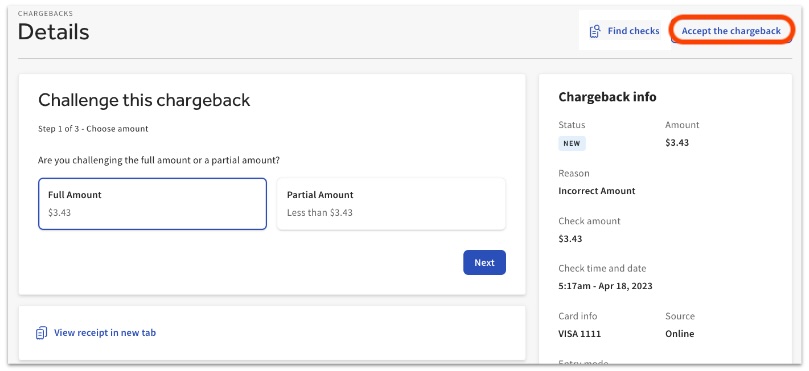
- Select the chargeback to open its details.
- Select View receipt in new tab to review the disputed check.
- Select Find checks if you need to search for related checks.
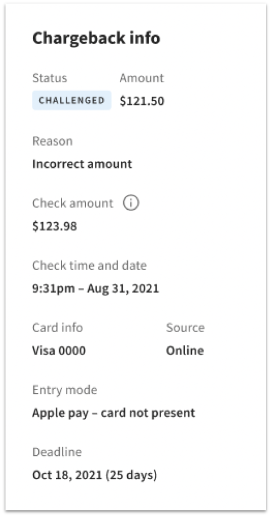
- Review the transaction information, including status, amount, reason, check amount, check time and date, card info, source, entry mode, and deadline.
- Do you want to accept or dispute this chargeback?
- If yes, go to step 2.
- If no, go to step 3.
- Accept the chargeback
- Select Accept the chargeback.
- Confirm acceptance.
- Select Yes in the confirmation pop-up.
- Confirm that accepting the chargeback means the reversal of funds will not be overturned.
- Verify the outcome.
- The chargeback status updates to Accepted.
- No further action can be taken on the chargeback.
- Select Accept the chargeback.
- Dispute the chargeback
- Verify whether the chargeback should be disputed.
- Review for possible fraud indicators such as:
- quick disputes after pickup or delivery
- repeated purchases of the same amount, especially for gift cards
- if gift cards were purchased and used immediately
- Review for possible fraud indicators such as:
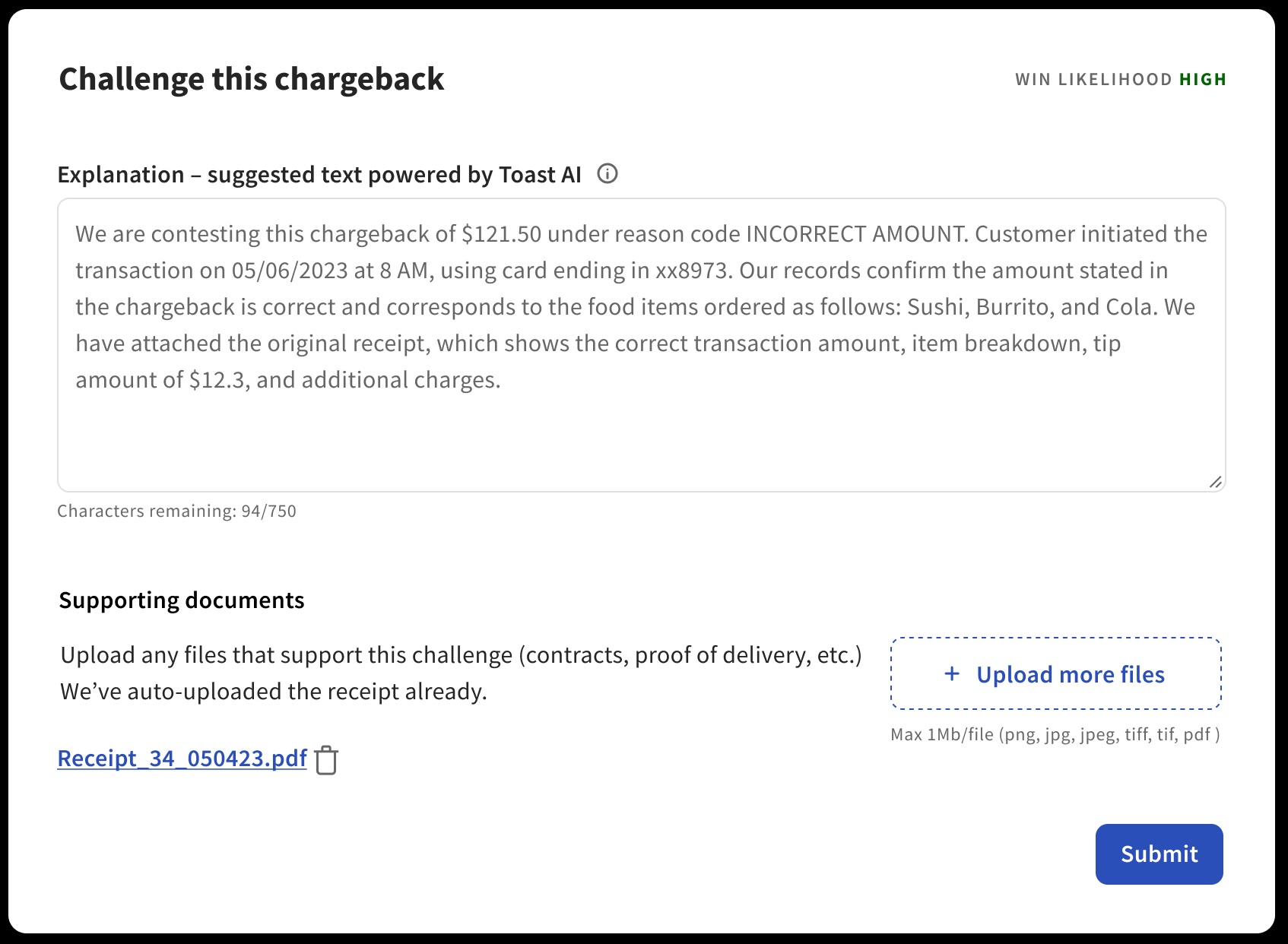
- Select the option to challenge or dispute the chargeback.
- Complete the dispute submission.
- Enter an Explanation.
- Upload Supporting documents.
- Confirm the submission before finalizing it.
- Confirm all submitted information is accurate and complete.
- Confirm that disputes cannot be edited or amended after submission.
- Verify the post-submission status.
- The chargeback status updates to Challenged.
- The guest’s bank or payment network reviews the dispute, which can take up to 180 days.
- The chargeback status updates to Challenged.
- Confirm the outcome after a decision is made.
- If the dispute is won, funds are returned by end of month.
- If the dispute is lost, no further action can be taken.
- Verify whether the chargeback should be disputed.

Handle Guest Chargebacks FAQ
When is the chargeback amount taken from the restaurant’s account?
The amount in the chargeback notification is debited from the restaurant’s bank account within two to four calendar days after Toast receives the notification, and automatically debited from that day’s deposit. The restaurant must dispute the chargeback for a chance to recover those funds.
Why does Toast charge a processing fee for chargebacks?
Toast aims to keep chargeback fees transparent instead of bundling them into other fees. Other processors may include similar costs in credit card fees, licensing fees, or other line items.
What does the chargeback processing fee cover?
The fee helps cover transmission of chargeback data, costs associated with the chargeback itself, and chargeback exposure related to credit card processing services.
What if I missed the deadline to dispute a chargeback?
If the deadline is missed, the chargeback is automatically processed as Accepted. The funds will not be returned to the account, and no further action can be taken to dispute the chargeback.
What does it mean to receive a message saying “Point of interaction error”?
A single transaction was processed multiple times, or the guest’s card was charged after a different payment method had already been used. This can happen for a number of reasons:
-
- multiple batches are submitted simultaneously
- multiple receipts exist for the same transaction
- when the transaction is duplicated in the restaurant’s system
- when the cardholder pays for the same service using another payment method
To prevent this error:
-
- Process a refund promptly for any duplicate transaction.
- Verify transaction receipts for accuracy before depositing them.
- If a guest switches to a different payment method after starting a card payment, void the original transaction.
Handle Guest Chargebacks Appendix
This material is referenced throughout the process above for efficiency.
Step 1b: Chargeback status definitions
- New: This is a new chargeback and requires action.
- Challenged: This chargeback has been challenged and is waiting for a decision by the bank or card network.
- Accepted: The chargeback has been accepted as legitimate and can no longer be challenged.
- Won: The challenge was successful and the restaurant will be refunded by end of month.
- Lost: The issuing bank ruled in favor of the cardholder and the chargeback can no longer be challenged.
- Expired: The deadline passed and no action can be taken.
- Requested: This is a retrieval request and the bank is requesting more details to help prevent a chargeback.
- Responded: The retrieval request has been answered and is waiting for a decision by the bank or card network.
Back to top | Back to Handle Guest Chargebacks Process
Step 1c: Win likelihood definition
- Win Likelihood is an AI-powered estimate that predicts the likelihood of winning a chargeback if it is challenged.
- A high win likelihood suggests a stronger probability of success.
- A low win likelihood suggests a lower probability of success.
- The final outcome is determined by the guest’s bank or payment network.
- The quality of the submitted evidence also affects the outcome.