Get Help With Your AMS1 Card Reader
Last updated: Dec 16, 2025, 2:28 PM
- My AMS1 Card Reader Won't Turn On
- Clear Cache and App Data
- How Does the AMS1 Work in Offline Mode?
- Reader Is Not Connecting or Is Losing Connection
- How Do I Restart the Reader?
- The Reader Is in Tamper Mode
- My AMS1 Battery Is Draining Fast
- Reader Is Failing PSP Test
- I'm Having Issues Keeping the Reader Connected to the Network
My AMS1 Card Reader Won't Turn On
If your AMS1 reader won't turn on, follow these troubleshooting steps:
- Check to make sure the charging cable is secure. An icon at the top of the screen indicates the battery charge level if the cable is properly connected and charging the device. The battery charge level must reach a certain point in order for the device to turn on.
- Power cycle the device by holding the power button on the side of the device for 10 seconds.
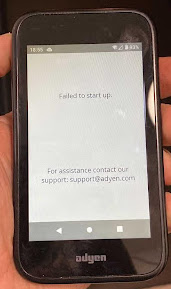
- Note: If you see the below image when turning on the device, please contact Customer Care.
Clear Cache and App Data
 | Clearing cache and app data on the POS will unpair the reader from the device. You will be required to repair the device and follow the setup instructions again. |
How Does the AMS1 Work in Offline Mode?
When Toast enters Offline Mode, the card reader will automatically store the processed payment locally on the reader. When the internet returns, the device will automatically sync with the host. The Pending icon indicates that there are payments that the terminal hasn't been able to send to the card reader host for completion (capture and settlement).
Reader Is Not Connecting or Is Losing Connection
If your AMS1 readers are not connecting to the network, follow these troubleshooting steps:
- Check the health of the device the card reader is connected to.
- Make sure the device is on a network by navigating to Settings > Network > Wifi and confirming the device is connected to the correct Wi-Fi network. If you're prompted to enter an admin passcode, enter 8678.
How Do I Restart the Reader?
If you need to restart the reader, perform a power cycle by holding down the power button.
The Reader Is in Tamper Mode
If the display of the payment terminal shows the words TAMPER or TAMPERED, do not use this card reader and immediately replace it through an RMA with Toast.
My AMS1 Battery Is Draining Fast
If the card reader's battery is draining fast, we recommend the following:
- Charge the device as much as possible and do not let the battery life go below 10%.
- If possible, swap the battery from a different device to determine if it's just the battery that needs replacing or if the issue is with the device itself.
- Submit an RMA if the issue persists.
Reader Is Failing PSP Test
If the reader is showing as connected to _TOAST but is failing the PSP tests, or is showing the _SECURE network as a non-saved network, follow these troubleshooting steps:
- Select Settings.
- Select Network and enter 8678 if prompted to enter a password.
- Enter SECURE PW from Toast Web.
- Wait for the network to jump over to _TOAST.
I'm Having Issues Keeping the Reader Connected to the Network
If you're unable to keep the card reader connected to the network, confirm that 2.4ghz Wi-Fi is disabled. Only 5ghz Wi-Fi should be used. If you are a Toast Managed Network, call Customer Care to confirm. If you are a Self-Managed Network, please reach out to your IT contact.