Outages and Disruptions: Toast Online Ordering
Last updated: Mar 11, 2026, 3:21 PM
Question
- Does Toast Online Ordering work when Toast is offline?
- How does Toast Online Ordering work in Offline Mode?
Answer
When your restaurant is in Offline Mode:
- Your Toast devices won't receive any orders placed from your online ordering portal.
- Once the system detects that orders aren't getting through to your restaurant, your online ordering page will stop accepting new orders. This can take up to five minutes.
- If your guest attempts to make a payment for an online order once orders are no longer being accepted, they'll see a message stating that their payment was not accepted.
- Adding delays (such as turning on order throttling or adjusting your quote time strategy) won't impact online orders that were placed shortly after Offline Mode was activated, while the system was still accepting orders. Any orders accepted during that brief window will still come through once your connection is restored.
- If manual approval is enabled and an online order has not been approved after five minutes of placing the order (which may happen during Offline Mode), guests may receive an automated email stating the order has not been approved, and suggesting they may want to reach out to the restaurant to check the order status.
- This email (only available when manual approval is selected) is the only way a guest will be notified if their online order was placed during Offline Mode and has not been received by the restaurant. You can disable approval email for manual approval mode on your Online Ordering settings page in Toast Web.
- During a widespread outage (i.e., the entire Toast Online Ordering service is down for over an hour), your Toast Online Ordering page will automatically be updated to notify your guests that orders cannot be placed online. Your restaurant address and phone number will be displayed for guests to contact your business directly.
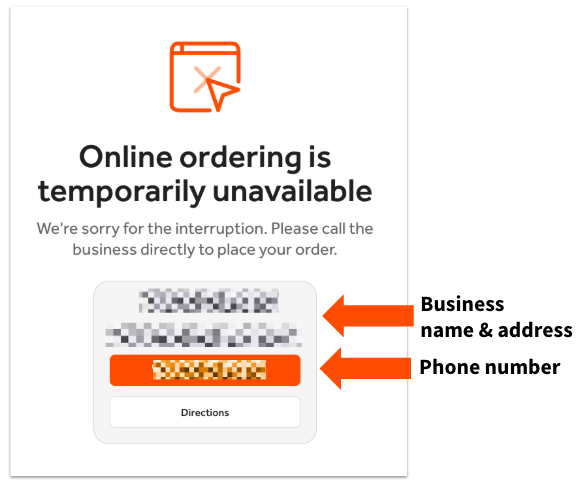
If a guest who placed an online order calls the restaurant, take this opportunity to explain the offline issue to guests. They may wish to cancel their online order, but keep in mind you can still take their order information over the phone and place the order on the POS. However, if your restaurant uses Toast Delivery Services® where you utilize DoorDash Drive or Uber Eats drivers for your delivery, keep in mind that DoorDash Drive and Uber Eats will not receive any orders.
If you have a limited-time menu configured before being in Offline Mode initiating, the menu availability settings will still apply. Toast recommends you do not attempt to create a limited-time menu while in Offline Mode as menu changes won't occur until your system is back online.
When Your Restaurant Comes Back Online
Currently, there is no way to sort or queue online orders as they arrive in your system once your connection is restored. You may, however, wish to snooze orders for the next 20 or 40 minutes to catch up on online orders placed during Offline Mode.
- If you have auto-fire disabled, any online orders placed during Offline Mode must be approved once an internet connection is restored (you can find them in Pending Orders mode).
- If auto-fire is turned on, the system will automatically approve and fire any online orders that came in during Offline Mode. If you use a Kitchen Display System (KDS), the orders will automatically appear on it once the connection is re-established.
- At this time, you can choose to void an order(s), depending on your current situation. It might be best to contact any guests and verify that they still want the order placed.
- To opt-out out of auto-firing during an outage, please contact Customer Care.