Replace Faulty Hardware (RMA)
Last updated: Jul 24, 2026, 9:53 AM
If Toast hardware stops working after troubleshooting, you may qualify for a free Return Merchandise Authorization (RMA) replacement under warranty.
- Before you begin
- RMA eligibility
- Step 1: Contact Toast Customer Care
- Step 2: Receive your replacement hardware
- Step 3: Return your faulty hardware
- Check the status of your RMA
- RMA policy notes
- Frequently asked questions
- Related articles
Before you begin
Applies to: Toast hardware (Toast Flex, Toast Go® 2, Toast Go® 3, Toast Tap™, Elo terminals, Toast printers, KDS devices, card readers) for customers in the US, Australia, Canada, Ireland, and the UK. | Permissions needed: Account access to chat with Toast Customer Care from Toast Web, Payroll Web, or the Toast Now app.
What you'll accomplish: Confirm your device is eligible for a free replacement under warranty, request the RMA, receive replacement hardware, and return the faulty device within 30 days.
Important: Your hardware must be within its warranty for the replacement to be free. Physical damage caused by a customer or guests is not covered and is billed at the full replacement price.
RMA eligibility
Use the table below to check whether your issue is likely to qualify for a free RMA before you contact Customer Care. The Customer Care team makes the final eligibility determination after troubleshooting.
| Issue | Likely covered (free RMA) | Not covered (paid replacement) |
| Device won't turn on or won't power up after troubleshooting | Yes — if device is within warranty | N/A |
| Card reader issues (chip, swipe, or tap not registering) | Yes — if device is within warranty | N/A |
| Power issues or unresolved errors | Yes — if device is within warranty | N/A |
| Port issues (bent or broken pins, readers failing to register) | Yes — if device is within warranty | N/A |
| Hardware or software functionality failure | Yes — if device is within warranty | N/A |
| New device that does not work out of the box | Yes — contact Customer Care immediately | N/A |
| Cracked or shattered screen | N/A | Yes — physical damage is billed at full price |
| Dropped device | N/A | Yes — physical damage is billed at full price |
| Liquid damage | N/A | Yes — not covered under warranty |
| Damage from natural disasters (flooding, earthquakes, tornadoes) | N/A | Yes — "acts of God" are not covered |
| Device that is out of warranty | N/A | Yes — paid replacement only |
For full warranty terms, see Toast's Limited Hardware Warranty Information.
Step 1: Contact Toast Customer Care
Start a live chat with Toast Customer Care so they can verify your warranty status and confirm the RMA. Customer Care also walks you through any remaining troubleshooting before issuing the replacement, and may provide an RMA reference number associated with the new order.
Chat (US customers): Start a live chat from the blue support button at the bottom right of every page in Toast Web, Payroll Web, or the Support tab in the Toast Now app. For more on contacting support, see How to Contact Customer Support or visit support.toasttab.com.
International customers can chat from the same blue support button, or call the regional Customer Care line:
- UK: +44 204 571 3302
- Ireland: +353 1 913 1083
- Canada: +1 343 451 6295
- Australia: +61 879 478 066
Expected outcome: A Customer Care representative confirms your hardware issue, verifies warranty status, and either approves the RMA (continue to Step 2) or directs you to a paid replacement option.
Step 2: Receive your replacement hardware
Once your RMA is approved, Toast ships replacement hardware free of charge. You will receive a tracking number by email as soon as the new hardware ships.
Standard shipping typically takes three to five business days. Expedited shipping typically takes one to two business days but may incur additional fees. Shipping carriers exclude Sundays and major holidays, and shipping may be delayed by holidays or weekends.
Carriers by Region:
- US: UPS or FedEx
- Australia: FedEx
- Canada: UPS
- UK: DPD
- Ireland: UPS
Expected outcome: You receive a tracking number by email and the replacement hardware arrives at your restaurant.
Step 3: Return your faulty hardware
Note: For Canadian customers, please see the section Special Instructions for Canada Returns below.
When the replacement hardware arrives, a pre-paid shipping label is included inside the box. Use this label to return the faulty device within 30 days.
- Open the replacement hardware box and locate the pre-paid shipping label inside.
- Remove any attached accessories — including card readers, guest-facing displays, and similar add-ons — from the faulty device. These accessories are not returned.
- Include all cables in the return box, including power and Ethernet cords. The Toast Hardware team uses the cables for testing.
- Make sure the returned device is clean, undamaged, and free from debris.
- Securely package the faulty device into the box. Re-use the packaging the replacement arrived in.
- Attach the pre-paid shipping label to the outside of the box.
- Schedule a carrier pick-up or drop the package at an approved location:
- US and Canada (UPS): Find pick-up and drop-off options at www.ups.com.
- US and Australia (FedEx, if labeled FedEx): Find pick-up and drop-off options at www.fedex.com.
- UK (DPD): Find pick-up and drop-off options at https://send.dpd.co.uk/pickup-finder
- Ireland (UPS): Find pick-up and drop-off options at www.ups.com.
Important: Use the provided return label and ship the faulty hardware within 30 days of receiving the replacement. If the label is not used or the device is not returned in time, you will be charged the full price of the replacement hardware and the original shipping charges, and the order cannot be tracked.
Lost or damaged return label? US customers can request a new RMA label at the UPS guest-access portal — you will need your RMA reference number from the RMA confirmation email. Replacement labels are emailed to the account's address within two to three business days. Check spam or junk folders. Customers in Australia, Canada, Ireland and the UK should contact Customer Care to request a new label.
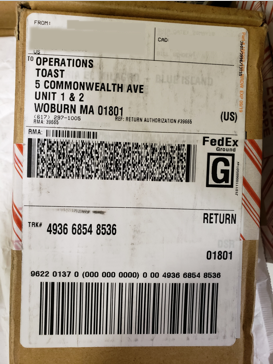
Expected outcome: Toast receives the returned device, processes it, and the RMA case is closed.
Special Instructions for Canada Returns Only
If you are returning faulty hardware from Canada, you must follow these steps precisely for the return to clear customs:
- Locate the Documents: Inside the packaging of your new device, you will find three Commercial Invoices along with a Returns Label.
- Prep the Box (Remove Old Labels): Fully remove the original shipping label from the box before proceeding.
- Pack the Commercial Invoices: For customs visibility, fold and protect each Commercial Invoice so that the text faces outward. Place all three into a clear pouch or plastic ziplock bag.
- Attach the Invoices to the Box: Securely tape the clear pouch/bag containing the invoices to the outside of the box.
- Apply the Return Shipping Label: Securely attach the new return shipping label to the box. Ensure it is fully visible and does not obstruct the clear pouch containing your commercial invoices.
- Schedule a carrier pick-up or drop the package at an approved location:
- Canada (UPS): Find pick-up and drop-off options at www.ups.com.
Note: If you are missing a Returns Label or Commercial invoice, please contact our Customer Care team.
Check the status of your RMA
To track an RMA shipment back to Toast, enter the tracking number from the pre-paid label at the carrier's site:
- UPS (US, Canada, Ireland): UPS Tracking
- DPD (UK): DPD Tracking
- FedEx (Australia, and US, where applicable): FedEx Tracking
To check the status of a replacement device shipping to you, or to look up your RMA reference number, see Check Your Hardware Order or RMA Request Status.
If you don't know your RMA reference number, look in the RMA confirmation email Customer Care sent when the RMA was approved. If you can't find that email, contact Customer Care.
RMA policy notes
- What's covered when under warranty. Hardware and software functionality failure, unresolved errors, card reader issues, power issues, and port issues (bent or broken pins, readers failing to register). For full warranty terms, see Toast's Limited Hardware Warranty Information.
- Physical damage is not covered. If physical damage is identified, such as a cracked screen or damage from a drop, you will be charged the full price of the replacement.
- "Acts of God" are not covered. Damage from natural disasters such as earthquakes, flooding, hurricanes, and tornadoes is not covered under the RMA policy.
- Free shipping label. Toast's RMA policy includes a free FedEx or UPS Ground shipping label in the US, a FedEx label in Australia, a DPD label in the UK, and a UPS label in Ireland and Canada. The label is included in the replacement equipment box. If the label isn't used, the order cannot be tracked, and you will be liable for the cost of both replacement hardware and original shipping charges.
- Returning unused (not faulty) hardware for a refund is a separate process. See Return Unused Hardware.
Frequently asked questions
Is my device eligible for a free RMA?
Your device is eligible for an RMA if it is within its warranty period and the issue is a hardware or software malfunction, you have troubleshooted the device with care, and they determine that it should be replaced. For example, the device won't turn on, a card reader stops working, ports are damaged, or unresolved errors persist after troubleshooting. Devices that are out of warranty, or that have physical damage (cracks, drops, liquid damage) or "acts of God" damage, are not eligible for free replacement and require paid replacement instead.
Does a cracked screen qualify for an RMA?
A cracked screen does not qualify for a free RMA. The RMA policy does not cover physical damage caused by a customer or their guests, including cracks, drops, and impact damage. Even if the device was not dropped, a crack is still classified as physical damage. You will be charged the full replacement price. For paid replacement options, contact Customer Care or check Toast Shop.
How do I find my RMA number or RMA reference number?
To find your RMA number, look in the RMA confirmation email Customer Care sent when the RMA was approved — the reference number is listed in that email. If you can't find the email (check spam and junk folders too), contact Customer Care and provide your account information so they can look it up.
How do I get a new return label?
To get a new return label, US customers can request a replacement at the UPS guest-access portal using their RMA reference number from the RMA confirmation email. New labels are emailed within two to three business days — check spam and junk folders. Customers in the Australia, Canada, Ireland, or the UK should contact Customer Care to request a new label.
How do I check the status of my RMA or replacement device?
To check the status of a replacement device shipping to you, use the tracking number sent by email when the device shipped. To track a faulty device returning to Toast, enter the tracking number from the pre-paid return label at the carrier's site (FedEx for Australia and US, where applicable, UPS for US/Canada/Ireland, DPD for UK). For more detail, see Check Your Hardware Order or RMA Request Status.
Can I return a device that arrived broken (DOA)?
Yes. If a new device does not work out of the box, contact Customer Care to start an RMA. New devices that are dead on arrival (DOA) are eligible for free replacement.
Related articles
- Check Your Hardware Order or RMA Request Status
- Get a New RMA Label
- Return Unused Hardware
- Toast Hardware Hub