Manage Linked Credit Cards on a Loyalty Account
Last updated: Apr 2, 2026, 9:40 AM
Question
- Where can guests manage linked credit cards for their loyalty account?
- How can I see which credit cards are linked to a guest's loyalty account?
- How can I remove a linked credit card from a guest's loyalty account?
- Can I disable credit card linking?
Answer
Guests can identify and remove linked credit cards by navigating to their loyalty account page. The link to this account page is sent to them in their welcome email or SMS message. It can also be found by using the "Lookup" page for your restaurant which you can find under Restaurant Info in Toast Web. The guest's account page will display a Manage linked credit cards option toward the bottom. Selecting the "trash can" icon next to the linked card will remove it. When the card is used again later, it will not re-link.
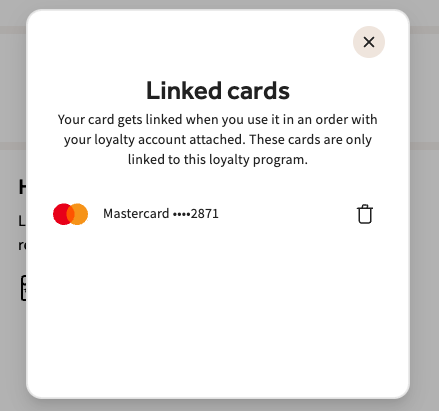
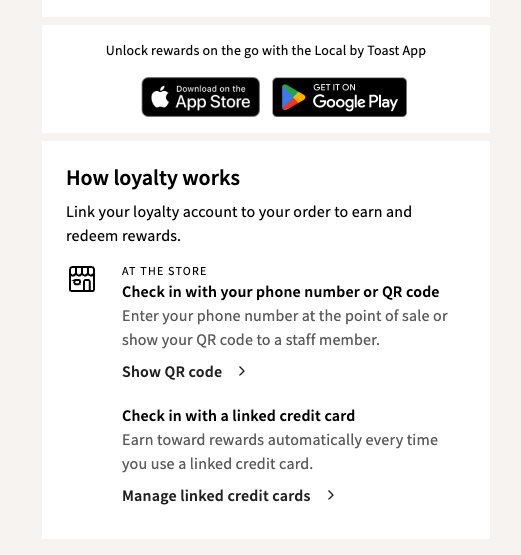
You can see which cards are linked to a guest's rewards account in the following steps:
- In Toast Web, navigate to Reports > Marketing > Rewards Accounts.
- Find the guest's account using email address, phone number, or loyalty card number.
- Select the rewards account.
- In the Card Details window, select the Linked Credit Cards tab.
Only the guest (using their loyalty account page) or Toast Customer Support can remove this card for the guest. Credit card linking cannot be disabled at this time.