Add Images to Menu Items in the Menu Manager
Last updated: Oct 20, 2026, 8:53 AM
- Before You Begin
- Menu Item Image Overview
- Add an Image to a Menu Item
- Replace a Menu Item Image
- Related Articles
Before You Begin
Applies to: Toast Web (Menu Manager, Edit Menus)
Permissions needed:
- Menu management access for the location you want to update
What you'll accomplish: Add or replace the photo shown for a menu item so it appears on your POS and Toast Online Ordering.
Menu Item Image Overview
Remember the old saying "A picture is worth a thousand words"? Well, that can certainly be true with respect to your Toast menu!
Adding images of your freshly prepared dishes to your menu items will carry over to your Toast online ordering website -- showing customers just how tasty the dish they're considering purchasing really is.
Images must be in .jpg or .png format, and no larger than 5 MB. For menu item images, we recommend a rectangle 750 px by 450 px. If you need to resize your image to upload it to Toast Web, there are plenty of free image resizing tools available on the web, like this one from Adobe (external link). If you're trying to upload pictures to your menu and you see a message that says "Please fix the errors below", it may be due to your image size. Scroll down the menu item page to see the specifics of the error message. Note: Even at the recommended 750 px by 450 px, images may be cropped or zoomed to fit certain POS displays because the POS applies its own aspect-ratio framing. Center the key content of the image so it remains visible after cropping.
Add an Image to a Menu Item
- In Toast Web, navigate to Menus > Menu management, then open the menu item you want to update in Menu Manager's Full Menu view or in Edit Menus.
- Select the item's name to open its details.
- In the item's general details, select + Add item image.
- Choose your image file, then select Open.
- Confirm the image appears on the item's details, then select Save and Publish your changes.
Expected outcome: The image appears on the menu item and carries over to your Toast Online Ordering page.
Replace a Menu Item Image
- Open the menu item's details, as described above.
- Select the trash can icon next to the current image, then choose a new image file to upload.
- Select Save. If you're ready for guests and employees to see the change, select Publish.
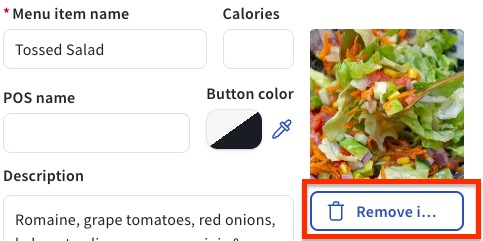
Expected outcome: The new image replaces the old one on the menu item and on Toast Online Ordering.
Related Articles
- Get Started With Menu Manager
- 86 an Item on the POS or Toast Web
- Can I preview how my menus will look on my POS?