Add or Remove an Integration With Toast Partner Integrations
Last updated: Jun 23, 2026, 2:10 PM
Add new partners, remove existing integrations, manage multi-location settings, and review activity in the Toast Partner Integrations portal (also called Toast Partner Connect).
- Before You Begin
- Open the Toast Partner Integrations Portal
- Filter Partners by Category
- Add an Integration at One Location
- Add an Integration to Multiple Locations
- Add a New Location to an Existing Integration
- Add or Modify External IDs
- Remove an Integration
- View Integration Audit History
- Request a Partner That Isn't in the Marketplace
- Frequently Asked Questions
- Related Articles
Before You Begin
Applies to: Toast Web
Permissions needed:
- 8.4 Manage integrations
What you'll accomplish: Add a new partner integration to one or more restaurant locations, remove an existing integration, manage external IDs, and review changes in the integration audit history.
Note: Access to the Toast Partner Integrations portal requires a Restaurant Management suite (Essentials or Pro). Some integrations, such as DoorDash, Grubhub, and Uber Eats, do not require a Restaurant Management suite and can be added at no cost. To confirm eligibility or upgrade your suite, see Set Up Toast Partner Integrations.
Open the Toast Partner Integrations Portal
The Toast Partner Integrations portal is the marketplace where you browse partners, add integrations to your restaurant, and review or remove integrations you have already added.
- Log in to Toast Web.
- Navigate to Integrations > Integration management > Browse & purchase integrations.
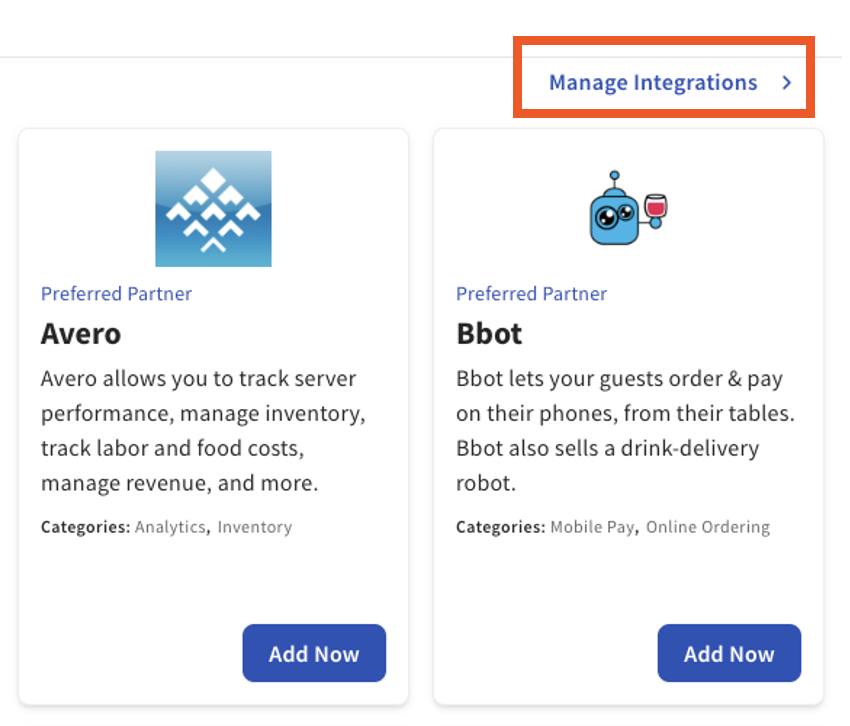
- Select Manage integrations in the top right corner of the page to review integrations that are already added to your restaurant.
Expected outcome: You see the My Integrations page listing every partner currently connected to your account.
Filter Partners by Category
The partner filter narrows the marketplace to partners that match a specific category, such as labor, accounting, online ordering, or marketing. Use this when you know the type of solution you need but not the specific partner.
- From the Toast Partner Integrations portal, select a category from the list on the left side of the page.
- Review the partner tiles that appear. Partners that fit more than one category list every applicable category on the tile.
- To learn more about a partner, select the partner logo or name to open the partner's website.
Expected outcome: The portal displays only partners in the category you selected.
Add an Integration at One Location
After you find a partner you want to use, add the integration directly from the partner tile.
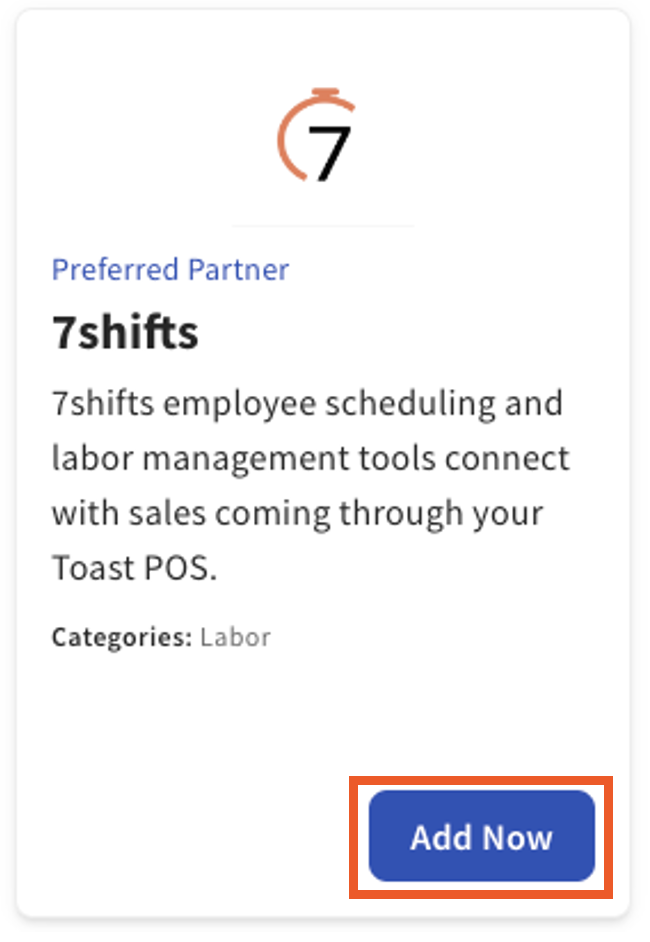
- Select Add Now on the partner tile.
- Review the partner's data visibility details and terms and conditions.
- Select Confirm to add the integration to the current restaurant location.
- To return to the marketplace, select Back to My Integrations.
Expected outcome: The partner appears on your My Integrations page. The partner is notified that you have added the integration and will contact you to complete any setup required on their side.
Note: Adding the integration in Toast is the first step. Most partners require additional setup on their platform, which can take several days or weeks depending on the partner. If a partner does not contact you, reach out to them directly to confirm next steps. See Toast Partner Integrations Data Scope Visibility Overview for details on what data is shared during this step.
Add an Integration to Multiple Locations
If your restaurant group has more than one location, add a partner integration to several locations in one workflow instead of repeating the single-location steps for each location.
- Navigate to Integrations > Integration management > Browse & purchase integrations.
- Select Manage integrations in the top right corner.
- Select Add More Integrations at the bottom of the page.
- Find the partner you want and select Add Now on the tile.
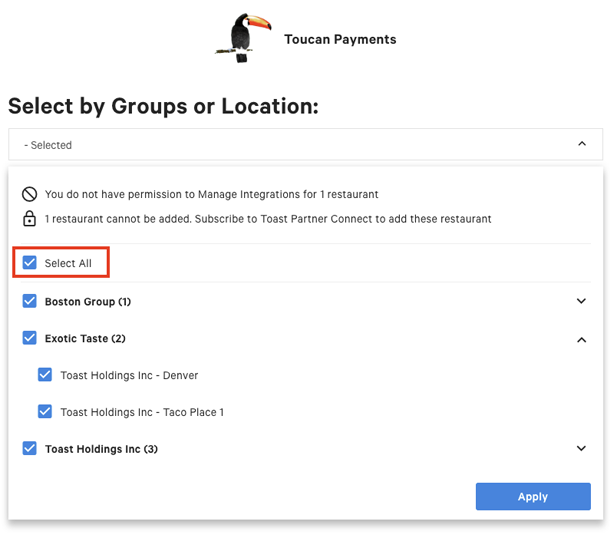
- Open the location drop-down menu on the left side of the page and choose the locations that should receive this integration. To add the integration to every eligible location, select Select All.
- Select Apply. The selector collapses to display a confirmation list of the locations you chose.
- Review your selections. To change a selection, select the down arrow and adjust the list.
- Review the partner's data visibility details and terms and conditions, then select Confirm.
Expected outcome: The integration is added to every selected location. You receive a follow-up email summarizing the locations that received the integration.
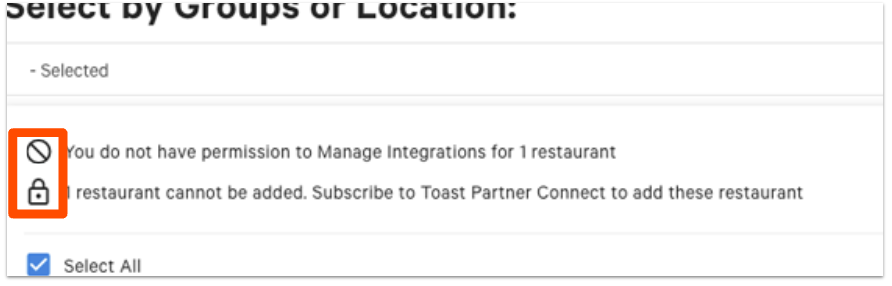
Note: A location may appear grayed out or display an icon in the drop-down menu. The icon indicates why the integration cannot be added at that location:
- Grayed-out location: The integration is already enabled at that location, you do not have the 8.4 Manage integrations permission at that location, or that location does not have access to Toast Partner Integrations.
- Padlock icon: The location does not have access to Toast Partner Integrations. The total count of locations without access appears at the top of the drop-down.
- Prohibitory sign: You do not have permission to add an integration at that location. The total count of locations where you lack permission appears at the top of the drop-down.
Note: Integrations cannot be removed from multiple locations at once. To remove an integration from several locations, remove it from each location separately. See Remove an Integration below.
Add a New Location to an Existing Integration
If a partner is already connected to one of your locations, add it to other locations from the My Integrations page without going back to the marketplace.
- Navigate to Integrations > Browse & purchase integrations.
- Select Manage integrations in the top right corner.
- Select the integration you want to extend to more locations.
- Under the Actions column, select the plus symbol next to the integration.
- In the Select Locations drop-down, choose every location that should receive the integration.
- Select Apply.
- Review the partner agreement and complete the add steps.
Expected outcome: The integration is added to every selected location and appears under My Integrations at each one.
Note: If you see an exclamation point instead of a plus symbol, the location does not yet have access to Toast Partner Integrations. To add the integration at that location, switch to the location in Toast Web, navigate to Integrations > Browse & purchase integrations, search for the integration, and select Learn More on the tile. Toast Shop opens so you can add the suite that includes Toast Partner Integrations.
Add or Modify External IDs
Some partners require a Location ID or Group ID to complete setup. If your partner has asked for an external ID change, manage IDs for one or more locations from the My Integrations page.
- From the Toast Partner Integrations portal, select My Integrations.
- Locate the integration you want to manage.
- Under the Actions column, select the gear icon to open the external ID menu.
- Use the search bar on the left to find a specific location, or scroll the list of every location associated with your Toast account that has access to Toast Partner Integrations.
- Edit the external ID for one or more locations.
- Select Apply to save the changes.
Expected outcome: The updated external IDs are saved for every location you edited.
Note: Not every partner integration requires an external ID. If your partner has not asked you for one, you can skip this section. To learn more about partner location and group IDs, see Find Integration Partner Location ID.
Remove an Integration
Remove a partner integration when you no longer need it at a specific location. Removals apply to one location at a time.
- In Toast Web, navigate to Integrations > Browse & purchase integrations.
- Select Manage integrations to open the My Integrations page.
- Locate the partner you want to remove and select the trash icon next to the partner name.
- Select Save.
Expected outcome: The partner is removed from the current location's My Integrations page. To add another partner, select Add More Integrations and follow the steps in Add an Integration at One Location.
Note: If you subscribed to Toast Partner Integrations as part of a Restaurant Management suite and you remove every integration, you continue to be charged the monthly suite fee. To cancel the subscription, contact Toast Customer Care.
View Integration Audit History
The integration audit history records every addition or removal made to your restaurant's connected partners, including who made the change.
- In Toast Web, navigate to Integrations > Integration management > Integration audit history.
- Use the drop-down menus at the top of the report to select a date and time range.
- Select Update to load the report.
Expected outcome: The report lists every addition and removal in the selected range with the username, partner name, date and time, and the action taken.
Note: For help with setup or unexpected behavior in an integration that is already added, contact the partner directly. The integration partner owns ongoing configuration and troubleshooting for their product.
Request a Partner That Isn't in the Marketplace
If the partner you want isn't listed in the Toast Partner Integrations portal, there are two paths depending on who is asking.
- You are a Toast customer: Reach out to your Toast Sales Rep, who can submit a partner application on your behalf.
- You are a partner who wants to integrate with Toast: Apply through Toast's Integration Partner page. To learn more, see Become a Toast Integration Partner.
Note: Toast does not currently support every third-party service. Examples of partners not available through Toast Partner Integrations include ADP, ezCater, and GratShare. This list is not complete and changes over time.
Frequently Asked Questions
How much does a partner integration cost?
Partner integration pricing varies by partner. Some integrations are included with your Restaurant Management suite at no additional cost, and some require a separate subscription paid to the partner or to Toast. The partner tile in the Toast Partner Integrations portal shows pricing details before you select Add Now. For questions about a specific partner's monthly fee, contact the partner directly or contact Toast Customer Care.
Also asked as:
-
- "How much is the monthly fee for this integration?"
- "Does Toast charge for integrations?"
- "Is there an extra cost for a partner integration?"
Why don't I see Add Now or Manage integrations?
If you don't see Add Now or Manage integrations, one of three conditions usually applies. First, your account may not have a Restaurant Management suite, which is required to access most partner integrations. Second, your Toast Web user may not have the 8.4 Manage integrations permission. Third, there may be a hold on your Toast account that blocks new integrations. To confirm your suite and request the permission, see Set Up Toast Partner Integrations and Permissions Reference Guide. If the issue persists, contact Toast Customer Care.
Also asked as:
-
- "Why is Add Now grayed out?"
- "I can't add an integration at my location"
- "Add Now button isn't working"
What happens after I select Add Now?
After you select Add Now and confirm the data visibility terms, the partner is notified that your account is ready to connect. Most partners then contact you to complete setup on their side, which can include creating a partner account, mapping locations, granting access, or providing credentials. Setup time varies by partner, from a few minutes to several weeks. If a partner does not contact you, reach out to the partner directly to complete the connection.
Also asked as:
-
- "What are the next steps after I added the integration?"
- "I added the integration but it's not working yet"
- "How do I finish connecting the integration?"
How do I re-do or refresh an integration?
To re-do or refresh an integration, remove the integration from the affected location, then add it again. Removing the integration disconnects the partner; re-adding the integration prompts the partner to reconnect and walks you through the data visibility step again. If your partner has reset their side or asked you to reauthorize, this is the standard path.
Also asked as:
-
- "How do I reset an integration?"
- "How do I reauthorize an integration?"
- "My integration stopped working — how do I fix it?"
Can I remove an integration from multiple locations at once?
Integrations cannot be removed from multiple locations at the same time. To remove an integration from several locations in a restaurant group, follow the steps in Remove an Integration at each location separately.
Also asked as:
-
- "Bulk remove integrations from locations"
- "Remove integration from all locations"
What if the partner I want isn't in the marketplace?
If the partner you want isn't listed in the Toast Partner Integrations portal, reach out to your Toast Sales Rep, who can submit a partner application on your behalf. If you are a partner who wants to integrate with Toast, apply through Toast's Integration Partner page.
Also asked as:
-
- "How do I add a partner not on the list?"
- "Can I add a custom integration?"
- "How do I request a new partner integration?"
Related Articles
- Set Up Toast Partner Integrations
- Toast Partner Integrations Data Scope Visibility Overview
- Find Integration Partner Location ID
- Permissions Reference Guide
- Become a Toast Integration Partner