Adjust Time Entries of Shifts When They Run Over
Last updated: Jun 12, 2026, 11:30 AM
Correct a shift that ran over, stayed open, or was auto-clocked out so an employee's hours are accurate in Toast Web or on the Toast POS.
- Before You Begin
- Quick Fix
- If the Shift Is Still Open From a Previous Day
- If the Shift Was Auto-Clocked Out at 4:00 a.m.
- If You Get a Time Entry Overlap Error
- If You Get the Time Entries Cannot Exceed 24 Hours Error
- If a Shift Will Not Reopen for Editing
- Frequently Asked Questions
- Related Articles
Before You Begin
Applies to: Toast Web, Toast POS
Permissions needed:
- 3.14 Edit Time Entries (to edit time entries)
- 4.3 Labor Reporting (to view the Time entry management page in Toast Web)
What you'll accomplish: Correct a shift that ran over, stayed open, or was auto-clocked out so the employee's hours are accurate.
Quick Fix
Use this table to match what you are seeing to the most common cause and the fastest fix. The detailed sections below walk through each scenario.
| Symptom | Most Common Cause | Quick Fix |
| Shift from yesterday never clocked out | Employee forgot to clock out, and the shift stayed open | Add a clock-out time on the Time entry management page in Toast Web, or remove and re-add the entry on the POS |
| Time entry shows a clock-out at 4:00 a.m. | The nightly auto-clock-out closed the shift | Edit the clock-out time to the correct value; saving overrides the auto-clock-out |
| Error: this time entry overlaps with another time entry | The new clock-in or clock-out time falls inside another shift on the same day | Adjust the times so they do not overlap, or split the overnight shift into two entries |
| Error: time entries cannot exceed 24 hours | A clock-out time is more than 24 hours after the clock-in time | Enter a clock-out time less than 24 hours after clock-in, or delete the shift and re-add it |
| Shift will not appear on the POS to review or adjust | The shift already has a clock-out time | Remove the clock-out time to reopen the shift, then edit it |
Note: You cannot remove the clock-in or clock-out time for your own shift.
If the Shift Is Still Open From a Previous Day
When an employee forgets to clock out, the shift stays open and can block them from clocking in to their next shift. You can close the open shift from the Time entry management page in Toast Web.
- In Toast Web, navigate to Reports > Labor > Time entry management.
- Use the date, location, and employee filters to find the open shift.
- Select the Time out field for that shift and enter the correct clock-out time in 12-hour format, including AM or PM.
- Select the check mark icon or press Enter to save.
Expected outcome: The shift closes, and the employee can clock in to a new shift. If the open shift crossed midnight, you may need to split it into two entries — see the overlap error section below.
For more ways to edit a closed or open shift, see Edit Employee Time Clock Entries. For a shift left open from a prior day, see Close an Open Shift From Yesterday.
If the Shift Was Auto-Clocked Out at 4:00 a.m.
If an employee does not clock out, Toast automatically closes the shift at your restaurant's business day cutoff, which is typically 4:00 a.m. These entries are labeled as auto-clock outs, and you can correct the clock-out time so the hours are accurate.
- In Toast Web, navigate to Reports > Labor > Time entry management.
- Enable the auto-clock out toggle at the top of the page to view only the shifts that were automatically clocked out.
- Select the Time out field for the shift and enter the correct clock-out time in 12-hour format, including AM or PM.
- Select the check mark icon or press Enter to save.
Expected outcome: Once you save an accurate clock-out time, the entry overrides the auto-clock out and no longer appears in the auto-clock out toggled view.
Note: When an employee has been auto-clocked out, you cannot add a separate time entry for them on that same day. If you see an error that the employee already has a time entry in this time period, adjust the auto-clock-out time first, then add the entry.
To find every auto-clock out for a date range, see Locate Auto Clock Out Time Entries.
If you would like to disable the auto-clock-out feature or adjust the clock-out time, please contact Customer Care.
If You Get a Time Entry Overlap Error
The error that a time entry overlaps with another time entry appears when the clock-in or clock-out time you entered falls inside another shift the employee has on the same day. This commonly happens with overnight shifts that cross the business day cutoff.
To resolve the overlap, adjust the clock-out time so it does not overlap with another shift and does not come before the clock-in time. If the employee worked an overnight shift that the auto-clock out split, enter the two shifts as separate entries that do not overlap. For example, enter the first entry from the evening clock-in to the cutoff time, then enter a second entry from just after the cutoff to the morning clock-out.
Expected outcome: The time entry saves, and the employee can complete the shift review.
If You Get the Time Entries Cannot Exceed 24 Hours Error
The error that time entries cannot exceed 24 hours appears when a clock-out time is more than 24 hours after the clock-in time. This often happens while a restaurant is in test mode, because the auto-clock-out feature only works once test mode is disabled.
To resolve the error, either add a clock-out time that is less than 24 hours after the clock-in time or delete the shift entirely if it is not a valid shift.
Expected outcome: The time entry saves with a corrected clock-out time, or the invalid shift is removed.
For more details on this error, see Get Help with Labor Error: Time Entries Can't Exceed 24 Hours.
If a Shift Will Not Reopen for Editing
If a closed shift will not appear on the POS for you to review or adjust, the shift most likely already has a clock-out time. You need to remove the clock-out time to reopen the shift.
- On the POS, navigate to the main menu and select Time Cards.
- Select the staff member's name to open their time card.
- Select the specific clock-in line item you want to adjust.
- Remove the clock-out time, then select Save.
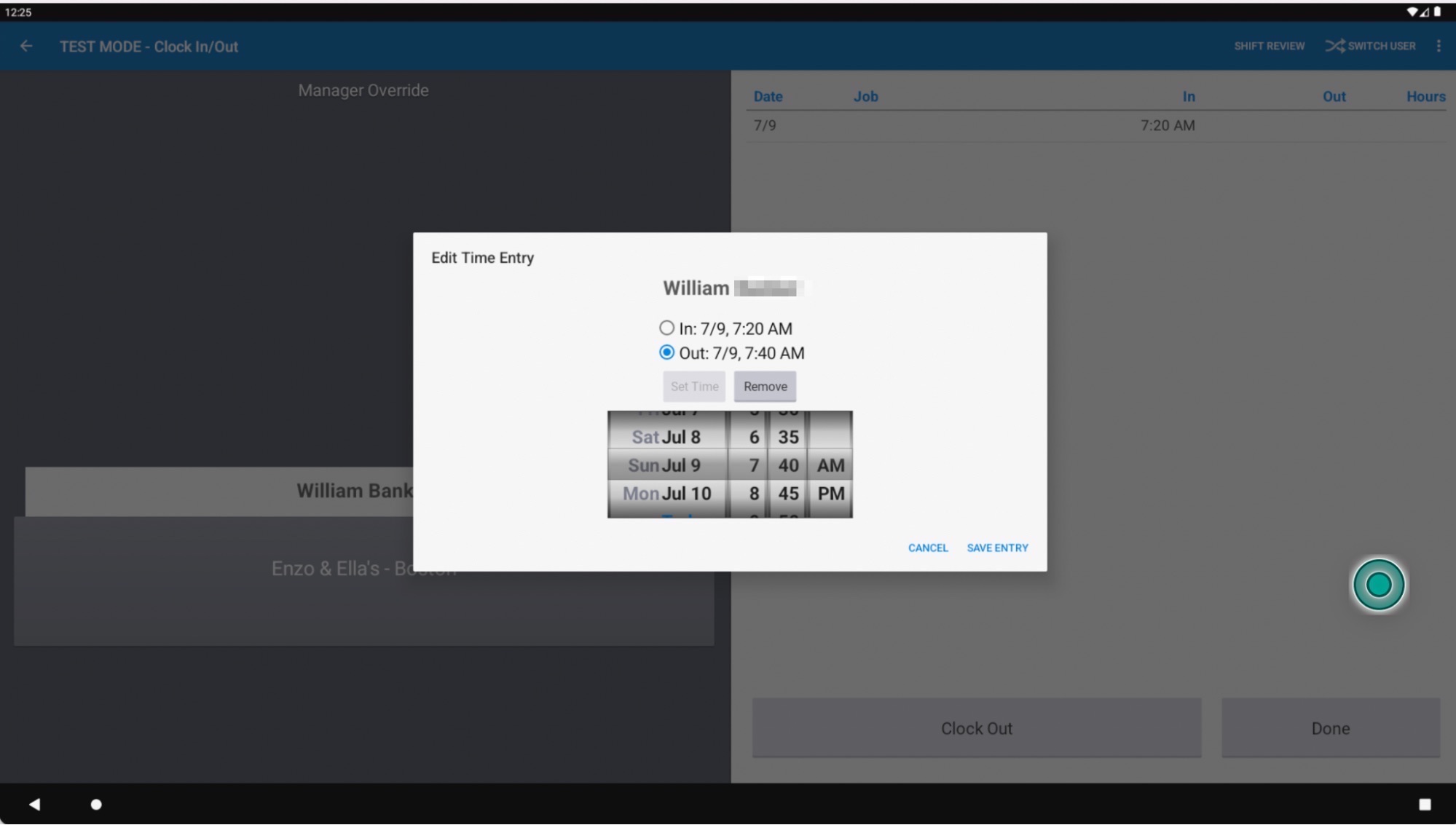
Expected outcome: Removing the clock-out time moves the shift back to the active category so you can review or adjust it. In Toast Web, you can also remove the clock-out time from the shift's details on the Time entry management page.
Frequently Asked Questions
Why does my employee's shift show a clock-out at 4:00 a.m.?
A shift shows a clock-out at 4:00 a.m. because the employee did not clock out, and Toast automatically closed the shift at your restaurant's business day cutoff, which is typically 4:00 a.m. To correct it, edit the Time out field on the Time entry management page in Toast Web and enter the accurate clock-out time. For details, see Locate Auto Clock Out Time Entries. To adjust the clock-out time or disable this feature, please contact Customer Care.
Also asked as:
- Why were my employees automatically clocked out?
- Why does the report show a 4 a.m. clock out?
- How do I fix an auto clock out time?
How do I close a shift that is still open from yesterday?
To close a shift that is still open from yesterday, edit the Time out field for that shift on the Time entry management page in Toast Web and enter the correct clock-out time, or open the shift's details and add a clock-out time. An open shift can prevent the employee from clocking in to their next shift. For step-by-step help, see Close an Open Shift From Yesterday.
Also asked as:
- Why can't my employee clock in?
- How do I clock out a shift from a previous day?
- My employee forgot to clock out, how do I fix it?
Why can't my employee clock in to a new shift?
An employee cannot clock in to a new shift when their previous shift is still open. Close the open shift by adding a clock-out time on the Time entry management page in Toast Web, and the employee will be able to clock in again. If your restaurant has auto-clock out configured, the system closes open shifts at your business day cutoff, typically 4:00 a.m.
Also asked as:
- My employee is stuck clocked in, how do I clock them out?
- Why does it say the employee is still on the clock?
Can I reopen a closed shift to edit it?
Yes, you can reopen a closed shift to edit it. On the POS, open the shift in Time Cards, remove the clock-out time, and select Save. In Toast Web, open the shift's details on the Time entry management page and remove the clock-out time. Removing the clock-out time moves the shift back to the active category.
Also asked as:
- How do I reopen a shift for shift review?
- The shift won't come up on the POS, how do I edit it?
What does the error this time entry overlaps with another time entry mean?
The error that a time entry overlaps with another time entry means the clock-in or clock-out time you entered falls inside another shift the employee has on the same day. Adjust the times so they do not overlap, and make sure the clock-out time does not come before the clock-in time. For an overnight shift, enter the evening and morning portions as two separate, non-overlapping entries.
Also asked as:
- Why does it say my time entry overlaps?
- How do I fix overlapping shifts?
Will my time entry edits sync to Toast Payroll?
Yes, time entry edits in Toast Web sync to Toast Payroll. However, if timesheets have already been approved or the pay period has already been submitted, the changes will not appear on that payroll and may need to be handled in the next cycle. For details, see Toast Payroll: Manage Timesheets.
Also asked as:
- Do timecard changes go to payroll?
- Will fixing a shift update payroll?
Related Articles
- Edit Employee Time Clock Entries
- Time Entry Management Overview
- Locate Auto Clock Out Time Entries
- Get Help with Labor Error: Time Entries Can't Exceed 24 Hours
- Toast Payroll: Manage Timesheets