Fix the Cutting Mechanism on Your Printer
Last updated: Oct 8, 2026, 2:18 PM
- TP200 Toast Printer and Epson M30 Stuck Cutter
- Epson TM-T20 Thermal Printer Stuck Cutter
- Epson TM-U220B Kitchen Printer Stuck Cutter
- Additional Resources
TP200 Toast Printer and Epson M30 Stuck Cutter
If you're experiencing a paper jam or a stuck cutter with your Toast Printer, there are a few steps you can take to fix it.
- Clean any debris from the cutting mechanism. Debris can stop the cutter from cutting the receipt paper.
- Open the printer cover to check to make sure there is enough paper on the receipt roll, and that it has not bunched up inside the hardware. Make sure there is no debris on the paper, the cutter, or the print head.
- Re-adjust the receipt paper roll and close the cover.
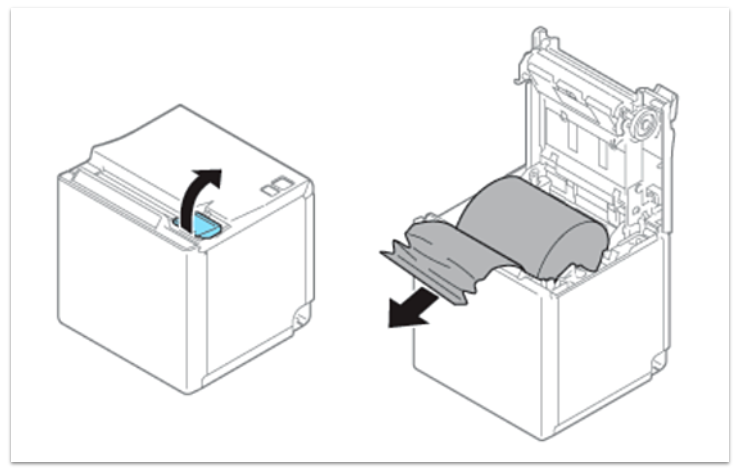
If your Epson TM-M30 cutter is stuck:
- Open the roll paper cover and remove any jammed paper, scraps, or small objects from the cutter area.
- Reload the paper roll so it sits straight and isn't bunched up, then close the cover firmly.
- If the Error light is flashing, turn the printer off, wait 10 seconds, and turn it back on.
- Make sure you're using single-ply thermal paper.
- Print a test slip. If the test print fails or the error light comes back, contact Toast Customer Care to check your printer's warranty and repair or replacement options.
Epson TM-T20 Thermal Printer Stuck Cutter
Here is an example of what the cutter blade looks like inside your Epson T20 printer:
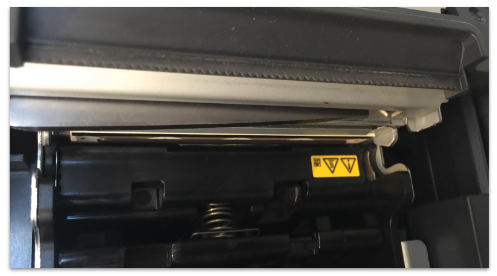
If you're experiencing issues with your Epson TM-T20 thermal printer, specifically with the cutter blade inside of the hardware, follow the instructions within the diagram below to troubleshoot the printer.
- Remove the cutter cover by sliding toward the front.
- Turn the knob in the direction of the arrow until the triangle mark appears in the opening. This returns the cutter blade to the standby position.
- Remove the jammed paper.
- Close the roll paper cutter and turn on the printer.
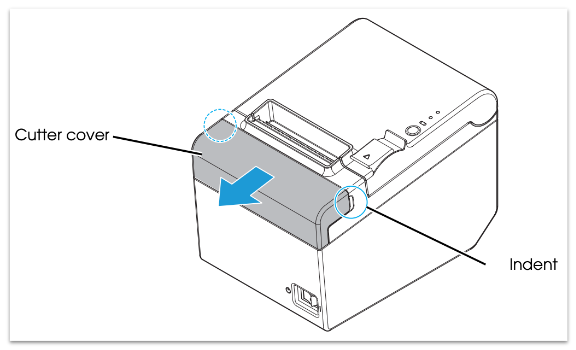
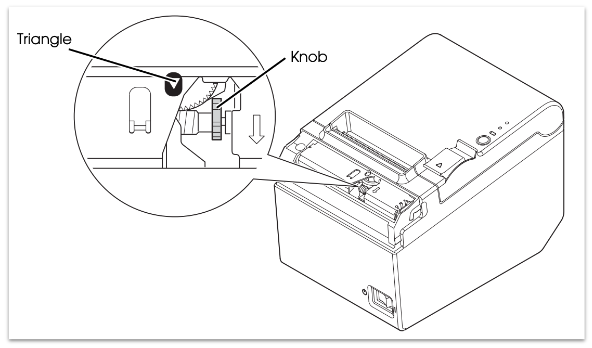
If you have further issues, reach out to Toast Customer Care for assistance.
Epson TM-U220B Kitchen Printer Stuck Cutter
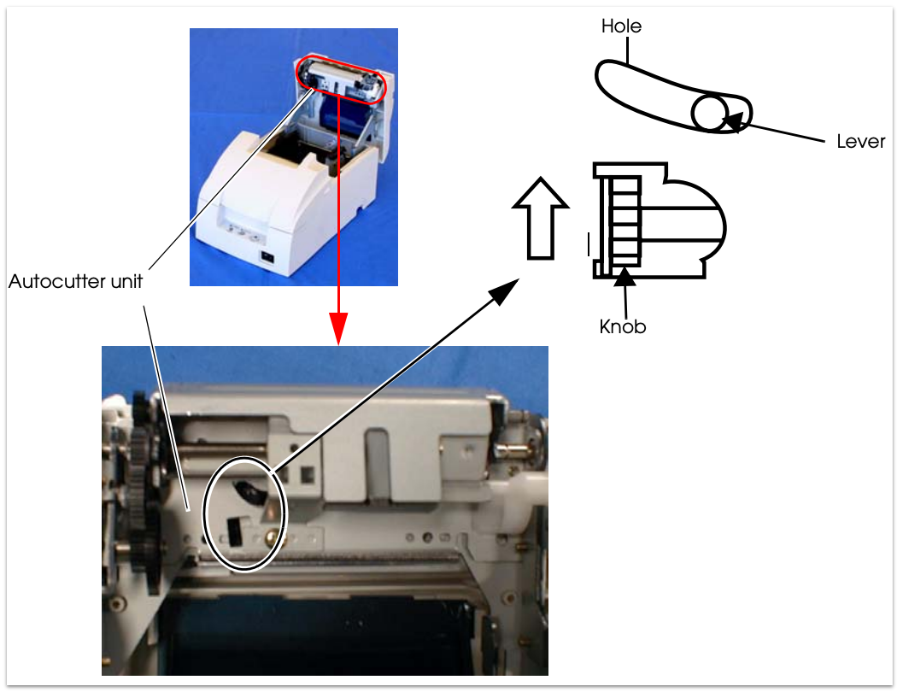
If a foreign object such as a push pin or paperclip drops in the Epson TM-U220B auto-cutter and causes the auto-cutter to lock up, the printer enters an error state and begins the recovery operation automatically.
For minor problems, the auto-cutter returns to the normal position itself. If your printer cutter is still stuck, you can follow the steps to fix the problem:
- Open the roll paper cover, and remove the jammed object if there is one.
- Turn off the printer, close the roll paper cover, and then turn it back on.
- The cutter blade will return to its normal position. If you don't want to turn off the printer, send an error recovery command and initialize the printer command instead.
- If the cutter blade doesn't return to the normal position, return the cutter blade to the normal position manually by rotating the auto-cutter knob in the direction of the arrow. When it's returned to the normal position, a lever comes into view in the center of the hole in the auto-cutter frame.
- Close the roll paper cover.
Additional Resources
- Get Help: My Printer Isn't Working
- Get Help With Epson TM-M30 [URL not independently verified — confirm the exact link before publishing]
- Get Help with the Epson Receipt Printer TM-T20ii
- Get Help with the Epson Kitchen Printer TM-U220B
- Get Help with the Toast Receipt Printer TP200