Log in to Toast Web With Biometrics
Last updated: Sep 15, 2026, 10:28 AM
Biometrics Overview
You can use biometrics on your devices to bypass the email and password step of logging into Toast Web (Toast's back-end).
Logging in with biometrics – as opposed to entering your username/email and password – provides a more streamlined login experience. No more forgetting passwords and having to go through the effort of resetting them.
Biometrics are body measurements and calculations related to human characteristics. If your device supports biometrics, Toast can use biometric authentication as a form of identification and access control. Typically it’s a fingerprint reader or a camera capable of facial recognition. Examples of biometrics include Face ID or face scanning on a smartphone, or fingerprints on a laptop.
| The option for biometrics will only show if it is supported by the browser you are using. Your browser (Chrome, etc.) would have asked for permission from the device. |
If you are encountering issues with utilizing your device's biometrics authentication functionality, we highly suggest that you check your device's settings to confirm if it's configured properly. For more information, please see:
- iPhone User Guide: Set up Touch ID on iPhone (external link): Learn how to enable or disable Touch ID on your iPhone.
- Samsung: Use the fingerprint sensor on your Galaxy phone or tablet (external link)
Use Biometrics to Log In to Toast Web
To use biometrics to log in to Toast Web (instead of typing in your password), follow these steps:
- When logging in, you'll be asked for your email and then the password associated with your Toast account to verify your credentials.
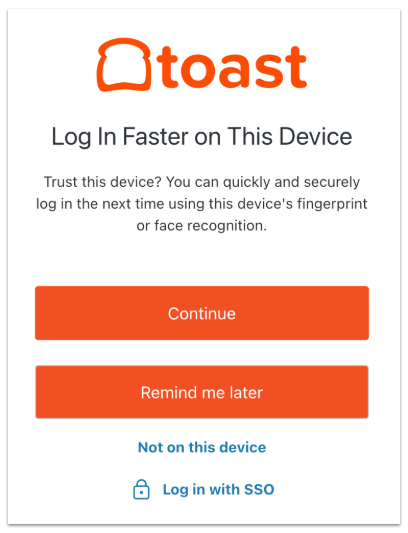
- You'll be offered the option to use biometric functionality to log in, using fingerprint or face recognition. If you'd like to process this way, select Continue. You can select Remind me later to skip this setup until your next login, or you can select Not on this device if you don’t want to set up biometrics because you do not trust the device.
- Next, you'll be asked to give permission for the application to use the biometric functionality.
- If you grant permission, you will be logged in. Success! If you don't give permission or cancel, you'll see an error message with the option to try again or log in using another method.
Remove Biometrics as Your Login Method
If you no longer want to use biometrics (fingerprints, face scanning, or Face ID) to log in to Toast Web, the MyToast app or the Toast Now app, you'll need to disable this on your device itself. Your device stores your fingerprint or face scan, so Toast does not have access to these identification signatures nor can we remove, disable, or reset biometrics on your behalf.
The following external links may help. If you're not using an iPhone or a Samsung mobile device, try searching for "remove biometrics on [your device here]" and following the steps in a device-sponsored search result. Review the steps before taking them to ensure you're comfortable with the result. Note: This will remove biometric identity verification from your device entirely, so this will affect any other apps or login methods that use biometrics on your device.
- iPhone User Guide: Set up Touch ID on iPhone (external link): Learn how to enable or disable Touch ID on your iPhone.
- Samsung: Use the fingerprint sensor on your Galaxy phone or tablet (external link)