Manage Checks in Bulk on the POS
Last updated: Sep 17, 2026, 11:28 AM
Configure Permissions for Bulk Check Management
Bulk check management allows servers to manage multiple checks at a time. This is especially useful should you need to:
- Change shifts quickly and send multiple paid and/or open checks to a new server
- Close several paid checks at one time
- Perform a bulk void of checks
Bulk actions require specific manager permissions. It is important to ensure your employees have the proper access permissions assigned. To learn more please review the Permissions Reference Guide and Assign User Access Permissions.
The bulk check management permissions include:
- 3.4 Bulk Transfer Checks - Allows multiple checks to be selected and reassigned to another server
- 3.5 Bulk Void Open Checks - Allows multiple open checks to be selected and voided
- 3.6 Bulk Close Paid Checks - Allows multiple paid checks to be selected and closed
When changing a job or employee's permissions, be sure to save and publish your changes.
Back to top
Use Bulk Actions on the POS
To use bulk actions on the POS, follow these steps:
- From the main menu of the Toast app on your POS, select Payment Terminal.
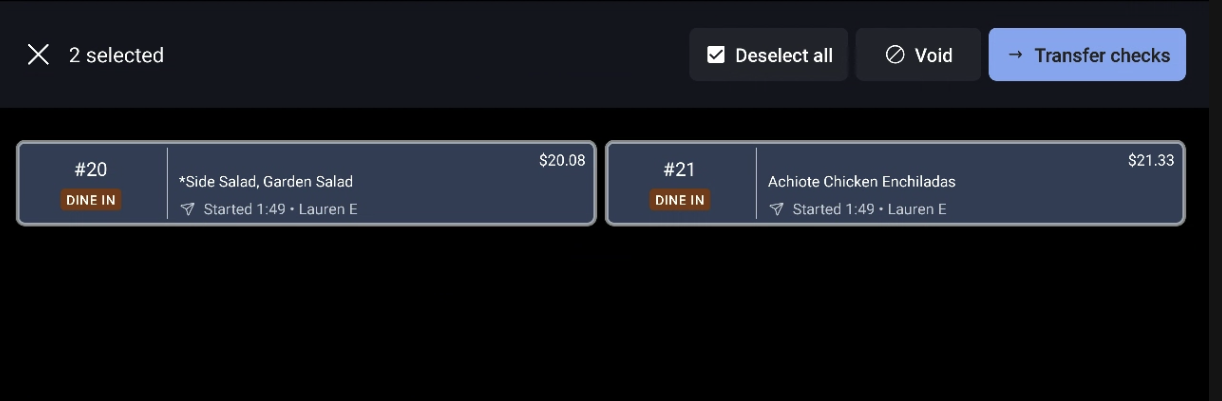
- Select and hold down on a check. A long press will trigger the ability to select multiple checks. Use the button at the top of the screen to Select all or Deselect all if needed.
- Select an action button at the top of the screen. The status of the check will dictate what actions can be done in bulk. In the example above, the two options are to Void or to Transfer checks.
- Open checks can be voided or transferred to another server. Note that the checks can only be transferred to another server who's clocked in.
- Paid checks can be closed or transferred to another server. Note that closed checks cannot be managed in bulk.
- Select Yes to confirm your selections and action from the pop-up window.
Note: Users without bulk action permissions will be prompted for a manager passcode or swipe if they attempt to view all checks, select Void Checks, or select Transfer Checks.