Card Pre-Authorization FAQ
Last updated: Jun 11, 2026, 11:41 AM
Card pre-authorization lets bartenders and waitstaff read a guest's card on an order, start a bar tab, save the card as a form of payment (labeled Saved CC), and verify the card while checking for funds. This article answers the questions guests and restaurants ask most often about how pre-authorization behaves. For setup and step-by-step instructions, see Configure and Use Card Pre-Authorization.
| Note: Pre-authorization is not currently available in Canada, Ireland, and the United Kingdom. |
- About Card Pre-Authorization
- Setting Your Pre-Authorization Amount
- How Holds and Charges Appear to Guests
- Using and Closing a Saved Card
- How Long a Pre-Authorization Lasts
- Reporting and End-of-Day
- Availability and Device Limitations
- Related Articles
About Card Pre-Authorization
What is card pre-authorization?
Card pre-authorization is a feature that lets you read a guest's card on an order, start a tab, and verify the card before the check is closed. It is commonly used in high-volume bars and nightclubs. When you take a card on the order screen, the card is saved as a form of payment (labeled Saved CC) and the guest's name and card information are stored as a bar tab. Pre-authorizing a card does not guarantee the guest will have enough funds to cover the entire check.
Also asked as:
-
- What does pre-authorization do?
- How does a bar tab pre-auth work?
- What is a saved card on a check?
Why would I take a card without any items on the check?
You can take a card before any items are added to a check to start a tab and save the card for payment when the check is closed. Taking a card on an empty check still verifies the guest's bank account and saves the card information as a form of payment. It will not check the guest's bank account for sufficient funds unless you have set a minimum pre-authorization amount.
Can I key in a card number to pre-authorize it?
No, you cannot key in a card number to pre-authorize it. Cards must be present and read on the order screen for pre-authorization to take place.
Does pre-authorizing a card start a tab for the customer?
Yes, pre-authorizing a card starts a tab for the customer. Taking a card on the order screen in Quick Order and Table Service mode saves the cardholder's name and card information as a tab. You can look up guest tabs using the Lookup function, where the card can be read again to pull up any checks associated with the cardholder.
Also asked as:
-
- Does a pre-auth open a bar tab?
- How do I find a guest's pre-authorized tab?
Can I pre-authorize more than one card on a check?
No, you cannot pre-authorize more than one card on a check. Each check can contain only one pre-authorized card.
Is it possible to allow only some of my Toast devices to pre-authorize cards?
Yes, you can allow only some of your Toast devices to pre-authorize cards. While the ability to pre-authorize cards is a global setting in Toast Web, individual devices can be configured to disable pre-authorization in Device Setup. If a card is read on the order screen on a device that has pre-authorization disabled, that card will be charged instead of pre-authorized. For configuration steps, see Configure and Use Card Pre-Authorization.
Setting Your Pre-Authorization Amount
How much does the check get pre-authorized for?
The check gets pre-authorized for either the configured pre-authorization amount set in Payment options in Toast Web, or for the total of whatever items have been added to the check. Pre-authorizing a card does not guarantee the guest will have enough funds to cover the entire check.
Can I set a minimum amount for each pre-authorization?
Yes, you can set a minimum pre-authorization amount in Toast Web. If a card is pre-authorized on a check that does not contain enough items to meet the minimum, the card is pre-authorized for the minimum amount you set. If the guest's check is greater than the minimum, Toast pre-authorizes the card for the greater amount by default.
The steps to set a minimum amount for each pre-authorization are below:
Login to toasttab.com > On the left side navigation bar > Finance > Related > Settings > Payment options > Credit > Optional: transaction limit > set the limit > Save > Publish changes.
What is a typical minimum pre-authorization amount?
A typical minimum pre-authorization amount is the average price of an alcoholic beverage. Many restaurants set their minimum to this amount.
Can I set a $0 minimum?
No, you cannot set a $0 minimum. You must have a pre-authorization minimum of at least $0.01.
How Holds and Charges Appear to Guests
Does pre-authorizing a card put a hold on a guest's funds?
Yes, pre-authorizing a card puts a temporary hold on the guest's funds. Toast immediately voids the pre-authorized amount, but the way the hold appears on an online bank statement varies by the guest's bank. It is common for a guest to see what looks like more than one charge while pre-authorization takes place, though only one charge for the final amount remains after credit card batching. Holds typically disappear one to two business days after the transaction, but some guests may see a pending charge for five or more days depending on their bank.
Also asked as:
-
- Why is there a hold on my guest's card?
- How long does the pre-auth hold last?
- When does the pending charge drop off?
Why does my guest see what looks like a double charge?
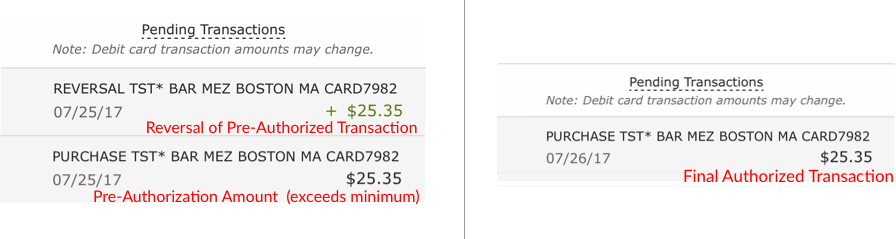
A guest may see what looks like a double charge because a pre-authorization can show a pending hold for the pre-authorized amount alongside the final charge for the check. The guest will likely see a pending charge for the amount that was pre-authorized, accompanied by a voided transaction for that amount. If a card is taken on a check with a balance less than the minimum pre-authorization amount, the pending charge will be the minimum amount. Both the hold and the void typically disappear the following day, and the guest will only see one charge for the final amount once batching has occurred.
Also asked as:
-
- Why are there two charges on my guest's card?
- My guest thinks they were charged twice — why?
What does a $0 pending charge mean?
A $0 pending charge is another indicator of a pre-authorization, and it disappears the next day. The guest may also see a second pending charge for the final amount of the check. After batching occurs the following day, the guest will see only one charge on their account for the final amount.
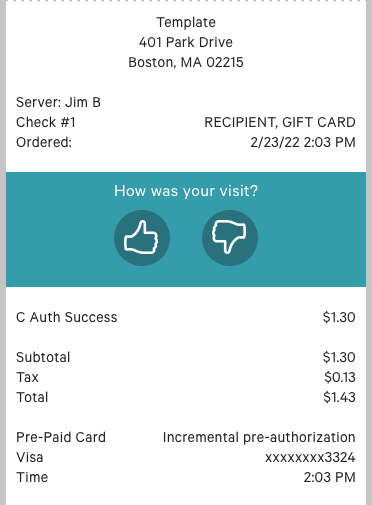
What does pre-authorization look like on a guest-facing receipt?
Pre-authorization appears on a guest-facing receipt as shown in the example below.
How might these transactions show on a guest's bank statement?
These transactions show on a guest's bank statement as a pending hold the day pre-authorization occurs, then as a single finalized charge the following day. The example below shows a debit card transaction, with the day of pre-authorization on the left and the following day on the right.
Using and Closing a Saved Card
Can a check be paid with a payment different from the pre-authorized card?
Yes, a check can be paid with a payment different from the pre-authorized card. A pre-authorized card is simply an additional payment option. For example, if another guest wishes to pay the balance on a different card, the new card can be taken on the payment screen, with no impact on the pre-authorized cardholder's bank account. Checks with pre-authorized cards can also be closed to cash, gift cards, or any other accepted form of payment.
Can a saved card be used to pay for only part of a check?
Yes, a saved card can be used to pay for only part of a check. Enter the partial amount on the payment screen and select Saved CC for that amount. A prompt will appear to confirm that the amount being paid is less than the balance of the entire check. The remaining balance can be closed to any other form of payment.
Can I adjust and void checks paid with a pre-authorized card?
Yes, you can adjust and void checks paid with a pre-authorized card. Once a check is closed using a Saved CC, you can go back into the check and void or adjust the payment as you would any ordinary card payment. Adjustments and voids can only be made once the check has been closed using the Saved CC.
Can I start a pre-authorization on one terminal and close the check on another?
Yes, you can start a pre-authorization on one terminal and close the check on another. A check can be closed to a Saved CC regardless of which terminal pre-authorized the card.
What happens when a split check contains a pre-authorized card?
When a split check contains a pre-authorized card, the first check keeps the pre-authorized payment. You can add a pre-authorized card to the additional split checks once they have been split from the original.
Why isn't my device pre-authorizing cards?
If your device is not pre-authorizing cards, confirm two settings are enabled. First, in Toast Web, confirm that pre-authorization is enabled in Payment options. Second, on the device, confirm that Credit Card Pre-Authorization is set to Yes in Device Setup. Dual reader setups (including some guest-facing displays) cannot yet dip or tap to pre-authorize — on these setups you must pre-authorize using the Magnetic Stripe Reader (MSR) as a swipe. For configuration steps, see Configure and Use Card Pre-Authorization. If pre-authorization still does not work after confirming these settings, contact Toast Customer Care.
Also asked as:
-
- My handheld won't pre-authorize cards — what do I do?
- Why won't my bar-top device pre-authorize?
How Long a Pre-Authorization Lasts
How long will a pre-authorization last?
A pre-authorization lasts for 24 hours. A check can be closed to a saved card within 24 hours of the original pre-authorization. After that window passes, the authorization expires.
Also asked as:
-
- How long is a pre-auth valid?
- When does a pre-authorization expire?
Will pre-authorized checks close automatically?
No, pre-authorized checks will not close automatically. Checks must be manually closed to a saved card.
What do I do if a pre-authorization is declined or fails the next day?
If a pre-authorization is declined or has expired by the next day, the 24-hour authorization window has passed and you will need to obtain the guest's payment information again to run the charge. For more detail, see What do I do when a card pre-authorization is declined?.
Also asked as:
-
- Why did my pre-authorization fail the day after the tab was opened?
- What does it mean if a pre-authorization shows as failed at the end of the night?
What happens to funds if a guest has enough for the pre-authorization but not the full transaction?
If a guest has enough funds for the pre-authorization but not the full transaction, the payment will be declined at close-out. If a guest has insufficient funds for the pre-authorization itself, the transaction should be declined outright. You can reduce the chance of a decline at close-out by raising your minimum pre-authorization amount.
Reporting and End-of-Day
Will pre-authorized cards appear differently in reporting?
No, pre-authorized cards will not appear differently in reporting. They will appear as regular card payments and will not affect reporting in any way.
How do pre-authorizing cards impact my end-of-day process?
Pre-authorizing cards does not impact your end-of-day process. Checks that contain a pre-authorized card are open checks until they are closed out. If you do not use digital receipts, closing a check to the saved card moves it to Paid Checks so a tip can be added before it is closed out. Like any card payment, a pre-authorized card must be closed out in an employee's Shift Review before ending a shift.
Does pre-authorization work in Offline Mode?
Pre-authorization does not work in Offline Mode, because Toast cannot communicate with card payment processors when offline. However, if a card was pre-authorized before going into Offline Mode, the card information is preserved and can be used as a form of payment when connectivity returns. If you close a check using a saved card in Offline Mode that was pre-authorized before going offline, it will be added to the queue and processed once the device comes back online. For more information, see Prepare to Operate in Offline Mode During Service Disruptions or Outages.
Availability and Device Limitations
Where is pre-authorization available?
Pre-authorization is available in all Toast regions except Canada, Ireland, and the United Kingdom.
Why doesn't the guest's name appear on the tab?
The guest's name does not appear on the tab when a card with a smart chip (EMV) is tapped instead of dipped. Dipping automatically populates the cardholder's name as the tab name, but tapping does not, due to limitations set by the card networks. To save time and avoid manual entry, dip the card when starting a bar tab. If you tap, update the tab name manually to avoid confusion or potential disputes.
Also asked as:
-
- Why is the tab name blank when I tap a card?
- Pre-authorization used to name the tab from the card — why doesn't it now?
Can I pre-authorize a card on a dual reader setup?
Dip and tap pre-authorization is not yet available for dual reader setups, including some guest-facing displays. On a dual reader setup, you must pre-authorize using the Magnetic Stripe Reader (MSR) as a swipe. To use the Toast Tap to pre-authorize on these setups, you must first remove the MSR reader. Swiping on the MSR will only add the tab name to the order. To enable dip and tap on all eligible terminals, see EMV Payments FAQ.
What does the disclaimer about battery life on handheld devices mean?
The disclaimer about battery life means that pre-authorization can drain a handheld card reader's battery slightly faster in Table Service mode. Pre-authorization requires the reader to stay awake on the order screen, which uses more battery power than waking only on the payment screen. For this reason, plug in and fully charge handheld devices on a daily basis.
Related Articles
- Configure and Use Card Pre-Authorization
- What do I do when a card pre-authorization is declined?
- Set Up Tabs & Pre-Authorization for Toast Mobile Order & Pay®
- EMV Payments FAQ
- Prepare to Operate in Offline Mode During Service Disruptions or Outages