Cash Drawer Reports Overview
Last updated: Jun 29, 2026, 1:26 PM
Understand what each cash drawer report in Toast Web shows, how to access them, and how Toast calculates closeout and deposit numbers.
Cash drawer reports in Toast Web give you insight into all cash and drawer activity at your restaurant, including starting cash, cash payments, expected and actual closeout cash, deposits, and any overages or shortages. This article explains what each cash drawer report shows, how to open them, and how Toast calculates the closeout and deposit numbers you see.
- About cash drawer reports
- The three cash drawer reports
- Who can access cash drawer reports
- How to open cash drawer reports
- Understanding the Drawer History report columns
- How closeout and deposit numbers are calculated
- Frequently asked questions
- Related articles
About cash drawer reports
Cash drawer reports are a set of reports in Toast Web that show all cash activity and drawer activity at your restaurant over a chosen time period. Use them to see how much cash came in and went out, who was responsible for each drawer, what the drawer was expected to hold versus what was actually counted, and how much you should deposit. These reports cover the most recent 24 months of activity.
Note: If you're looking for reports from before the last 24 months, start a chat in Toast Now with Customer Support.
The three cash drawer reports
There are three cash drawer reports, each answering a different question.
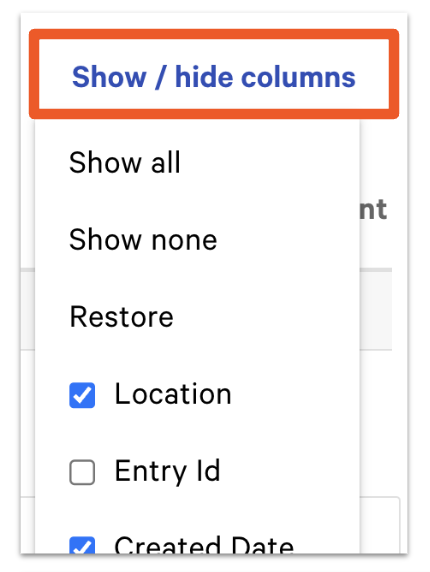
The Cash Activity Audit report displays all cash activity over a date range that you choose. Use it to share cash-specific reports from one or more restaurant locations with an accountant or bookkeeper. You can customize which columns appear by selecting the Show/hide columns button.
The Cash Drawer Overview report displays cash activity across multiple restaurants on a single day. This is useful for managing a restaurant group. This report will not populate unless you are part of a restaurant group with more than one location.
The Drawer History report provides an overview of all cash activity at a single location on a single day. Each column summarizes a physical cash drawer, the House, or an individual server, and the Total column equals the sum of cash collected into all cash drawers and the House.
Who can access cash drawer reports
Cash drawer reports are available in Toast Web to users with reporting access for cash and loss management. To adjust closed drawers or correct a closing balance from within a report, you also need the Edit Historical Data permission. If you don't see the reports or cannot make a correction, contact your Toast administrator to review your permissions.
How to open cash drawer reports
There are two ways to open the cash drawer reports in Toast Web.
From Cash Overview: navigate to Finance > Related > Settings > Cash overview, select View related reports, and choose the cash drawer report you want to view.
From Cash and Loss Management:
- In Toast Web, navigate to Reports > Cash and loss management.
- From the left-hand report navigation menu, select the cash drawer report you'd like to view, or use the search bar to find it directly.
Understanding the Drawer History report columns
The Drawer History report uses the following columns to describe each drawer's activity.
- Status: Whether a cash drawer is open or closed.
- Time opened/closed: The time a cash drawer was opened or closed.
- Locked to: Which employees have access to the cash drawer, so you know who is making cash transactions.
- Closed by: The employee who last closed the cash drawer.
- Starting Cash: The cash a drawer opens with. Drawer settings can be set to Manual, where a user sets the starting balance each time the drawer opens, or Automatic, where Toast sets the starting balance automatically. Automatic is recommended by Toast.
- Cash Payments: Payments made with cash.
- Cash collected: The amount of money the employee owes the restaurant. Cash collected is used to collect cash in hand from a server and add it to the cash drawer. Note: Cash sales will not match cash in hand if the employee split their cash between both a register and their own bank.
- Undo Pay Out: Reverses a pay out (a pay out removes cash from active or open drawers to pay for goods or services). The reversal shows as its own row.
- Cash In: Adds cash into active and open drawers.
- Tips Paid: The tips that were paid in cash.
- Cash Out: Removes cash from active and open drawers, typically when there is too much cash and some needs to move to a safe or other secure location.
- Pay Out: Functions like Cash Out but is tied to a specific reason, such as reimbursing an employee who bought supplies or paying a vendor in cash.
- Cash Drop: Moves cash from a cash drawer to the House. This is a security feature for when a drawer holds too much cash and lets you move a specified amount to a more secure location, such as an office safe.
- Expected Closeout Cash: The amount of cash expected based on the starting cash and the cash taken in and out of a given drawer.
- Actual Closeout Cash: The amount of cash you counted and recorded into Toast through the Cash Drawer section.
- Expected Deposit: The Actual Closeout Cash minus the starting cash balances of all cash drawers.
- Actual Deposit: The total cash deposit you counted and recorded into Toast through the Deposit section.
Note: While viewing the report you can also adjust a drawer's balance, which is useful for fixing a discovered discrepancy between expected and actual amounts. For the steps, see Adjust a Cash Drawer After It Has Been Closed.
How closeout and deposit numbers are calculated
The closeout and deposit figures on the Drawer History report follow a set order, which is why a number can look higher or lower than expected.
Expected Closeout Cash is your starting cash plus cash taken in, minus cash taken out (Cash In, Cash Out, Pay Outs, and Cash Drops). This is why Expected Closeout Cash usually includes the starting cash float, not just the day's cash sales. For example, a drawer with $200 starting cash and $200 in cash payments shows $400 expected, not $200.
Cash Overage/Shortage is the Expected Closeout Cash minus the Actual Closeout Cash. A positive number means more cash was counted than expected (overage); a negative number means less was counted than expected (shortage). A common cause of a shortage is that the starting cash balance was not included when the drawer was counted at closing. If there is no Actual Closeout Cash recorded, the Overage/Shortage reads N/A.
Expected Deposit is the Actual Closeout Cash minus the starting cash balances of all drawers, so the float is removed from what you deposit. Deposit Overage/Shortage is the Expected Deposit minus the Actual Deposit. If no Actual Deposit is recorded, the column reads N/A.
A cash shortage on a drawer reduces the Expected Deposit for that day, because the deposit is based on the actual cash counted.
Frequently asked questions
What does a cash overage or shortage on my drawer mean?
A cash overage or shortage is the difference between the Expected Closeout Cash and the Actual Closeout Cash on a drawer. An overage means more cash was counted than Toast expected, and a shortage means less was counted than expected. The most common cause of a shortage is that the starting cash balance was not included when the drawer was counted at closing. To investigate or correct a discrepancy, see Cash Drawer Discrepancy.
Also asked as:
- Why are we seeing a cash overage/shortage?
- Why do I have a cash overage/shortage and how do I fix it?
- What is this overage/shortage on my deposit?
Why is my expected closeout cash higher than my cash payments?
Your expected closeout cash is higher than your cash payments because it includes your starting cash float, not just the day's cash sales. Expected Closeout Cash is the starting cash plus cash taken in, minus cash taken out. For example, a drawer that started with $200 and took $200 in cash payments shows $400 in expected closeout cash.
Also asked as:
- What is the difference between expected closeout cash and actual closeout cash?
- How is expected closeout cash determined?
- Why is my expected closeout cash different than total cash payments?
Why is my expected deposit a negative number?
An expected deposit can appear negative when the Actual Closeout Cash recorded is less than the combined starting cash balances of your drawers, which the deposit calculation subtracts. This often points to a missing or incorrect Actual Closeout Cash entry, or a starting balance that wasn't accounted for at closing. To confirm and correct the entry, see Cash Drawer Discrepancy.
Also asked as:
- Why is my deposit showing a negative balance?
- Why is my expected deposit short?
How do I correct a closing balance or adjust a drawer after it's closed?
To correct a closing balance or adjust a drawer after it has been closed, you make a cash adjustment from within the drawer in the report, which requires the Edit Historical Data permission. For the full steps, see Adjust a Cash Drawer After It Has Been Closed. To adjust the starting cash balance specifically, see Adjust Starting Cash Drawer Balance.
Also asked as:
- How do I change the closeout cash for a drawer from yesterday?
- How do I fix an incorrect closing shortage on my drawer history report?
How do I find or print a closed drawer report from a previous night?
To find a closed drawer report from a previous night, open the Drawer History report and use the report filter to set the specific date. Cash drawer reports cover the most recent 24 months of activity. For a single closed drawer's details, see Closed Drawer Report. To share cash reports with an accountant or bookkeeper, use the Cash Activity Audit report.
Also asked as:
- How can I print out a closed drawer report from a previous night?
- Can you help me find a closed drawer report?
Why does my cash drawer overview show $0?
A cash drawer overview can show $0 when no cash activity has been recorded for the selected day, or when the Cash Drawer Overview report is viewed for a single-location account. The Cash Drawer Overview report only populates for restaurant groups with more than one location. To see cash taken in at a single location, use the Drawer History report instead.
Also asked as:
- Why doesn't the cash drawer overview show cash taken in?
Related articles
- Cash Drawer Discrepancy
- Adjust a Cash Drawer After It Has Been Closed
- Closed Drawer Report
- Use Cash Drawers
- Get Help With Cash Drawer and Shift Review