Sling by Toast: Change Email Address
Last updated: Jun 11, 2026, 5:02 PM
Users can update their Sling login email through their profile on web or mobile. This change also updates where notifications are sent.
- Review Email Update Permissions
- Update Email From the Web
- Update Email From the Mobile App
- Verify the New Email Address
After joining your company’s Sling account, you can update the email address used for login. This also updates where you receive Sling email notifications.
Review Email Update Permissions
Once a user joins a Sling account, only that user can update their email address. Admins cannot make this change on behalf of users because the update requires password verification.
Update Email from the Web
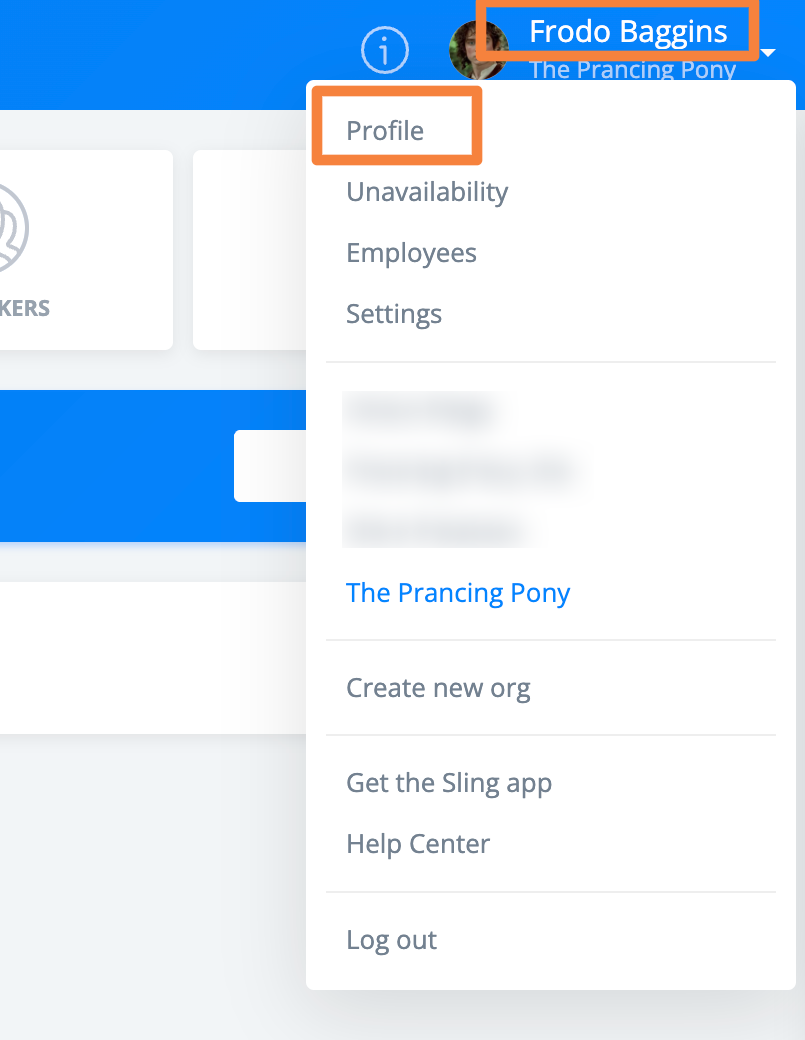
Select your name in the upper right corner of the page, then select Profile from the dropdown menu.
On the profile page, enter the new email address in the email field.
After you begin typing, a password field appears. Enter your current password to continue.
Select Save at the bottom of the screen to submit the change.
Sling sends a verification email to the new address. You must confirm the change using the link in that email.
If you do not verify the new email, the original email address remains on your profile and is still used for login.
Update Email from the Mobile App
Select your profile picture, then select Edit profile.
You can also access your profile from the More tab.
In your profile, select Edit in the upper right corner.
Enter your new email address, then select Save.
Verify the New Email Address
You must verify your new email address through a confirmation email sent by Sling.
Select the link in the verification email to complete the update. If you do not complete this step, the change will not take effect.
If you do not see the email, check your spam or junk folder, as automated messages may be filtered there.