Create an Online Ordering Account
Last updated: Oct 7, 2026, 2:05 PM
How do guests create an Online Ordering Account?
Toast's Online Ordering platform allows your guests to create a single account that can be used across all Toast Online Ordering sites.
Want to boost revenue with online ordering? Add the Toast Digital Ordering Suite to your account.
Create an Account
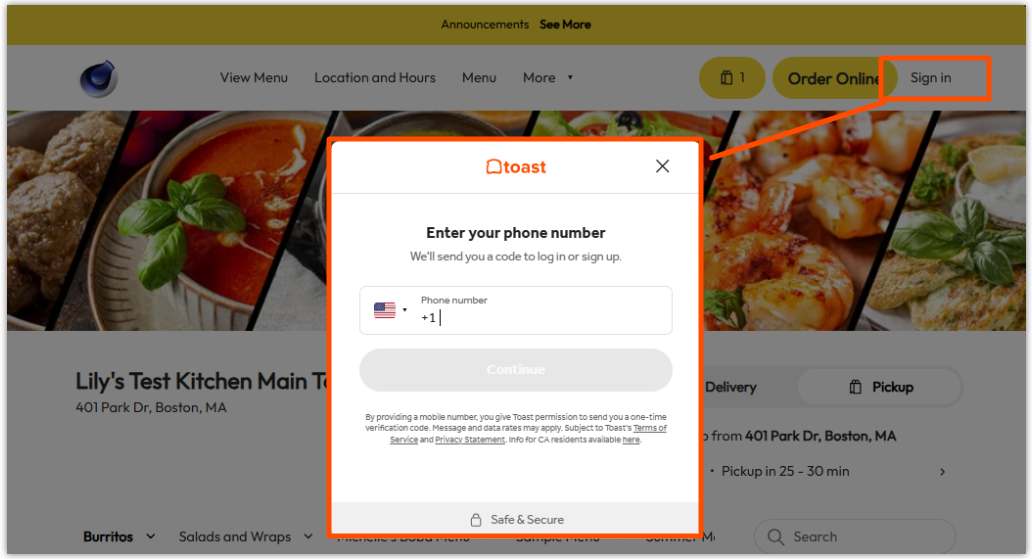
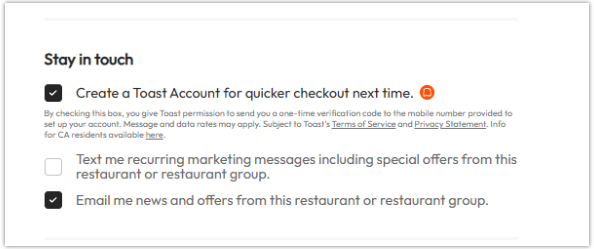
Guests sign in to or create a Toast account with their phone number. No password is needed.
To create an account from your Online Ordering page, guests can:
- Select Sign in in the page header and follow the prompts to enter their phone number and the one-time verification code sent to it, or
- At checkout, enter a valid phone number, then check the box for Create a Toast Account for quicker checkout next time.
Guests can also place an order as a guest without creating an account.
Save Information to an Account
After creating your account, you may save additional contact information in My Account, such as payment options and information.
- From your Online Ordering page, guests can select their account options in the page header.
- From there, select My Account to review your saved contact and payment information.
- You can also manage your Email and SMS marketing subscription preferences from the My Account page. To update your preferences, navigate to My Account and scroll to the Marketing Preferences section. Toggle Email and/or SMS marketing on or off and save your changes. Note: Changes to your preferences will be honored within 10 days.