Create and Utilize Service Prompts
Last updated: Mar 25, 2026, 1:53 PM
- Service Prompt Overview
- Service Prompts on the POS
- Create a Service Prompt
- Service Prompts and Reporting
Service Prompt Overview
Setting service prompts on the POS is a way to require your servers to add specific items to a guest's order. For example, if your servers pour beverages themselves, it's easy to forget to actually add the drink to the order. These service prompts will pop up during the ordering process or payment process as a reminder to add required items to each guest's order.
A service prompt reminds the server to add a required menu item to a guest's order. Until that requirement is met, the server will not be able to progress.
At a breakfast restaurant where servers pour their own drinks, they may forget to add them to the bill. For a restaurant with lots of to-go orders, they may forget to pack utensils. Either could be configured as a requirement to be added to an order. If a service prompt is set, the number of required menu items to complete the prompt is dependent on the number of guests. For example, if there are four guests at a table and a service prompt has been created to require drinks, four drinks will need to be added to complete the order, even if those drinks are water at no cost.
This prompt can be configured to appear when sending an order to the kitchen or when a guest is ready to pay.
Service Prompts on the POS
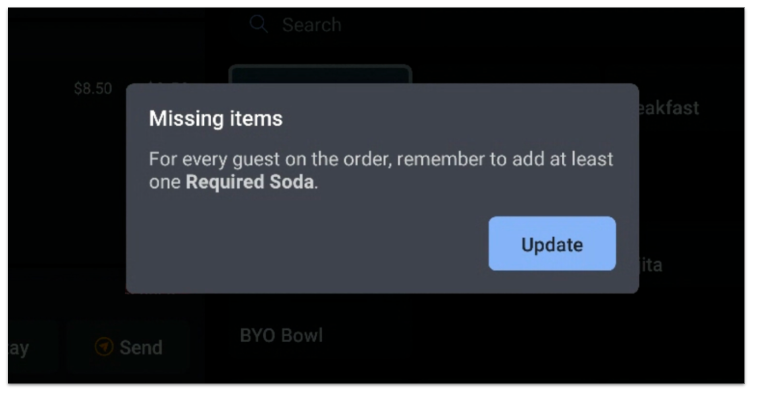
When prompted, your waitstaff will see this notification appear on the screen. They'll be required to add a menu item to the order to continue.
Create a Service Prompt
- In Toast Web, navigate to Front of house > POS notifications > Service prompts.
- Select the + New Prompt button, which will bring you to the configuration page.
- Enter a name for your prompt in the Prompt Name field. This is not seen by your waitstaff and is just for organizational purposes.
- Enter text in the Customize Service Prompt field for your staff to see. For example, if you add "drink or water" to the service prompt field, the message the server will see on the POS would be "For every guest on the order, remember to add at least one drink or water" if they have not met the configured requirements.
- If you have multi-location management (MLM) enabled, select a Target and an Owner from the drop-down menus (learn more about MLM configuration: Get Started With Multi-Location Management). If you have only one location or don't have MLM enabled, you won't see these fields.
- For the Prompt server when setting, select Sending to kitchen or Paying. This is the moment in the order workflow when the server will see your prompt. At this time, you can't create time-based service prompts. Remember, the server will not be able to progress the order or take payment until the requirement is met.
- Select your desired options for the Apply to which dining options? setting. For example, if you'd like utensils to be mandatory for takeout orders, you can select the Take Out check box. Keep in mind that prompts will only appear for orders taken on the POS. The prompt will not appear for online ordering, kiosk orders, Grubhub, etc. For online orders, see Configure Packaging Preferences for Takeout and Delivery to set your packaging offerings for guests.
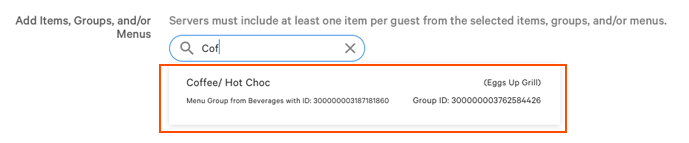
It's important to note that if you're creating a service prompt for something like takeout utensils, menu items will need to be created so servers can fulfill the prompt requirements. In this scenario, you would need to create a menu item for "utensils" so it can be added to the order. If you'd like the prompt to be just a reminder for your staff, you can also create a menu item for "no utensils," that way the service prompt requirement is still met. For more information on how to create menu items, check out the article Create and Manage Menu Items. - Lastly, select which items meet your service prompt requirements. If at least one item per guest is added from the configured list, a server will not see the service prompt. You also have the option of adding an entire menu group or full menu, so you don't have to add each item individually.
Or, if you'd like a non-alcoholic beverage to be mandatory for each guest on the order, and you have a non-alcoholic beverage menu group, you can save time by adding the entire group to your requirements instead of adding each item individually. - Save and publish your work.
Service Prompts and Reporting
To check on the success of your service prompts, you can take a look at your Menu reporting. We'd recommend exploring your drink revenue prior to enabling the prompt feature and comparing it to sales after enabling the feature.
You can learn more about menu reports in this Support Center article: Menu Reports Overview.