Get Help With Guest Menu Errors on Toast Mobile Order & Pay®
Last updated: Sep 17, 2026, 10:21 AM
Question
Why are my guests receiving an error when adding items to their cart using Toast Mobile Order & Pay®?
Answer
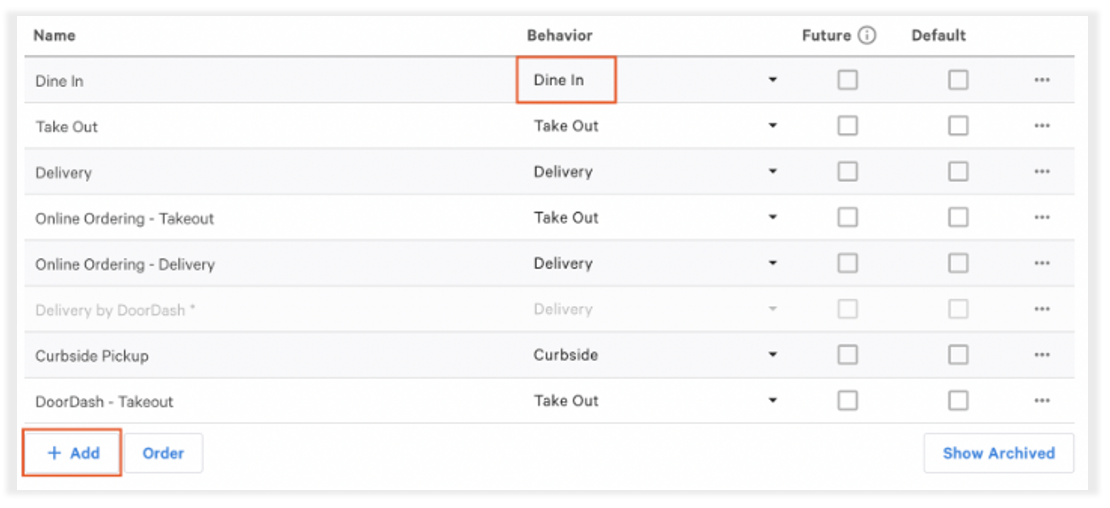
If your guest is receiving a "Cannot read property 'guid' of undefined. Please try again" error when trying to add items to their cart using Toast Mobile Order & Pay®, you may need to double-check your dining option settings:
- Log in to Toast Web and navigate to Kitchen > Dining options.
- Ensure you have at least one dining option set up with Dine In behavior; if not, you can edit an existing dining option to have this behavior (if appropriate) or create a new dining option using the + Add button.
- When finished, be sure to Save and Publish any changes.