Food Runner Fulfillment on KDS
Last updated: Sep 16, 2026, 5:15 PM
Food Runner Fulfillment on KDS allows everyone to keep track of the status for each item on a ticket without having to close out the entire ticket first.
| Food Runner Fulfillment on KDS is only available in Grid View. To use food runner fulfillment, the Fulfill Items setting must be set to Enable individual item fulfillment. |
- What is Food Runner Fulfillment?
- How to Enable Grid View
- How to Enable Food Runner Fulfillment
- Differences Between Two-Level Fulfillment and Single-Level Fulfillment
What is Food Runner Fulfillment?
Food Runner Fulfillment’s item-level status tracking at the expediter helps reduce errors and streamline service during peak hours. Food runner fulfillment is critical in situations where items are given to the guest as soon as they are ready, giving a visual indication of the fulfillment status of an individual item for that KDS device and fulfillment level.
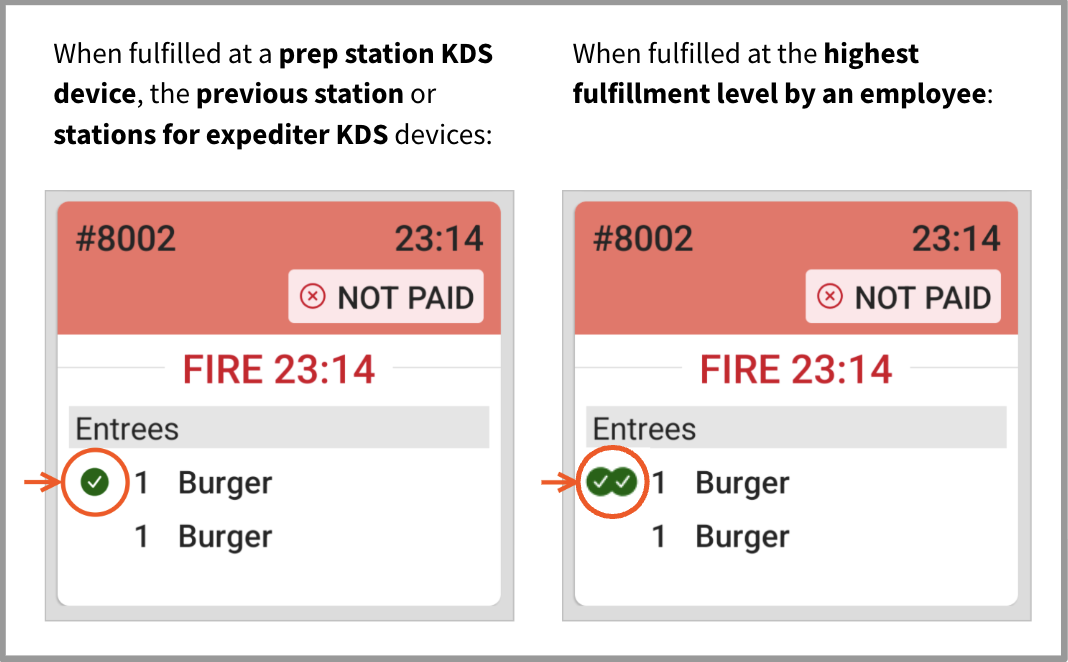
If a ticket with multiple items contains an item that is fulfilled at a prep station KDS device, or at the previous station or stations for expediter KDS devices, it is marked with a green check mark. When an item on a ticket is fulfilled at the highest fulfillment level by an employee, the Toast platform marks the item with a green double check mark on that expediter KDS device.
How to Enable Grid View
To enable Grid View on your Toast device, complete the following steps:
- From the main screen, navigate to the Kitchen Display System screen.
- Then, select the overflow menu (the ⋮ icon) in the top right corner of your device screen, and select Device Setup.
- In the Device Setup screen, select KDS View. Change the view to Grid View, then select Save.
How to Enable Food Runner Fulfillment
To use food runner fulfillment, the Fulfill Items setting must be set to Enable individual item fulfillment.
- In Toast Web, navigate to Kitchen > Printers, tickets, & KDS devices > Kitchen.
- Scroll down to the Ticket Screens section.
- For the Fulfill Items setting, select Enable individual item fulfillment.
- Save and publish your changes.
Differences Between Two-Level Fulfillment and Single-Level Fulfillment
If you use two-level fulfillment, the highest level of fulfillment is at the second-level expediter KDS device. The green double check mark appears when the item is fulfilled at the second-level expediter KDS device.
If you use single-level fulfillment, the highest level of fulfillment is at the expediter KDS device. The green double check mark appears when the item is fulfilled at the expediter KDS device.
Here is an example of two tickets on the expediter KDS device: one with the green check mark, and another with the double check mark.
Food runner fulfillment only works for expediter KDS device tickets with multiple items. Once a ticket or all of the items on a ticket are fulfilled, the ticket disappears from the KDS device.