Get Started With the TP300 Printing Hub Adapter
Last updated: Sep 1, 2026, 8:18 PM
How to set up the TP300 Printing Hub Adapter to connect a Flex 14 terminal to the Printing Hub for power, Ethernet, printing, and USB hub access.
The Printing Hub Adapter is a cable designed to enhance compatibility when connecting the Toast Receipt Printing Hub (TP300) to Flex 14 (TT200) terminals. It allows customers to utilize advanced hardware features of the TP300 Receipt Printer while continuing to use their existing Flex 14 terminals and peripheral accessories like scanners and scales when plugged into the TP300 USB hub.
TP300 Printing Hub Adapter Supported Devices
The Toast Printing Hub Adapter is specifically engineered for the following Toast hardware:
- Printer: Toast Receipt Printing Hub (TP300).
- Terminal: Toast Flex 14 (TT200) terminal.
TP300 Printing Hub Adapter Installation Guide
To set up your hardware, follow these steps:
- Printer Connection: Connect the end of the Printing Hub Adapter labeled "To TP300" directly to the USB-C port on the TP300 Printer. Secure the connection using the integrated thumbscrews to prevent accidental disconnects.
- Terminal Connection: Plug the Toast USB-C cable provided with the Printing Hub into the receptacle on the adapter.
- Final Step: Connect the other end of the USB-C cable to your Flex 14 (TT200) terminal.
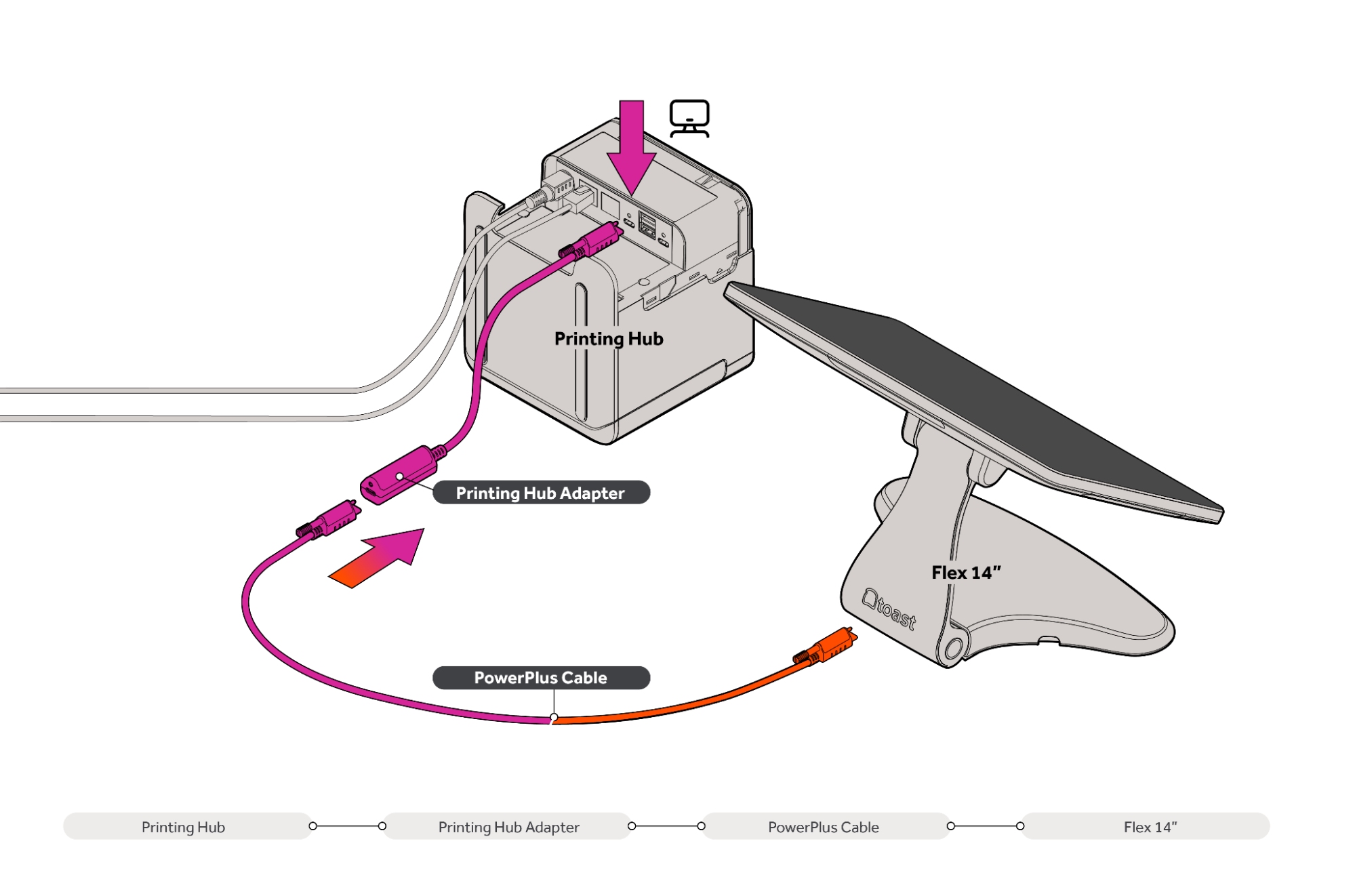
You can also watch this video for a detailed guide on installing the TP300 Printing Hub Adapter for the Flex 14.
Installing the TP300 Printing Hub Adapter for Flex 14
Enabled Features With TP300 Printing Hub Adapter
When properly connected, the TP300 Adapter enables several high-performance functions through a single cable connection:
- Power Delivery: Supplies power from the TP300 Printer to the Flex 14 terminal.
- Ethernet over USB-C: Enables the terminal to access the internet over the USB cable and Adapter.
- Direct-Print over USB-C: Facilitates reliable, high-speed printing from the terminal to the TP300 over the USB connection, providing a backup if network connectivity is lost.
- USB Hub Networking: Supports the use of peripherals (such as scanners, scales, or card readers) attached to the TP300's USB-A and USB-C ports, making them accessible to the Flex 14 terminal.