Hilton Hotels: PMS Sync for Payment Reports
Last updated: Mar 27, 2026, 11:15 AM
Question
Can I see if charges successfully posted to my Hilton hotel PMS in Toast reporting?
Answer
| The following feature is only available for Hilton customers. |
The PMS Sync Status column in your Payments report helps you reconcile charges faster and troubleshoot payment sync issues more efficiently. This column clearly shows whether each non-residential payment successfully posted to your Hilton hotel PMS, making it easy to quickly identify and address sync failures.
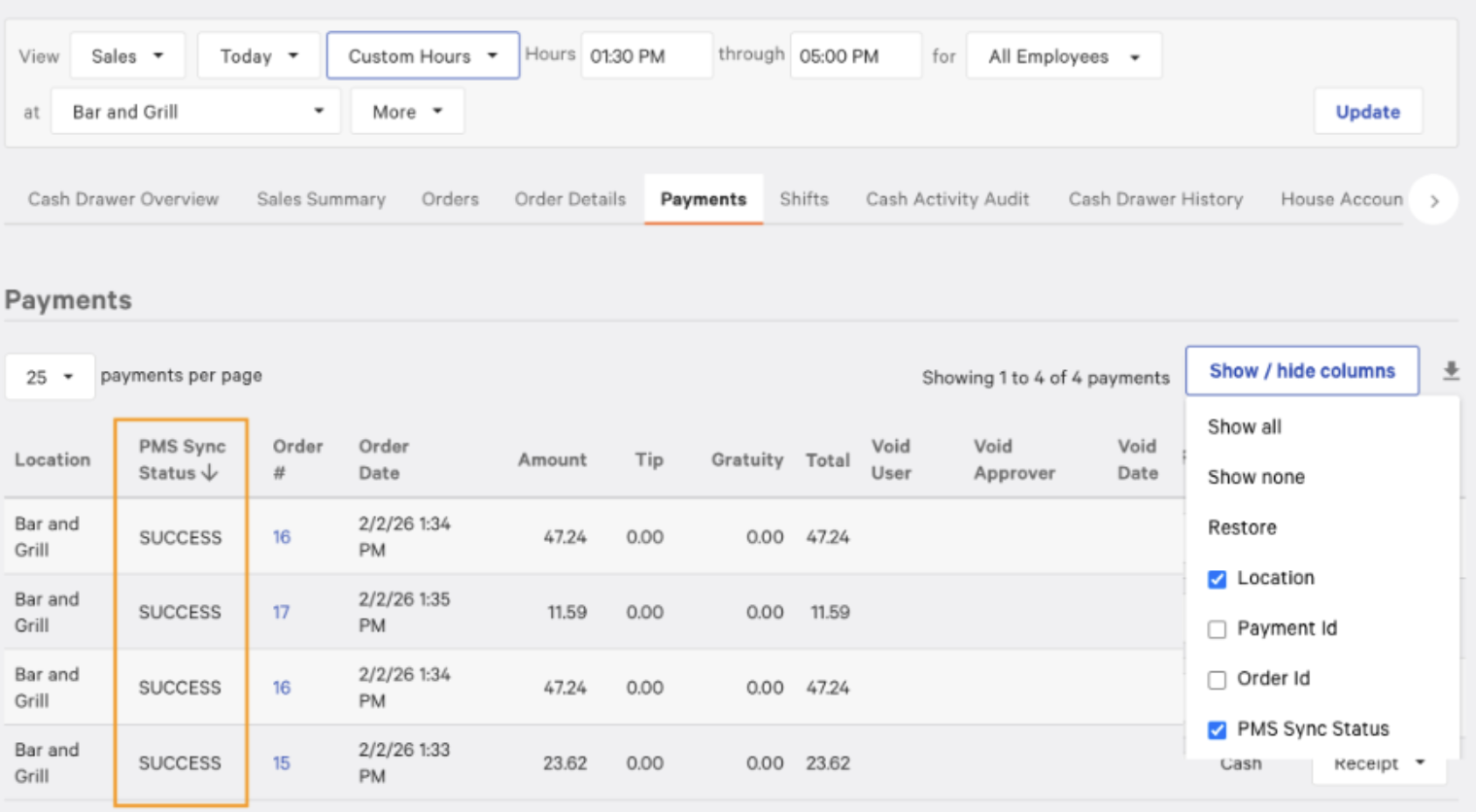
PMS Sync Status is best used during daily reconciliation between Toast and your hotel PMS, as well as when troubleshooting payment discrepancies between your POS and PMS providers. This helps you resolve issues before they impact guest experience or reporting accuracy.
To access the PMS sync column in your Payments report:
- In , navigate to Reports > Payments.
- Select the Show/hide columns dropdown.
- Select the checkbox next to PMS Sync Status to display the column.
Note: If you manage multiple hotel restaurant or bar outlets, you'll want to filter by location while viewing the Payments report.
This column will show the PMS sync result for each individual payment transaction with a status value of success, pending, or failed.
- Success: The payment was posted successfully to the hotel PMS.
- Pending: The payment was initiated, but the PMS sync did not complete. This typically indicates the sync was interrupted before Toast received a final result. Review the payment details and confirm whether the charge appears in the hotel PMS. If the status remains PENDING, contact Toast Support for further assistance.
- Failed: The payment did not post to the hotel PMS. Review the transaction details and take follow-up action as needed.
It is important to check the Payments Report daily to catch failed PMS syncs early. You can also use the payment report’s summary view to identify patterns or recurring sync failures. Contact Toast Support for assistance if you see repeated FAILED statuses for specific order types or time periods.