Identify and Use Menu, Group, and Item Versions
Last updated: Sep 16, 2026, 2:28 PM
Question
- How can I tell if a menu, menu group, or item has been versioned?
- Why might it be useful to use different versions of my menu entities?
- How do I determine if a menu, menu group, or item has been versioned?
Answer
Here are some ways to identify menus, menu groups, or items that have been versioned:
- With Toast Multiliocation Management (MLM), an icon will be present to indicate when there are multiple versions of an entity, as shown below. This icon can be used to open other versions of the menu, menu group, or item, should you wish to use a different version as a starting point for creating more location-specific versions.
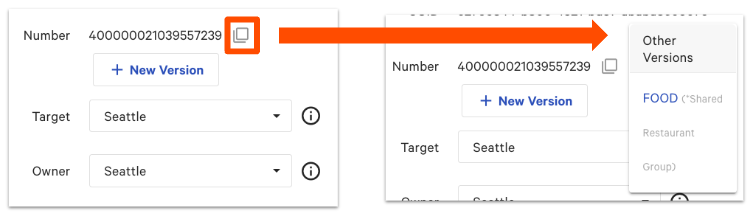
- You can also see menu version information on the Advanced properties page:
-
- In Toast Web, navigate to Menus > Bulk management > Advanced properties.
- Open theShow/Hide drop-down and make sure that Number is selected.
-
-
- If a portion of a menu or other configuration is versioned, the reference numbers will be identical. When viewed along with Target and Owner fields, you'll be able to easily discern which parts of your menu or other configurations are version:
-

-
-
- How might you use menu versions? Let's say there's a group of multiple locations but with minor regional differences in their menus (e.g., slight ingredient variations, menu item price, etc.). If a new location is opened and added to the group, it would be easier to start with the menu, menu group, or item from a similar location, compared to modeling it after the core business with no variations to the menu, menu group, or item versions.
-