Assign Online Orders to a Specific Employee
Last updated: Sep 17, 2026, 10:23 AM
Question
How do I assign online orders to a specific employee?
Answer
You can adjust a setting in the Server Selection Options section to assign online orders to people instead of a specific device.
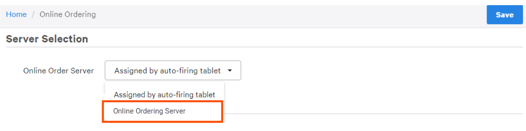
We suggest setting up a generic "Online Ordering" employee to be used specifically for online orders and selecting it as the Online Order Server. This will automatically assign this server to all online orders, regardless of who logs into the auto-firing device. If you rely on server assignment for tip tracking or reporting, this will ensure that online orders (including those from third-party integrations like DoorDash, Grubhub, and Uber Eats) will be consistently assigned to one profile instead of servers or kitchen staff. Check out our article on Add and Manage Employees in Toast Web to learn how to set up employees.
Note: You can only select one profile as the default Online Order Server.
- To assign Online Orders to a specific server, log in to Toast Web and navigate to Takeout & delivery > Online Ordering.
- Scroll down to Server Selection and select a server from the Online Order Server drop-down.
- Save and publish your changes.
Additional Information
- For information on how to redirect online ordering tips, please see Redirect Online Ordering Tips.