Gift Card Liability Without the Toast Gift Card Module
Last updated: Sep 17, 2026, 6:36 PM
- Gift Card Liability Overview
- Gift Card Reporting
- Recommended Gift Card Redemption Method
- Track Sales Made with Gift Card Payments
- Multi-Location Gift Card Tracking
Gift Card Liability Overview
When your Toast Gift Card module is deactivated, your restaurant will no longer be able to sell or activate new gift cards, and the functionality to redeem existing gift cards will no longer be available.
If you have outstanding gift card balances when your Toast Gift Card access is removed, your restaurant is still liable for those past purchases. If you do not import existing gift card balances into a different system, you must manually keep track of balances and redemptions.
The following sections will help you manage the process.
Back to top
Gift Card Reporting
You can find a report of all of your gift cards in Toast Web:
- From the home page, navigate to Reports > Payments > Gift card balances.
- From here, you can view gift card balance information. If you do not have any gift cards, the report will not load.
Recommended Gift Card Redemption Method
Once Toast's Gift Card Module is turned off, you must manually manage all gift card redemptions. Note that at this point, your guests cannot redeem their gift cards on Toast's Online Ordering system.
To manually support Toast Gift Cards, you will need to create a payment option in order to close out open checks where guests plan on redeeming a gift card.
Create a Payment Option
To create a payment option. Follow the steps below:
- In Toast Web, navigate to the Finance > Related > Settings > Other payment options
- Select +Add in the Other Payment Options section.
- Create your new payment option by completing the following information. Note: While some settings in the Other Payment Options section should be set up as seen below, other settings you see on this page are optional and can be changed based on your preference.
- Name: Label your payment option with a name that will indicate it is a payment option for gift cards, we recommend naming the payment option Gift Card.
- Treat as a Discount: Since this will be used as a form of payment, select No for Treat as a Discount.
- Tax Exempt: Gift cards do not exempt an order from being taxable so leave Tax Exempt set as No.
Use the New Payment Option to Redeem a Gift Card in POS
If a guest would like to redeem their balance on a gift card purchased via the Toast Gift Card module, you will need to use the new Payment Option created in order to close the check. Follow these steps:
STEP ONE - Confirm and adjust the gift card balance.
- Use the gift card balance report to confirm the gift card and its balance.
- Manually adjust the balance accordingly, depending on how much of the gift card your guest will be using. Note: If you are a multi-location establishment, you must keep track of locations where gift cards are purchased vs. redeemed.
STEP TWO - Close the check in the POS.
Now that the balance has been confirmed and manually adjusted, it is time to apply the payment to the guest's check.
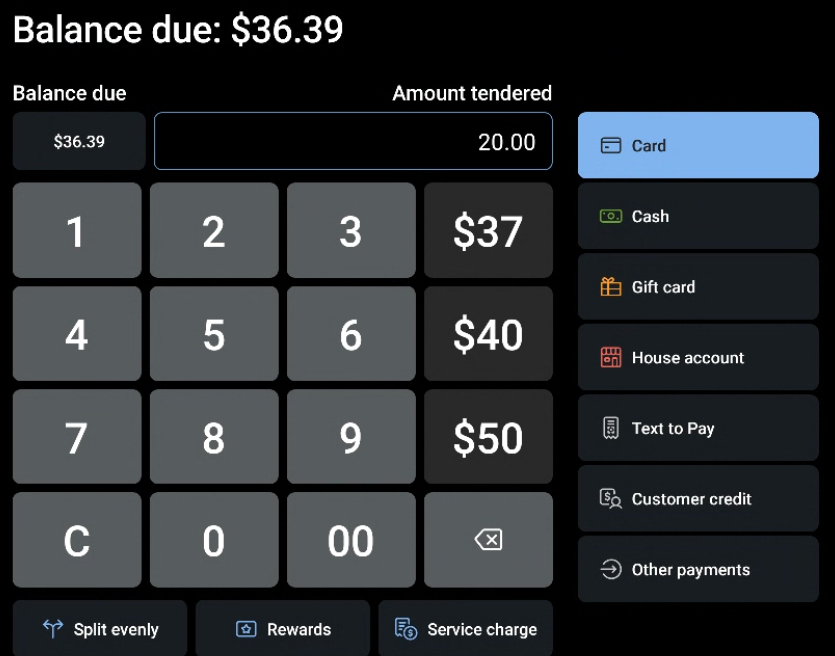
- From the payment screen, indicate how much the payment is worth in the Amount Tendered section. In this example, the gift card was adjusted by $5.00, as that is the remaining balance on the card.
- Next, select Gift Card from the payment options on the right side of the screen.
- Select the new payment option you set up to redeem gift cards.
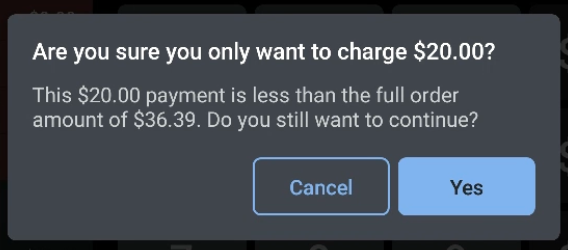
- If applicable, confirm the partial payment in the next screen by selecting Yes.
- The partial payment now appears on the Payment Screen. Other forms of payment can be applied to cover any remaining balance.
Track Sales Made with Gift Card Payments
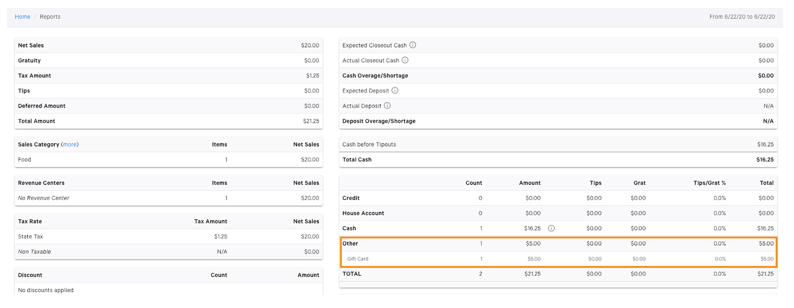
In order to track sales using alternative methods for redeeming and honoring gift cards, these payments will also appear in a new section of the Sales Summary Report.
In the payment breakdown section, you will find these payments tracked in the Other category as seen below.
Multi-Location Gift Card Tracking
With the Toast Gift Card module, Toast will automatically track and highlight instances where a gift card is purchased at one location but redeemed at another. When your Toast Gift Card module is deactivated, tracking on inter-location gift card liability will become manual. For financial record-keeping purposes, we recommend tracking shifts in liability. Details such as where the card was initially purchased compared to where the card is ultimately redeemed should be tracked closely to ensure your restaurant's records are up-to-date according to your local regulations.