Error Screens on Your Kiosk, Toast Go® Handheld, or Terminal
Last updated: Sep 17, 2026, 7:12 PM
- Troubleshoot "Excuse us for a moment" Error Screen on Elo Terminal or Kiosk
- Troubleshoot "The content has failed to load on this device" Error Screen on Kiosk
- Troubleshoot Elo View Screen on Elo V2
- Blue Error Screen on Toast Go®
- "Storage emulated" Error Screen
- Troubleshoot Login Issues
- "Submit Error Report" Error Screen
- Troubleshoot "The device is not initialized" Error Screen
Troubleshoot "Excuse us for a moment" Error Screen on Elo Terminal or Kiosk
If you encounter the screen below on either your Elo terminal or Kiosk, it means that you're stuck in what we call "Elo view." This will only occur on an Elo device.

If your device is an Elo terminal, follow these steps:
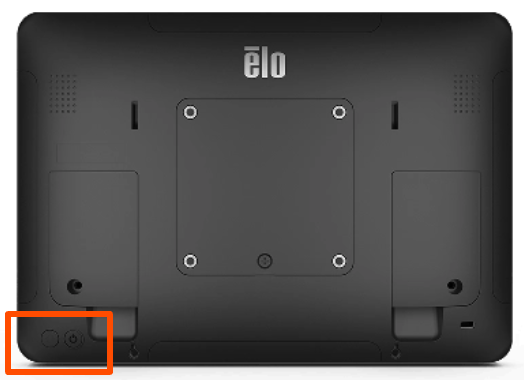
- Hold down the power and home buttons at the same time. These are located on the back of your device. Make sure to not hold the buttons down for too long, otherwise it might start the factory reset process.
- A screen will show up asking for a password. If you have an Elo V2, or V3, enter 1elo (it may also be elo1). If you have an Elo V4, enter toastunlock401park.
- Select Ok.
- Navigate home.
- On the screen, tap on the empty white space 5 times.
- Select Android Home.
- After the terminal successfully loads into the traditional Android home screen, proceed to install the Toast app.
- Go to Settings and then Security & Privacy.
- Enable Install from unknown sources.
- In the browser, go to toasttab.com/link/apk and download the installation file.
- If you continue to see the same error screen, or if these steps don't work, please call Customer Care for assistance.
- Confirm that your Kiosk has an active ethernet (hard-wired) connection to your network.
- Once confirmed, power cycle your device:
- Locate the power button at the bottom of your device (use the image at the top of this article for reference).
- Hold the power button down for approximately 10-15 seconds.
- Select Power Off.
- Select Ok.
- If the error screen continues to appear, please call Customer Care for assistance.
Troubleshoot "The content has failed to load on this device" Error Screen on Kiosk
The blue screen below that says "The content has failed to load on this device" will only appear on a Kiosk (Elo or Flex).
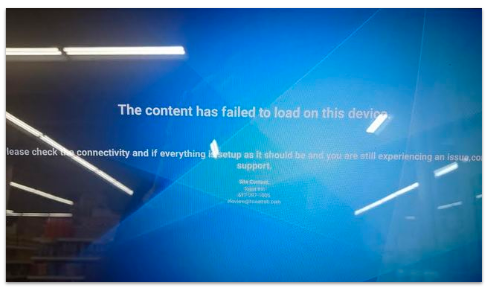
Follow these steps to try and get the Kiosk to start up normally:
- Unplug the power cable from the tablet.
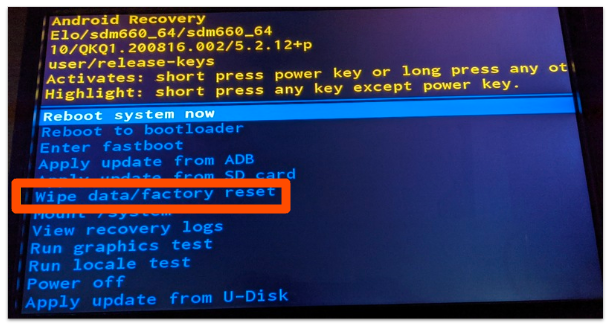
- Hold down the Home button on the back of the tablet while replugging the power cable in until Android recovery mode appears.
- Follow the on-screen instructions to select "Wipe data/factory reset" (or similarly worded "factory reset" option).
If this doesn't resolve the issue, please call Customer Care so they can assist in further troubleshooting.
Troubleshoot Elo View Screen on Elo V2
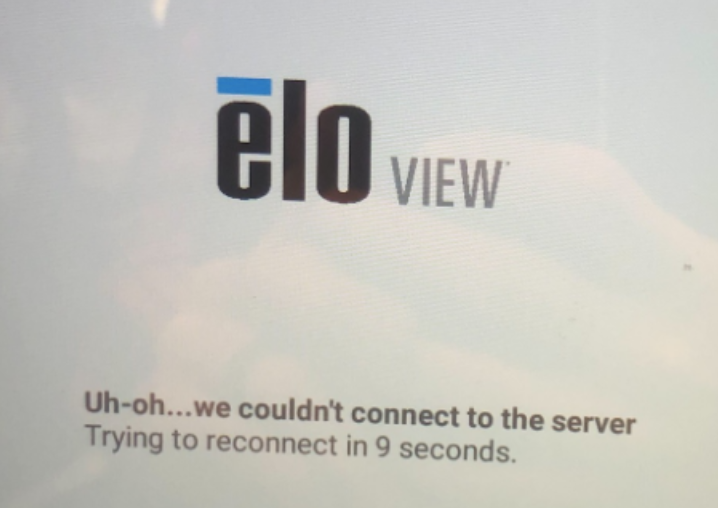
Try these troubleshooting steps if you see an Elo View screen that says "Uh-oh... we couldn't connect to the server. Trying to reconnect..."
- Make sure your router is functioning properly and is set up and connected to Toast's secured network.
- Next, confirm that the Firewall Allow List has all Toast domains enabled, including the following Elo domains.
Blue Error Screen on Toast Go®
The blue error screen means the Toast Go® has encountered a device failure. Toast recommends calling Customer Care so they can factory reset your device and take any other necessary steps.
"Storage emulated" Error Screen
This error points to an issue with physical device storage and can be resolved with a factory reset. Please reach out to Toast Customer Care for assistance with a factory reset of your device.
Troubleshoot Login Issues
If you're having trouble logging in to the Toast Web app on your device, try following the instructions in this Support Center article: Log In to Toast on Your POS Device.
Back to top
"Submit Error Report" Error Screen
If your screen goes white and displays a "Submit Error Report" message when starting a tab, closing out a transaction, or attempting some other action, it may be due to a networking issue. Try following the troubleshooting steps in this Support Center article, Verify Your Internet Connection.
Troubleshoot "The device is not initialized" Error Screen
- Navigate to Settings.
- Navigate to Apps.
- Select Toast POS.
- Clear Cache.
- Clear Data.
- Force-stop the Toast POS app.
- Relaunch Toast POS.