Configure Modifier Prep Times
Last updated: Sep 17, 2026, 8:06 PM
- Integral vs. Independent Modifiers
- Configure Prep Times for Integral Modifiers
- Configure Prep Times for Independent Modifiers
Note: Modifier prep times cannot be configured for pre-modifiers.
Integral vs Independent Modifiers
There are two ways Toast uses a modifier's prep time:
Integral modifier - A modifier that is necessary when completing an item. Toast sums up the prep times set for the modifiers and the item. For example: A burger might be usually cooked medium at your restaurant, so you set the prep time for the item to 460 seconds. To accommodate guests who might want their burger cooked to other temperatures, you create a modifier group called "Meat Temperature Options" with the following modifiers:
- Medium: 0
- Rare: -60 (since it takes less time to cook a rare burger than a medium)
- Well Done: 120 (since it takes more time to cook a well done burger than a medium)
Since the KDS will sum up the prep time of the item and modifiers, a rare burger will take 400 seconds, well done burgers will take 580 seconds, and a medium burger will take 460 seconds.
Independent modifier - A modifier that is usually prepared separately from its item. The modifier prep time set for independent modifiers is scheduled and fired independently on its own ticket. For example: At your restaurant, you offer several salad options and sides with your entrees, including a Caesar salad prepared tableside and a garden salad prepared in the kitchen. By defining different prep times for each salad, you can make sure that all side salad orders will be served at the same time to your guest.
Note: You must enable the fire by item prep time feature in order to use modifier prep times. Check out this Support Center article to learn more: Configure Item Fire by Prep Time.
Back to top
Configure Prep Times for Integral Modifiers
To configure prep times for integral modifiers, follow these steps:
- In Toast Web, navigate to Menus > Bulk management > Advanced properties.
- Using the Show/Hide drop-down on the top right, select Prep Time.
- Use the arrow (>) icons to expand your menus until you find the modifiers you'd like to configure.
- In the Prep Time column, enter the number of seconds that a modifier adds to or subtracts from the item prep time. To reduce the item prep time, enter in a - (negative) in front of the time (e.g. -60). If the total prep time for an item and its modifiers is negative, the system will read it as 0 seconds which fires last in every order or course.
- Save and publish your changes.
Configure Prep Times for Independent Modifiers
In order to implement prep times for independent modifiers, you must use course firing at your restaurant and specify a course for the item and modifier. To learn more, see this Support Center article: Manage Course Firing Options.
- In Toast Web, navigate to Kitchen > Pacing > Meal pacing.
- Ensure that Enable course pacing is selected for the Course Pacing setting.
- For the Modifier Course Firing setting, select Fire modifier to its configured course.
- Save your changes.
- Navigate to the menu item with the modifiers you're setting the prep times for.
- Scroll down to the Preparation section of the item details page, and select No, specify course here for the Inherit Course from Menu Group? setting.
- The Course setting will appear. Select your desired course.
- Save your changes.
- Navigate back to advanced properties (Menus > Bulk management > Advanced properties).
- Using the Show/Hide drop-down on the top right, select Prep Time and Course.
- Use the arrow (>) icons to expand your menus until you find the modifiers you'd like to configure.
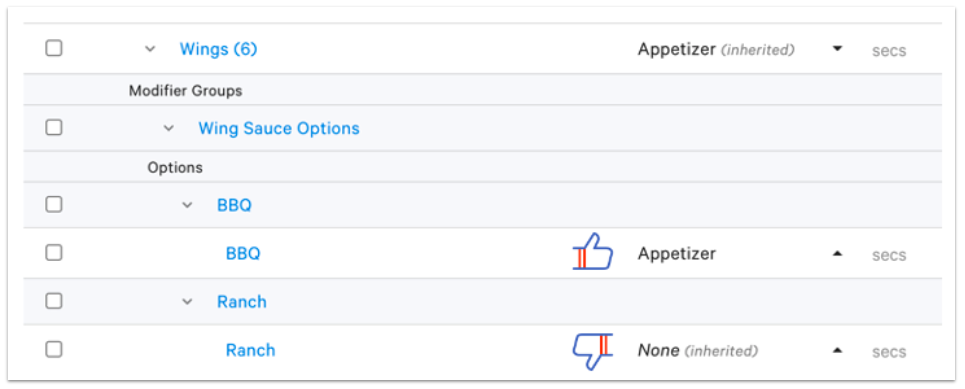
- Check to make sure that the Course for the modifier is not inherited from the menu item. It can be the same as the item course or different, however the course cannot be left as inherited.
- If the modifier group is used by more than one menu item, all of those menu items must be configured to specify a course, and not inherit it.
- In the Prep Time column, enter the number of seconds a modifier takes to prepare.
- Save and publish your changes.