POS Payment Status Tags
Last updated: Apr 22, 2026, 6:35 PM
Question
- What does "backgrounded payment" mean?
- What are the different payment statuses that can appear on a check?
Answer
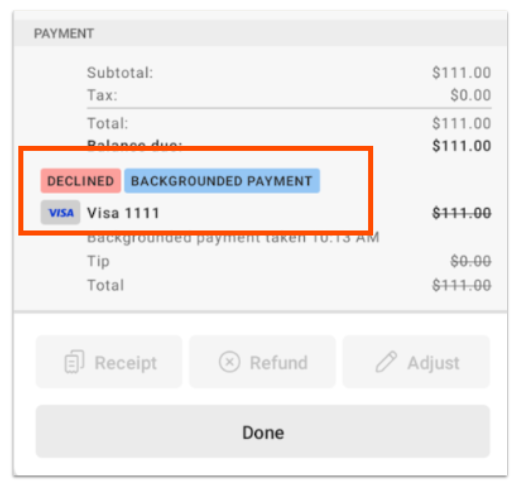
The following tags may be displayed on the POS, on top of a check's payment method, as shown below:
| Tag | Description |
| Voiding | A payment is actively being voided. This means the payment was authorized, but is being canceled prior to capture, and the cardholder will not be charged. |
| Refunded | A payment was authorized and captured successfully, then returned to the cardholder. |
| Authorized | A payment was submitted and is expected to process when captured. No further action is needed. |
| Captured | A payment has been successfully processed, and is expected to settle with the merchant. |
| Backgrounded payment | A card payment was attempted while offline and the check was closed. However, when the Toast POS device reconnected to the network, the payment was declined. Checks with this tag are moved from closed status to open status once the device is back online. |
| Declined | The guest's card was not processed successfully (What can I do if a guest's card is declined?). For payments stored in the background during offline mode, the card payment used while offline was declined after your Toast POS device reconnected. |
| Yellow "pending" | A yellow "pending" tag indicates the payment is queued for payment processing. While payments are pending, do not:
Taking either of these actions can result in losing pending payments. Lost payments cannot be recovered. If your Toast POS device doesn't have Internet connectivity, attempt to reconnect your Toast POS device to your network as soon as possible. |
| Red "pending" | A red "pending" tag indicates the payment was queued for processing, but payments are now paused. To resolve, refer to the red banner at the top of the Toast POS device. Paused card payments must be resolved before continuing to process a pending payment. While payments are pending, do not:
Taking either of these actions can result in losing pending payments. Lost payments cannot be recovered. If your Toast POS device doesn't have internet connectivity, attempt to reconnect your Toast POS device to your network as soon as possible (Outages and Disruptions: Troubleshoot Internet or Network Connection Issues). |