Configure Toast Mobile Order & Pay® Printer Routing
Last updated: Sep 17, 2026, 7:04 PM
Printer Routing by Service Area for Toast Mobile Order & Pay
Wondering how to send orders from your QR menus to different printers at your restaurant? If you use Toast Mobile Order & Pay® in your restaurant but want to divert tickets to different prep stations based on where the guest is seated, you can use item routing.
First, please ensure your menu items are routed to a prep station before being forwarded to another. For example, if your restaurant has two bars, one for the inside and one for your outdoor patio, you will first need to ensure your drink menu is assigned to the inside bar prep station in Advanced Properties. Then, when orders are placed outside, you can forward those drink items sent from the inside bar prep station to the patio prep station.
For a refresher on assigning prep stations to parts of your menu, check out Prep Stations Basics.
Once you've ensured that your desired menu is already assigned to a prep station, you can proceed with the following steps to set up item routing based on the service area.
Configure Item Routing by Service Area in Toast Web
- Log in to Toast Web and navigate to Kitchen > Kitchen stations > Item routing.
- Enter the Rule Name to define the prep station routing. We recommend entering the name of your selected Service Area here.
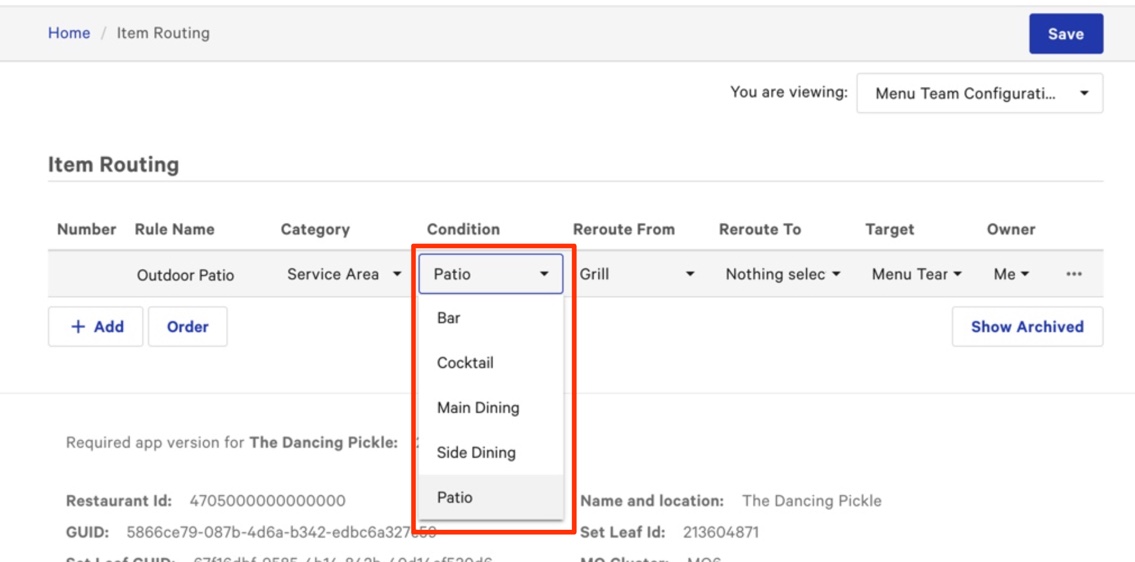
- In the Category dropdown, select Service Area.
- In the Condition dropdown, choose the configured Service Area to trigger the reroute.
- Choose the Reroute From prep station. By default, the tickets are routed to this station. Only one selection can be made from the Reroute From dropdown.
- Choose the Reroute To prep station. This is the prep station to which tickets will be routed if the order is placed in the selected service area (the condition).
- Note: If you have multiple prep stations, you must create a new rule to reroute each to the service area's prep station. For example, if you have a Drinks, Raw Bar, and Grill/Fry prep station, you must create a new rule for each: Outdoor Patio - Drinks, Outdoor Patio - Raw Bar, Outdoor Patio - Grill/Fry.
- Save and publish your changes.