Configure Modifier Behavior
Last updated: Sep 17, 2026, 8:15 PM
Configure Modifier Behavior
Video overview of how to adjust modifier behavior in Toast Web.
As you start creating modifier groups for either individual items or menu groups, you'll notice that you have the ability to make a modifier group either required, optional, force show, or optional.
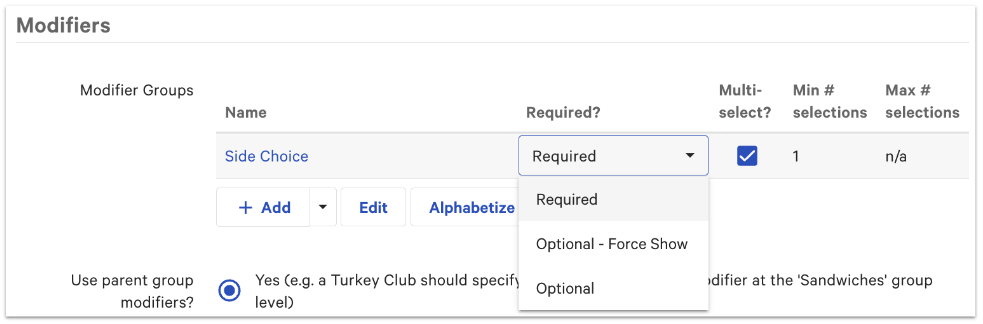
Let's outline what each one of these options means:
| Option | Definition | When would I use this? |
| Required | Staff and/or guests must make a selection and they won't be able to send this item to the kitchen without a modifier selection. |
|
| Optional - force show | This modifier group is optional and will automatically show when the item is added to a check. A selection is not needed or required though, and staff and/or guests will be able to skip over if they'd like to. |
|
| Optional | This modifier group is optional and will not automatically show when the item is added to a check. Instead, the staff member or guest will need to select the modifier group for it to show and to enter any modifiers. |
The option selected will impact whether you'll need to set a minimum number of selections for the modifier group. If you've selected optional or optional - force show, the option to set a minimum will not appear since staff members and guests don't have to choose any modifiers from this group. You'll only be able to set a minimum number of selections for modifier groups that are set to required.
To see some examples of the maximum and minimum number of modifiers and when they could be used, check out this Support Center article: Set Up and Use Multiple Modifier Selection.
Once you've selected whether your modifier group will be set as required or optional, it will show up and act differently on your POS, and in your Toast Online Ordering or Toast Mobile Order & Pay® pages. Check out the examples in the next sections of this article.
Modifier Behavior on Your Menus
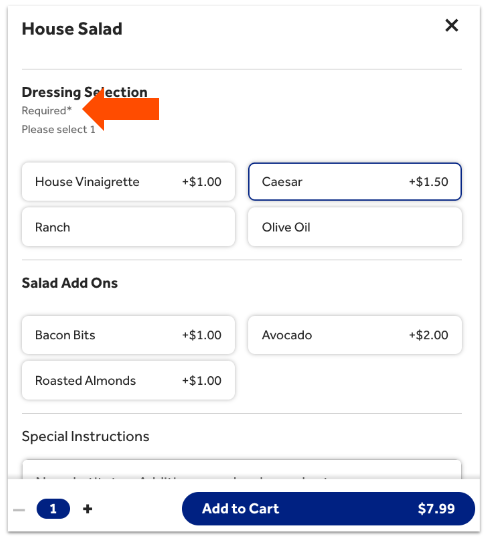
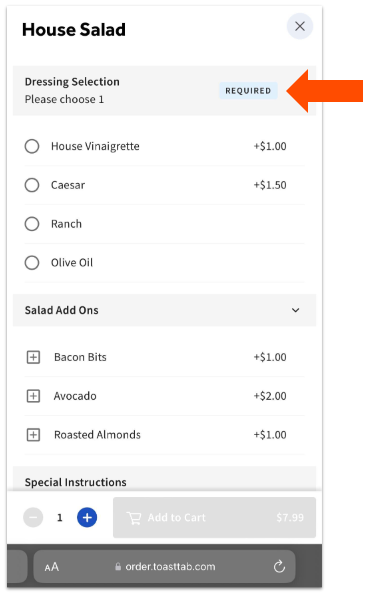
The following screenshots show how different modifier group behaviors will appear on your different menu channels. If a modifier group is not visible on a specific channel, guests and staff will not be able to see it and it will be missing from orders placed on that channel, even if it is marked as required. Learn more in our platform guide: Required modifiers and visibility settings.
Modifier Behavior on Your POS
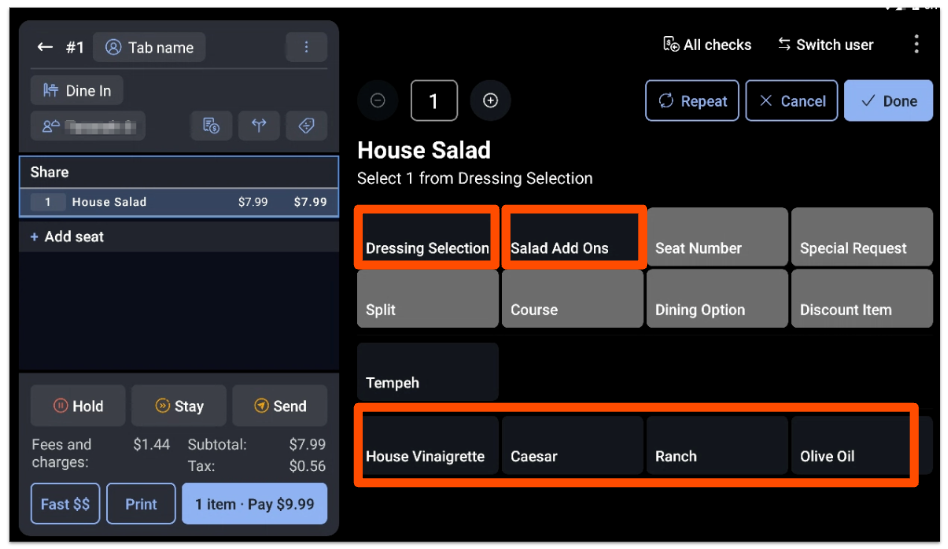
In this example, you'll notice that staff must select a dressing (set to required) before they can add the item to the order, but the Salad Add Ons modifier group is set to optional, and staff need to select the button in order to view the modifier options.
Modifier Behavior on Toast Online Ordering
Modifier Behavior on Toast Mobile Order & Pay™
Modifier Group Visibility
If a modifier group is not visible on a channel:
- A modifier selection will not be required when ordered through that channel.
- The order will succeed without a modifier selection from the required modifier group.
If a required modifier group is visible on a channel:
- A modifier selection will be required when ordering through that channel.
- The order will succeed only when a modifier from the required group has been selected.
- The order will fail if a modifier from the group has not been selected.
Your modifiers and modifier groups will show up in each channel based on the settings configured in UI options. To learn more, check out this Support Center article: Configure Modifier Display Options.