Set Up Curbside Pickup for Online and Call-In Orders
Last updated: Sep 17, 2026, 7:11 PM
Use this quick-start guide to set up and start using curbside pickup for online and call-in orders in your restaurant.
- Curbside Pickup Overview
- Create a Curbside Pickup Dining Option
- Enable Curbside Pickup for Online Orders
- Enable Arrival Notification Texts and Printed Alerts
- Place an Order Online for Curbside Pickup
- Take a Call-In Curbside Pickup Order
Curbside Pickup Overview
Offer your guests a safe and convenient order pickup experience by delivering meals directly to their vehicles. This dining option prompts for guest's make, model, and color of the vehicle during the ordering process, so the information can be displayed on the order screen or on a printed receipt for your staff to use.
This article will cover all of the steps you need to take to use this feature, including:
- Creating a curbside pickup dining option
- Enabling curbside pickup for online orders (optional)
- Enabling arrival notification texts for guests and printed alerts for your staff (optional)
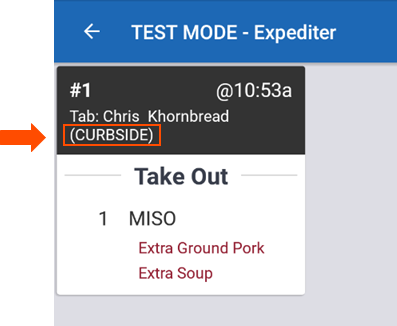
If your restaurant uses a Kitchen Display System (KDS), curbside orders will show with "(CURBSIDE)" in the ticket header.
Create a Curbside Pickup Dining Option
- In Toast Web, navigate to the Kitchen > Dining options > Dining options.
- Make sure that you already have a takeout dining option created. Curbside pickup cannot be the only dining option enabled in your restaurant.
- Select + Add to create a new dining option. Alternatively, if you'd like to change the behavior of an existing dining option, skip to step 5.
- Enter Curbside Pickup in the Name field.
- Select Curbside from the Behavior drop-down menu.
- Select Save and Publish Now to finalize your changes.
Note: If you already have a curbside dining option configured using the Takeout behavior, it will be treated as a takeout order and will not prompt guests for vehicle information or arrival notifications.
Enable Curbside Pickup for Online Orders
Once a dining option with curbside pickup behavior has been created, you'll need to select that dining option within your online ordering settings.
- In Toast Web, navigate to Takeout & delivery > Availability > Online Ordering.
- Scroll to the Dining Options section and select the drop-down menu next to Curbside Option. Choose a dining option from the list with curbside pickup behavior.
- Optional: Select Add instructions to enter a custom message for guests placing orders for curbside pickup. For example, this can be a reminder to call the restaurant upon arrival or to open the trunk of your car for a contactless delivery to your vehicle.
- Select Save and Publish Now to finalize your changes.
Enable Arrival Notification Texts and Printed Alerts for Curbside Pickup
Arrival notifications allow you to send guests check-in instructions via text and give them a contactless way to notify you once they arrive at the restaurant. To enable this feature, follow these steps:
- In Toast Web, navigate to the Takeout & delivery > Availability > Takeout/delivery.
- For the Curbside Pickup SMS setting, select Yes.
- Choose whether you want to use our standard Guest check-in SMS message or enter a custom text message for your guests.
- Then, choose our standard Check in confirmation page or enter custom instructions for your guests to receive their orders.
- For the Printed alerts setting, select the printer you want to use to print the curbside check-in alert ticket. If no printer is selected, arrival tickets will print at the auto-firing device's receipt printer.
- Save and publish your changes.
Once a guest has arrived to pick up their order and checked in, a guest check-in ticket will print at the printer selected above.
Place an Order Online for Curbside Pickup
This is the process a guest will take when placing an online order for curbside pickup:
- In the Curbside Pickup section of the online ordering page, guests will see a checkbox that says "Bring my order to my car."
- Guests will enter their vehicle's information (make/model and color) and proceed to submit their order online.
- After placing the order, guests will be shown a curbside pickup confirmation which indicates when the order will be ready and displays any check-in instructions you have configured.
- Upon arrival, the guest will call the restaurant.
- A restaurant employee will then use the information entered during checkout to identify the correct vehicle and deliver the order.
Take a Call-In Curbside Pickup Order
| When collecting guest information, it's important to comply with all privacy, regulatory, and phone carrier requirements. Toast expects all merchants to comply with all applicable federal, state, provincial, local, and foreign laws, rules, regulations, regulatory guidance, and industry best practices. As such, Toast requires that its merchants train all staff to obtain appropriate customer consent when collecting a phone number for the purposes of sending order-ready messaging. The below text must be read before any guest provides a phone number for the purposes of order status messages powered by Toast: |
- After entering the guest's order on the Quick Order screen, select the Dining Option button in the check details.
- Change the dining option to Curbside Pickup.
- Enter the guest's First Name, Last Name, Phone Number, Car Make / Model, and Color, along with any additional instructions or notes.
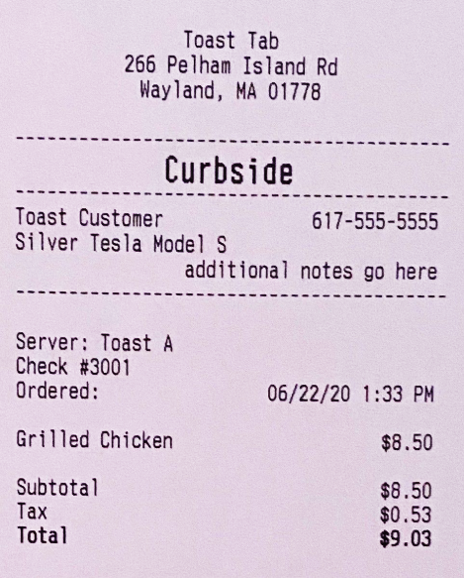
- This vehicle information can then be viewed at the top of the order screen or on the printed takeout receipt for staff to use when delivering the meal to the guest.