Join the Toast Community
Last updated: Sep 17, 2026, 5:32 PM
Want to meet restaurateurs who are eager to learn how to optimize their business, delight their guests, do what they love, and thrive? Sign up for the Toast Community today to connect with the Toast restaurant community.
You can access the Toast Community here.
The Toast Community is open to all restaurant operators who are actively using Toast.
Note: You must log in with your Toast Web login credentials to access the Toast Community.
- Toast Community Overview
- Benefits of Signing Up
- Access the Toast Community
- Engage With the Toast Community
- Frequently Asked Questions
Toast Community Overview
The Toast Community is a dedicated forum for restaurant operators across the country to share resources, best practices, and dining trends, all while creating meaningful relationships with other passionate industry members. Customers like you can also hear from and engage with Toast product experts in forum discussions, "Ask Me Anything" events, and more.
Benefits of Signing Up
- Connect to all things Toast: Access the Community with your Toast Web credentials and easily search the Support Center knowledge base directly within the Community.
- Engage with like-minded restaurateurs: Connect and contribute to conversations related to guest experience, restaurant operations, industry trends, and more!
- Hear the latest from the Toast Team: Hear from us regularly with helpful tips for growing and managing your business.
- Be rewarded for your contributions: Reach superuser status and unlock new community privileges.
Access the Toast Community
Follow these instructions to access the Toast Community:
- Navigate to community.toasttab.com and select the Login button at the top right-hand corner.
- Log in with your Toast Web (back-end) login credentials.
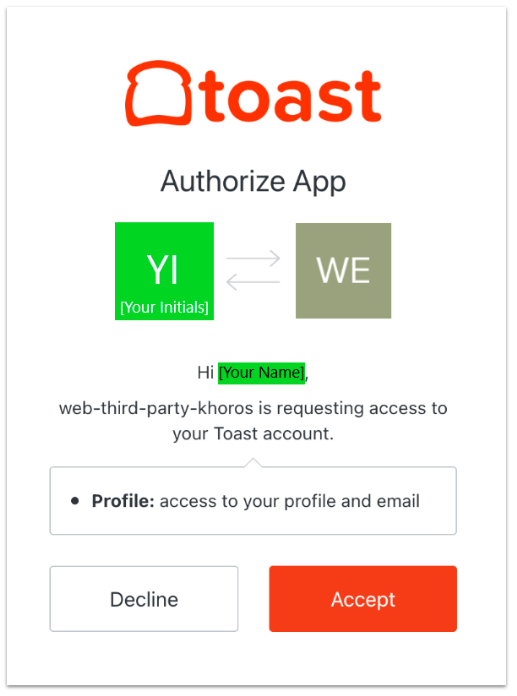
- You’ll see an Authorize App notification from Khoros -- Toast's third-party community platform -- asking for permission to link your Toast Community account to your Toast Web account. Khoros will not be able to manage or control any part of your restaurant and is only used for accessing the Toast Community.
- Register by creating a username to complete your profile.
Once you’ve registered in the community, please visit the Community Guidelines to learn how to interact in the community. You can also introduce yourself and your restaurant in the Introductions thread!
Note: These links will only work once you’ve registered with and logged into the community!
Engaging in the Toast Community
There are multiple ways to engage once you're in the Toast Community.
Community Discussion Board
You can start a conversation on a community discussion board. Engage in open, peer-to-peer discussions with access to thousands of restaurateurs in one of our four community discussion boards related to running a successful restaurant. These discussion boards include:
- Guest Experience
- Restaurant Operations
- Back Office & Team
- Industry Trends
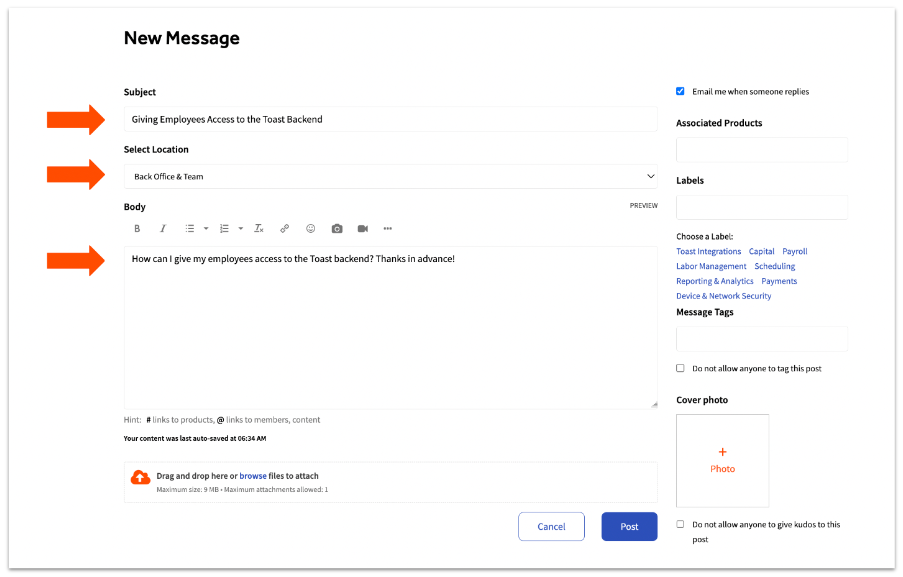
Once you've selected a Community Board, follow these instructions to make a post.
- Add a Subject.
- Select the Location (e.g. Back Office & Team discussion board).
- Choose a Label on the right side.
- Share your question, best practice, or success story.
- Optional: Add a photo or enter tags about your post.
- Select Post.
Restaurant Group Hub
Looking to connect with other bakery owners? Curious how other pizzerias configured their menu? Join a restaurant group to participate in conversations with like-minded restaurateurs.
Below is the list of Restaurant Groups you can join to share best practices and discuss anything you'd like related to your restaurant type:
- Fine Dining
- Fast Casual
- Casual Dining
- Cafe Bakery
- Pizzeria
- Bar & Nightclub
- Hotel Restaurants
- Enterprise & Multi-Unit Operator
Frequently Asked Questions
Do I need to create an account?
No, you will not need to create an account for Community. You’ll be prompted to create a username and can sign in using your Toast Web credentials.
How do I get access to a Toast Web account?
If you don’t have a Toast Web account, please work with someone from your restaurant with Toast admin access.
Will my information be private?
Yes, all of your posts in the Community Hub and discussion forums are gated and only accessible to Toast customers.
Can I post anonymously?
At this time, customers are unable to share anonymous posts.