Toast Payroll: Employee Enrollment in SimplyInsured Benefits
Last updated: Apr 8, 2026, 10:21 AM
Question
How can an employee register for health benefits once they are eligible via SimplyInsured in Toast Payroll Pro?
Answer
| This article only applies to companies who are using the SimplyInsured health coverage model. If you're unsure if your company uses this model or if you're eligible, check with your employer. |
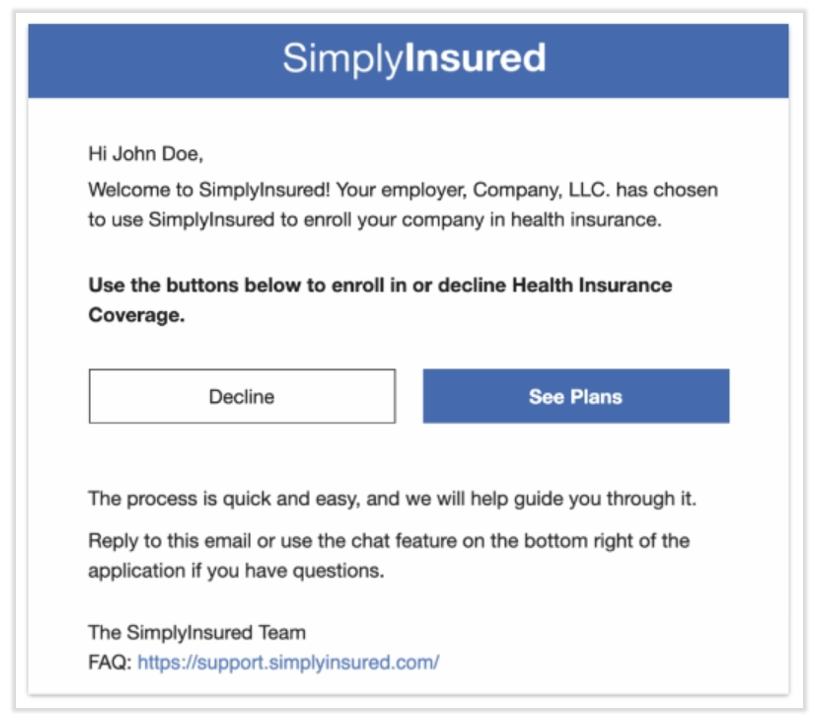
- You may receive an email from SimplyInsured.
- Your employer will determine your eligibility.
- The email will be sent to the email on-file on your Toast Payroll profile.
- The email will be sent from toastsupport@simplyinsured.com.
- Open the email and select See Plans or Decline. Note: Toast Payroll cannot advise on which option you should pick.
- Both buttons will take you to the SimplyInsured platform where you can log in with your Toast email address and password.
- Decline: If you'd like to decline some or all health coverage, you must still complete each of the steps SimplyInsured presents to you
- See Plans: SimplyInsured will guide you through four steps, including Basic Information, Choose Plan, Additional Information, and Signature. The video in What Does The Employee Application Look Like Through Toast Payroll? (external link) guides you through each of these steps.
- If you'd like to cancel your health coverage at any time, this is done through the employee SimplyInsured portal. Use the same email and password you used above.
Insurance policies available through Ten 250 Corporation, dba SimplyInsured, pursuant to its licenses. Neither Toast, Inc., nor any of its affiliates or subsidiaries, sells or underwrites insurance. However, Toast Insurance Services, Inc. (“TIS”) maintains various insurance licenses and may receive compensation in connection with policies purchased through SimplyInsured. Not all applicants may qualify. Coverage examples are for illustrative purposes only. Your policy documents govern, terms & exclusions apply.
This content is for informational purposes and is not intended as legal, tax, HR, or any other professional advice. Please contact an attorney or other professional for advice.