Toast Payroll: Manage Payroll Taxes
Last updated: Oct 9, 2026, 1:57 PM
The Tax Center is Toast Payroll's hub to manage payroll taxes, resolve filing tasks before quarterly deadlines, and access W-2s at year-end.
- About the Tax Center
- Quarterly Tax Filing Alert
- Tax Center Overview
- Resolve Tasks in the Tax Center
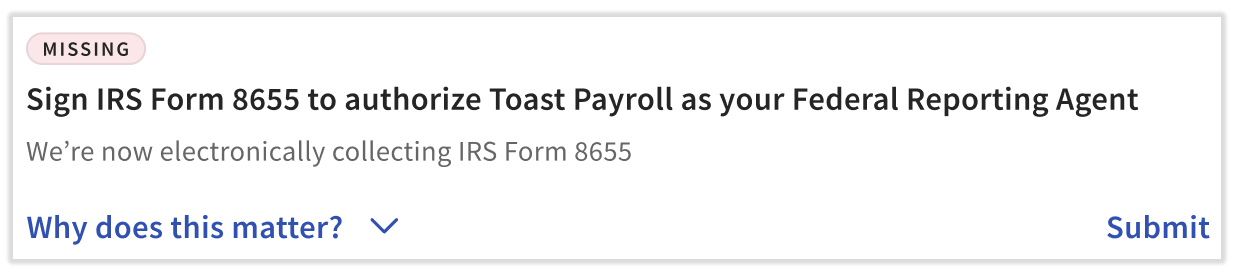
- Sign IRS Form 8655 to Authorize Toast Payroll as Your Federal Reporting Agent
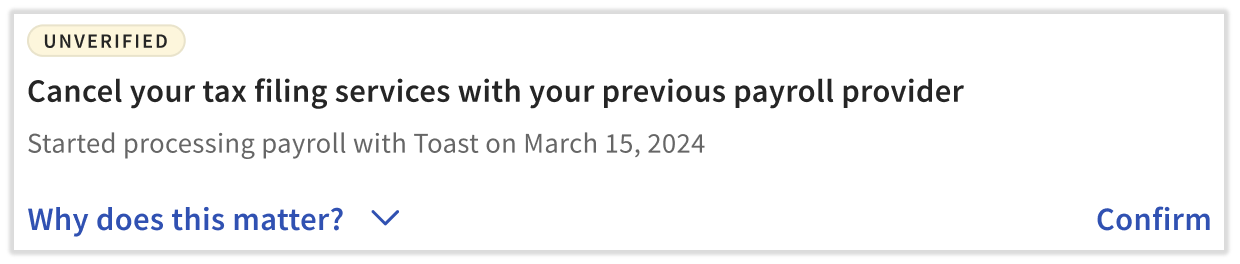
- Cancel Your Tax Filing Services With Your Previous Payroll Provider
- Employee Has Not Provided Their Social Security Number
- Specify Your [State] Tax Withholding Account Number
- Specify Your [State] Unemployment Tax Account Number
- Confirm You Have Linked Toast Payroll as Your Third-Party Administrator (TPA)
- Verify Your [State] Withholding Pay Frequency
- Verify Your [State] Unemployment Tax Rate
- Tax Center Around Year-End
- Related Articles
About the Tax Center
The Tax Center is Toast Payroll's central hub for managing payroll taxes, withholding taxes, and employer tax filings. Use the Tax Center to:
- View and maintain tax information — for example, state tax accounts and tax forms — for the business
- Proactively respond to and resolve tax issues before quarterly filing deadlines
- Track your tax filing timeline and upcoming deadlines
- View critical tax filing data — for example, rejections, quarterly tax packages, and year-end tax documents
Who can access the Tax Center: HR+ users in Toast Payroll. The Tax Center is available right away, even before posting your first payroll, so you can use it during onboarding to manage your tax information.
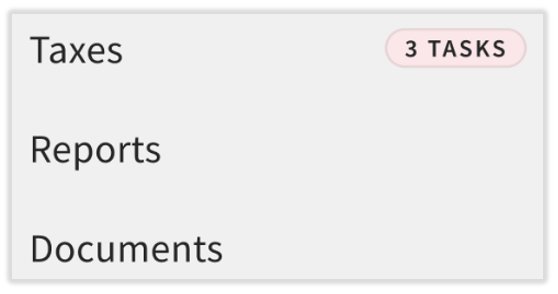
To open the Tax Center in Toast Payroll, select Taxes from the left-hand navigation menu. (If you do not see Taxes on the left side of the screen, select Payroll from the Toast Web navigation rail on the left to make the Toast Payroll navigation rail appear.) If you have outstanding tasks, a number in red appears next to Taxes showing how many tasks need to be addressed.
Quarterly Tax Filing Alert
HR+ users may see a tax alert banner on the Toast Payroll dashboard when there are outstanding tasks in the Tax Center before an upcoming quarterly tax filing. The alert notifies you to update federal, state, or employee tax information before the filing deadline.
To resolve the alert, select Resolve tax issues. This takes you directly to the Tax Center where you can address any outstanding items Toast Payroll needs before filing quarterly taxes.

Tax Center Overview
Navigate the Tax Center
The two buttons Tax resources and Tax documents in the upper-right corner of the Tax Center provide quick access to other pages in Toast Payroll:
- Tax resources opens several options:
- Edit tax accounts navigates to the Settings > Payroll > Tax Accounts page, where you can add or update your tax account information — including state withholding tax accounts, state unemployment tax accounts, local tax accounts, and some paid family and medical leave (PFML) and third-party administrator (TPA) accounts — without contacting Toast Payroll. See Toast Payroll: Get Help With State Tax Account Numbers for details.
- SSN collection settings gives some employers the option to require Social Security Numbers (SSNs) upon new hire, employee clock-in, or employee onboarding. These options are not available to all employers due to state laws and regulations.
- Other options provide quick answers or open a detailed help center article.
- Tax documents navigates to the Reports > Tax Filing page, where you can view quarterly tax packages, Form W-2 packages, your company's Form W-3, and more.
Understanding Your Tax Filing Status
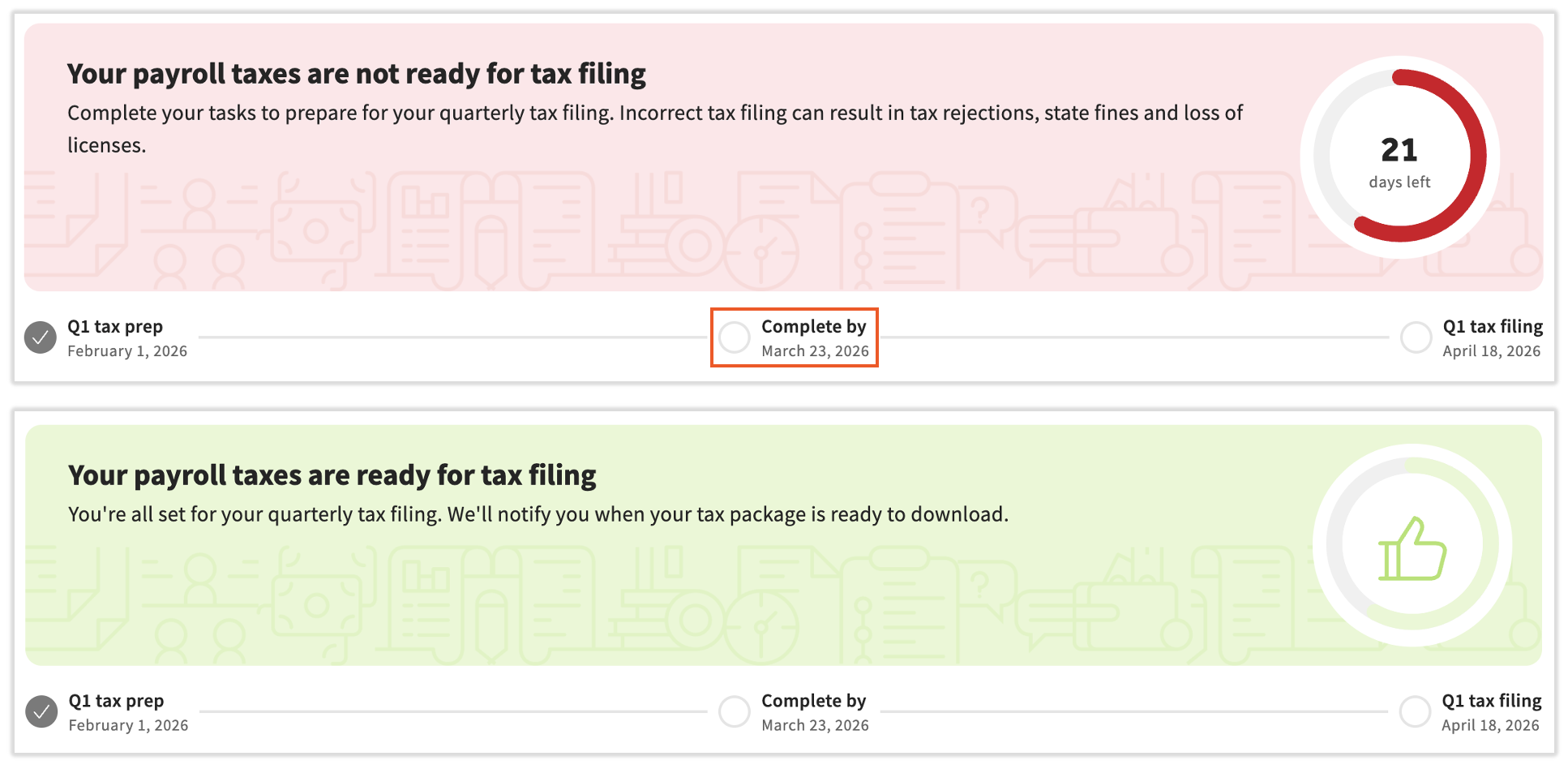
At the top of the Tax Center, a color-coded banner shows the status of your upcoming quarterly tax filing. The banner color and the timeline dates below it both change as you complete tasks.
The following table describes each banner state and what action to take:
| Banner color | What it means | What to do |
|---|---|---|
| Grey | You are onboarding and have not submitted your first payroll with Toast | Complete the Payroll Setup Checklist, then resolve the remaining tasks in the Tax Center |
| Red | You have outstanding tasks to complete before your payroll tax filing deadline | Resolve any tasks on this page |
| Yellow | Your tax-related tasks are resolved, but employees are missing Social Security Numbers (SSNs) | Add all employee SSNs to Toast Payroll — employees can follow the steps in Toast Payroll: Verify or Update My Social Security Number (SSN) |
| Green | All tasks in the Tasks section are complete for the upcoming quarter's filing | Use the educational materials on the right side of the page to learn more |
| Blue | Toast Payroll is preparing or is ready to submit your payroll tax filing | Wait for the filing to be prepared by Toast, or download your tax package. See Tax Center Around Year-End for more information |
Tax Filing Timeline Dates
The dates within the timeline at the top of the Tax Center help you plan for quarterly tax filings. Use these dates to track milestones and deadlines:
- Q# tax prep date — the first day to check the Tax Center for outstanding tasks
- Complete by date — the deadline to complete all tasks; the days remaining until this date appear in the circle
- Q# tax filing date — when Toast Payroll expects to complete your taxes; this date is based on the last payroll of the quarter
Important: To maximize filing success, complete all Tax Center tasks before you process your last payroll of the quarter.
Resolve Tasks in the Tax Center
Further down the Tax Center page, you will see an expandable tile for each federal or state tax account that you operate with Toast Payroll. Select each account tile to view the tasks it contains. Within each task, select the action item to review and complete the task. You can also select Why does this matter? for more information about how each item contributes to the success of your payroll filing.
Note: If tasks appear greyed out or locked, you do not have the security role permission to view or resolve that task. Contact your business's Toast Payroll HR+ user or admin for assistance.
Sign IRS Form 8655 to Authorize Toast Payroll as Your Federal Reporting Agent
Why does this matter? Toast Payroll must be listed as your third-party administrator for every tax account so Toast Payroll can file and communicate with the state agency on your behalf. Failure to complete this form may result in missed tax filings, state fines, and filing rejections.
How do I resolve this task? Visit Toast Payroll: Form 8655 Reporting Agent Authorization for step-by-step instructions.
Cancel Your Tax Filing Services With Your Previous Payroll Provider
Why does this matter? If your previous payroll provider continues to file taxes for your business, the filings from Toast Payroll with the latest payroll data may risk rejection, inaccurate processing, late or missed filings, state penalties, and Toast Payroll penalties.
How do I resolve this task? Reach out to your previous payroll provider — someone other than Toast — to close your previous payroll account.
Employee Has Not Provided Their Social Security Number
Why does this matter? Employees with missing Social Security Numbers (SSNs) will be excluded from payroll tax filings. Missing SSNs can lead to tax filing rejections, missed Form W-2s, the need for amendments, business penalties, Toast Payroll fees, and difficulty with employees accessing unemployment benefits.
How do I resolve this task? Add your employee's Social Security Number to their profile.
Note: 1099 contractors will not appear in this task. Social Security Numbers for 1099 contractors do not need to be entered into Toast Payroll.
![[Employee name] has not provided their Social Security Number](https://dwvhey99m5tyy.cloudfront.net/images/ka2PV000000Vx5RYAS/0EMPV000004cV5J)
Specify Your [State] Tax Withholding Account Number
Why does this matter? Failure to register for and provide a valid tax withholding account number for states that require it may result in state penalties, Toast Payroll fees, and business penalties such as loss of business license. If your account is in an Applied For state, this task will remain open until a valid state withholding account number is added.
How do I resolve this task? Add or update your state tax account information on the Tax Accounts page.
![Specify your [state] tax withholding account number](https://dwvhey99m5tyy.cloudfront.net/images/ka2PV000000Vx5RYAS/0EMPV000004cKrS)
Specify Your [State] Unemployment Tax Account Number
Why does this matter? Toast Payroll requires your state unemployment tax account numbers once your state registration is complete. Failure to register for an unemployment account and provide a valid account number may result in state fines, Toast fees, and business penalties such as loss of business license. If your account is in an Applied For state, this task will remain open until a valid state unemployment account number is added.
How do I resolve this task? Add or update your state tax account information in Tax Accounts.
![Specify your [state] unemployment tax account number](https://dwvhey99m5tyy.cloudfront.net/images/ka2PV000000Vx5RYAS/0EMPV000004cVoT)
Confirm You Have Linked Toast Payroll as Your Third-Party Administrator (TPA)
Why does this matter? Toast Payroll must be listed as your third-party administrator (TPA) for every tax account so Toast Payroll can file and communicate with the state agency on your behalf. Failure to link Toast Payroll as your TPA may result in missed tax filings, state fines, and filing rejections.
How do I resolve this task? Confirm that you have completed the TPA linking instructions.
![Confirm you have linked Toast Payroll as your Third-Party Administrator (TPA) for your [state] unemployment tax account](https://dwvhey99m5tyy.cloudfront.net/images/ka2PV000000Vx5RYAS/0EMPV000004tb9V)
Verify Your [State] Withholding Pay Frequency
Why does this matter? State tax withholding pay frequencies can change over time, and your pay frequency in Toast Payroll must match the schedule your state requires for remitting withholding taxes. An incorrect pay frequency may result in late or missed filings, missed withholding payments, state fines, and Toast Payroll fees.
How do I resolve this task? Add or update your state tax account information.
![Verify your [state] tax withholding payment frequency](https://dwvhey99m5tyy.cloudfront.net/images/ka2PV000000Vx5RYAS/0EMPV000004cQAU)
Verify Your [State] Unemployment Tax Rate
Why does this matter? State unemployment tax (SUTA) rates can change annually. An incorrect SUTA rate in Toast Payroll may result in tax discrepancies, state fines, business penalties, and Toast Payroll fees.
How do I resolve this task? If you receive a notice about a SUTA rate update, add or update your state unemployment tax account information on the Tax Account page. If your SUTA rate has been incorrect for an extended period of time, contact Toast Customer Care so we can determine whether voids and re-records can resolve the issue or whether you should correct this directly with the state.
![Verify your [state] unemployment tax rate](https://dwvhey99m5tyy.cloudfront.net/images/ka2PV000000Vx5RYAS/0EMPV000004cXLd)
Tax Center Around Year-End
On or around December 1st of each year, the Tax Center displays additional items for year-end tax filing and Form W-2 season. Toast Payroll gathers relevant year-end items and presents them as interactive tasks or buttons. Use the Tax Center along with Toast Payroll: Get Started With the Year-End Checklist and the seasonal emails Toast sends to navigate the year-end period.
When you navigate to Taxes, a new banner at the top shows a general timeline of the year-end season. The banner color and timeline dots change as you complete tasks and the timeline advances. (If you do not see Taxes on the left side of the screen, select Payroll from the Toast Web navigation rail on the left to make the Toast Payroll navigation rail appear.)
Important: Complete all tasks on this page so the banner turns blue. The deadline for completing these tasks appears in the second step of the timeline and coincides with the due date of your last payroll of the year. Your selection cannot be changed after your last payroll of the year has been submitted.
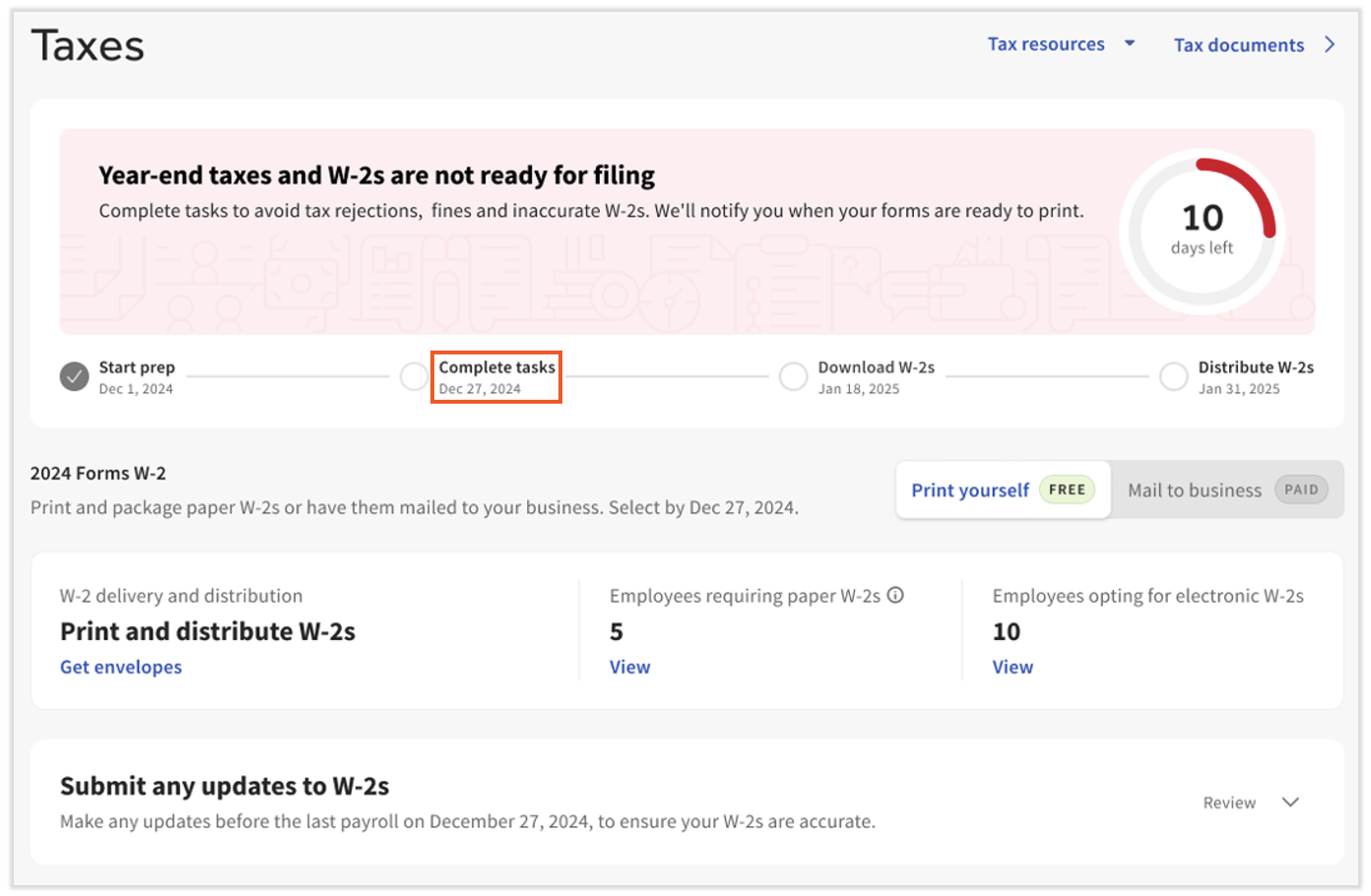
The self-print/Toast-print Form W-2 toggle has moved from the Reports > Tax Filing page to the Tax Center. If you toggle this to Mail to business, you will see the shipping address (which is editable) and the associated fees before shipping and sales tax if Toast prints Form W-2s for employees who requested a paper form.
Scroll to the Submit any updates to W-2s tile and review options you may use to close out year-end. Select the hyperlinks within the tile to open a pop-up with more details and a button to chat with our team about these items.
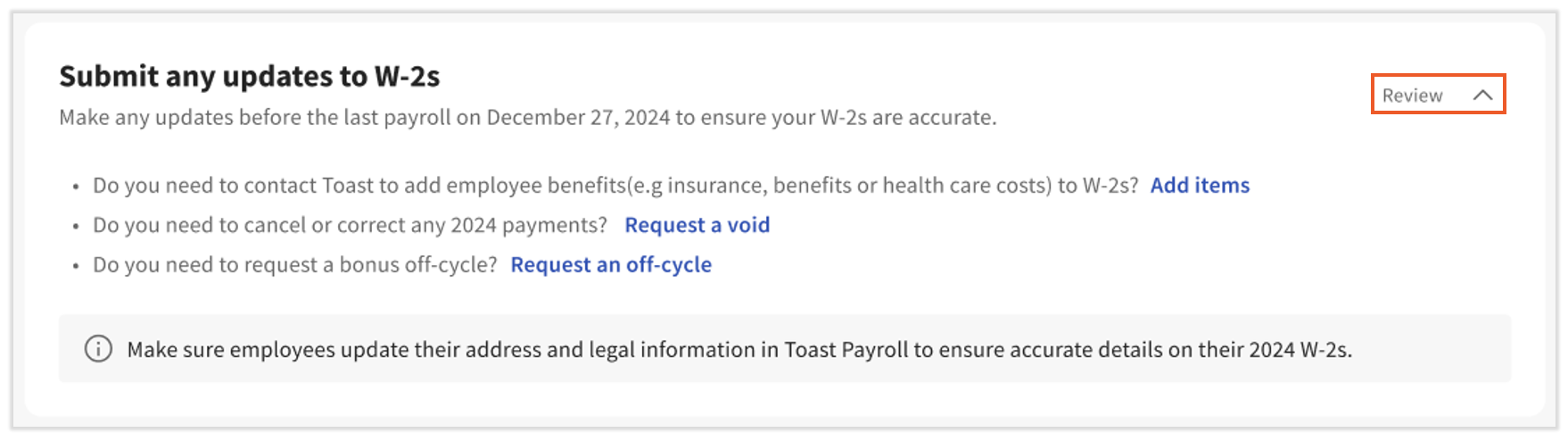
Important: Complete any remaining tasks below this tile. If not addressed, your company may be issued tax notices for missing or invalid information and may be assessed financial penalties.
Once Form W-2s Are Ready
Once Toast has prepared your company's Form W-2s — typically on or around January 19th of each year — the Tax Center changes again.
In the blue banner, two quick-access buttons appear:
- Your Q4 quarterly tax package is available directly for download.
- If applicable, a Paper W-2s button also appears. Per SSA regulations, you must distribute a paper Form W-2 by January 31st to any employee who opted into a paper copy. Employees who opted into an electronic copy can use these instructions to retrieve the form on their own.
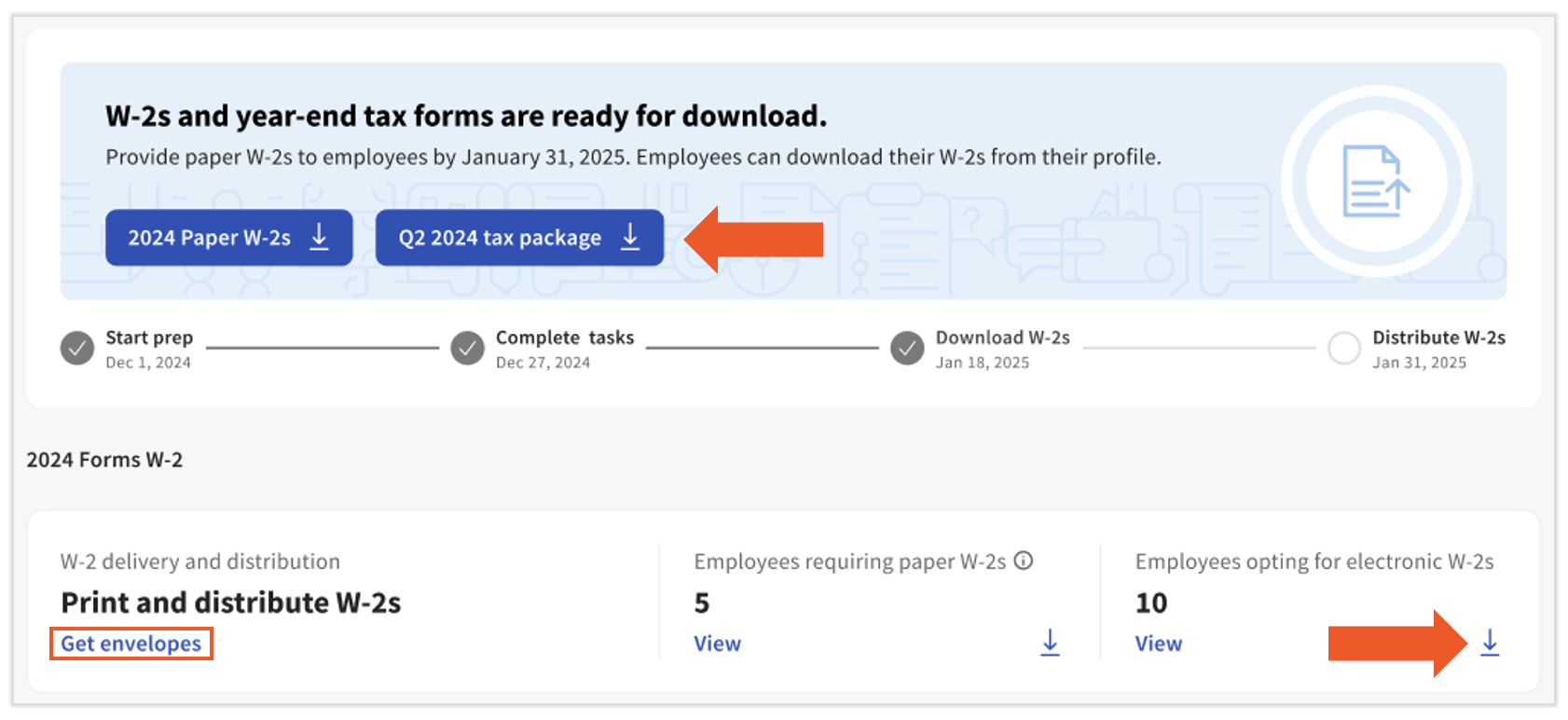
Additional items visible once Form W-2s are ready:
- A Get envelopes link if employees opted into a paper Form W-2. This style of envelope left-aligns both the company and employee addresses.
- The number of employees opted into paper and electronic Form W-2s. Select View to see a list of each employee in either category.
- A download button in the paper or electronic W-2 tile to download a bulk PDF of all Form W-2s in either category.
Related Articles
- Toast Payroll: Get Started With Taxes
- Toast Payroll: Get Help With State Tax Account Numbers
- Toast Payroll: Form 8655 Reporting Agent Authorization
- Toast Payroll: Read Your Quarterly Tax Package
- Toast Payroll: Get Started With the Year-End Checklist
This content is for informational purposes and is not intended as legal, tax, HR, or any other professional advice. Please contact an attorney or other professional for advice.