Toast Payroll: Date Glossary
Last updated: Jun 24, 2026, 10:20 AM
What each Toast Payroll date means and how it controls whether an employee, earning, or deduction pulls onto a payroll.
- What This Applies To
- Quick Date Check
- Which Hire Date Is Which
- Employee Start Dates
- Payroll Termination Date
- Earning Start Date
- Earning End Date
- Deduction Start Date
- Salary Effective Date
- Benefit Open Enrollment Date
- Frequently Asked Questions
- Related Articles
What This Applies To
This glossary applies to managers and HR+ users working in Toast Payroll. The dates described here are found on an employee's Toast Payroll profile — on the Position Detail page and the Recurring page. To change any of these dates, see the linked articles in each section; this glossary explains what each date means, not the navigation path to edit it.
Quick Date Check
Use this table to match what you are seeing to the date that controls it.
| Symptom | Most Common Cause | Where to Fix |
| A new employee does not appear on the payroll, and cannot be added to it | Position Begin Date or Original Hire Date is after the first day of the pay period | Update the date on the Position Detail page — see Toast Payroll: Update Positions |
| A salaried employee's pay looks reduced for the period | Position Begin Date falls in the middle of the pay period, so salary is prorated | Confirm the Position Begin Date is correct on the Position Detail page |
| A rehired employee is not pulling onto the payroll | Adjusted Hire Date (set by the rehire) is after the pay period | Confirm the rehire dates — see Toast Payroll: Rehire Guide |
| A terminated employee's final hours or pay did not pull | Payroll Termination Date is before the pay period's check date | Add the employee on the Employee Earnings step while their termination date is still within the pay period |
| A new recurring earning or deduction did not apply to this payroll | Earning Start Date or Deduction Start Date is after the next check date | Update the start date on the employee’s Recurring page — see Toast Payroll: Add or Edit Earnings & Deductions |
| A recurring earning or deduction stopped applying unexpectedly | Earning End Date or Deduction end date is before the next check date | Update the end date on the employee’s Recurring page — see Toast Payroll: Add or Edit Earnings & Deductions |
| A pay change did not take effect on the expected payroll | Salary Effective Date hit after the payroll was already opened/started | Apply the change in the current payroll, or wait for the next one |
Which Hire Date Is Which
Customers often call any of these a "hire date," but Toast Payroll tracks three separate dates, and they do different things.
- Position Begin Date is when the employee starts working under a specific position. An employee with more than one position can have a different Position Begin Date for each.
- Original Hire Date is when the employee was first hired and began employment overall.
- Adjusted Hire Date is usually blank. It populates when a terminated or leave-of-absence employee is brought back, and it then reflects the rehire date.
The Payroll Termination Date is also separate from the general termination date (the employee's last day of employment in their status record). The Payroll Termination Date controls the last payroll an employee can be paid on; the general termination date records when their employment ended.
Employee Start Dates
There are up to three dates related to hiring on an employee's profile: Position Begin Date, Original Hire Date, and Adjusted Hire Date. To view them, navigate to the employee's profile, select the caret icon to the right of the primary job, and select Edit on the following page. To change any of these dates, choose a reason for the change (Administrative Update is a common choice). For the full Position Detail page walkthrough, see Toast Payroll: Update Positions.
An employee who does not appear on a payroll run is often affected by one of these three dates falling outside the associated pay period. Read each section below to determine which date to update so the employee can appear on, or be added to, the payroll.
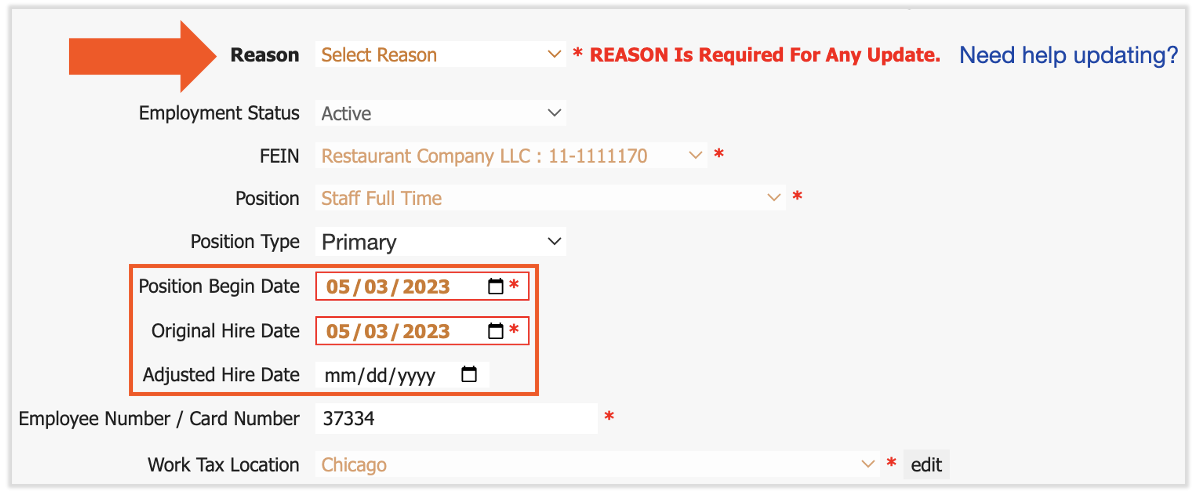
Position Begin Date
The Position Begin Date is when the employee begins working under the associated position. If the employee is assigned to multiple positions, the Position Begin Date may be different for each position. Changing this date affects internal reporting only.
If an employee has a new or secondary position with a Position Begin Date on or before the first day of the pay period, they appear on that payroll. If the Position Begin Date is the day after the pay period starts, or later, they do not appear on the payroll and cannot be added to that pay group. Update the Position Begin Date to the first day of the pay period or earlier, then add the employee to the payroll.
For example, if an employee is hired on May 14th and you have a payroll with a pay period ending May 12th, the employee cannot appear on that payroll unless their Position Begin Date and Original Hire Date are adjusted to May 12th or earlier.
Note: For salaried employees, a Position Begin Date in the middle of the pay period decreases salary proportionally to the days they were not part of the pay period. For example, if a salaried employee's Position Begin Date is May 2nd and the weekly pay period runs May 1st through May 7th, they appear on payroll with 32 pay period hours (40 minus 8) and a salary that is six-sevenths of their full payroll salary. This reflects their availability during the pay period, not hours worked.
Original Hire Date
The Original Hire Date is when an employee was first hired and began employment. If this date is after a pay period, the employee cannot appear on that pay period's payroll. For example, if an employee's Original Hire Date is February 1st, 2021 and they should be paid on the payroll running January 15th through January 31st, 2021, the system does not allow it unless the date is changed to January 31st, 2021 or earlier.
Adjusting the Original Hire Date also affects Time Away From Work (TAFW) and benefits. There are often waiting periods before an employee is eligible for TAFW or benefits, and Toast Payroll uses this date to determine eligibility.
Adjusted Hire Date
The Adjusted Hire Date works much like the Original Hire Date. In most cases it is blank, but it populates when terminated or leave-of-absence employees are brought back to work. When an employee is rehired, this date reflects the rehire date — see Toast Payroll: Rehire Guide. The Adjusted Hire Date affects the employee's ability to appear on certain payrolls, as well as TAFW and benefits eligibility, in the same way the Original Hire Date does.
Payroll Termination Date
The Payroll Termination Date is the check date of the last payroll on which a terminated employee is eligible to be paid. In the termination flow it is the field labeled "What is the last check date on which the employee should be paid?" It is separate from the employee's last day of employment.
If the termination is completed before payroll is opened, set the Payroll Termination Date to at least the check date of the last payroll the employee should be paid on, or the employee will not be allowed on the payroll. If the final check has already been issued, select Employee has already been paid; the individual then displays on the Employee Earnings step with zero earnings. If the termination is completed after payroll is opened, you can manually remove the employee if they are not owed wages — leaving them on the payroll does not cause issues.
A former employee can still be added to a payroll as long as their termination date lands within that payroll's start and end dates. Add them on the Employee Earnings step. Once the pay period that contains the termination date has passed, the employee no longer appears on future payroll runs automatically. For the full termination procedure, see Terminate or Archive an Employee in Toast Web or Toast Payroll.
Earning Start Date
The Earning Start Date is found on the employee's profile under the Recurring page. If a new recurring earning has a start date on or before the next check date, it takes effect on that payroll. If the start date is after the next check date, the earning does not appear on that payroll and must be added manually. To add or change a recurring earning, see Toast Payroll: Add or Edit Earnings & Deductions.
Earning End Date
The Earning End Date is found on the employee's profile under the Recurring page. If a recurring earning has an end date before the next check date, the earning no longer appears on the payroll. If the end date is on or after the next check date, the earning remains on the payroll. To resume a stopped earning, move the end date to on or after the next check date.
Deduction Start Date
The Deduction Start Date is found on the employee's profile under Recurring > Deductions. If a new recurring deduction has a start date on or before the next check date, it takes effect on that payroll. If the start date is after the next check date, the deduction does not appear on that payroll and must be added manually.
To stop a recurring deduction so it does not pull on an upcoming payroll, set its end date to before that payroll's check date. To add, change, or end a recurring deduction, see Toast Payroll: Add or Edit Earnings & Deductions.
Note: A deduction is recorded based on the check date it is taken on, not the pay period dates. This determines which quarter the deduction falls in for tax filings. For more on quarter timing, see Toast Payroll: Earning and Deduction Timing.
Salary Effective Date
The Salary Effective Date controls when a pay change applies. The change applies to the first payroll opened after the Salary Effective Date hits. If the Salary Effective Date hits before a payroll is opened, the change takes effect on that payroll. If it hits after a payroll has already been opened, the change takes effect on the next payroll and may need to be added manually in the current one.
Benefit Open Enrollment Date
If you use the Classic Benefits module, the system looks at the new-hire eligibility dates and plan start dates when it auto-creates payroll deductions. The deduction begins based on the plan start date and the rules of the benefit tiers. The resulting deduction follows the same timing as any other deduction — see the Deduction Start Date section above.
Frequently Asked Questions
Why is a new employee not showing up on payroll?
A new employee does not show up on payroll when their Position Begin Date or Original Hire Date is after the first day of the pay period. The system does not recognize them as an employee during a period that starts before their hire-type date. Update the Position Begin Date and Original Hire Date to the first day of the pay period or earlier, then add the employee to the payroll. See Toast Payroll: Update Positions.
Also asked as:
- Why isn't this employee appearing on the payroll?
- How do I get a new hire onto payroll?
- My employee's hours aren't pulling into payroll, why?
Why did a recurring deduction or earning not apply to this payroll?
A recurring deduction or earning does not apply to a payroll when its start date is after that payroll's next check date, or when its end date is before the next check date. To apply it to the current payroll, set the start date to the start of the pay period or earlier. To keep it from pulling, set the end date before the check date. See Toast Payroll: Add or Edit Earnings & Deductions.
Also asked as:
- Why isn't the deduction being taken out?
- How do I stop a recurring deduction?
- Why did the earning stop pulling?
Can I still pay a terminated employee on payroll?
You can still pay a terminated employee on a payroll as long as their Payroll Termination Date lands within that payroll's start and end dates. Add them on the Employee Earnings step. Once the pay period that contains the termination date has passed, they no longer appear automatically. See Terminate or Archive an Employee in Toast Web or Toast Payroll.
Also asked as:
- How do I pay a terminated employee their final check?
- Why didn't the terminated employee's hours pull?
- Can I add a former employee back to payroll?
Related Articles
- Toast Payroll: Update Positions
- Terminate or Archive an Employee in Toast Web or Toast Payroll
- Toast Payroll: Add or Edit Earnings & Deductions
- Toast Payroll: Earning and Deduction Timing
- Toast Payroll: Rehire Guide
This content is for informational purposes and is not intended as legal, tax, HR, or any other professional advice. Please contact an attorney or other professional for advice.