Toast Payroll: Resolve a Failed Payroll Debit
Last updated: Nov 3, 2026, 2:26 PM
Learn what to do when you get a failed payroll debit email or Support Center notification and can't process payroll in Toast Payroll.
- Before You Begin
- Quick Fix
- If You Received a Payroll Debit Failed Notification
- If You Want to Repay by Wire Transfer
- If You Want to Repay From Your Daily Sales
- If Your Outstanding Balance Was Updated
- If You Sent a Wire and Still Can't Process Payroll
- If You See a Repayment Line on Your Payouts
- If You Aren't Receiving Failed Payroll Debit Notifications
- Frequently Asked Questions
- Related Articles
Before You Begin
Applies to: Toast Payroll, Toast Web
Permissions needed:
- Access to Toast Payroll
What you'll accomplish: You will resolve your failed payroll debit, by wire transfer or from your daily sales, so you can process payroll again.
Quick Fix
| Symptom | Most Common Cause | Quick Fix |
| You received a Payroll Debit Failed email or Support Center notification, and you can't process payroll. | Toast Payroll was blocked from withdrawing funding for your payroll from your bank account. The most common errors are insufficient funds, a closed or frozen bank account, an invalid account or routing number, or other related reason. | Send the full outstanding balance by wire transfer, or repay from your daily sales if you're eligible. See If You Received a Payroll Debit Failed Notification. |
| You want to repay without sending one wire transfer. | You may be eligible to repay from a portion of your daily sales. | See If You Want to Repay From Your Daily Sales. |
| You received an Updated Failed Payroll Debit Balance email or Support Center notification. | Another debit attempt for the same payroll was unsuccessful, and your balance changed. Reminder, Toast Payroll has two separate debits per payroll run. | Review the updated amount in Toast Payroll and pay that amount. See If Your Outstanding Balance Was Updated. |
| You sent payment, but you still can't process payroll. | The amount hasn’t been received yet. Wires can take up to 24 hours to arrive. It is also possible the payment was sent by ACH instead of wire transfer, which is not a valid way to send the funds. | Confirm with your bank how and when the payment was sent. See If You Sent a Wire and Still Can't Process Payroll. |
| Your payout shows a Repayment of failed payroll debit line. | You chose to repay a failed payroll debit from your daily sales. | See If You See a Repayment Line on Your Payouts. |
| You have a failed payroll debit, but you didn't receive a failed payroll debit email or notification. | The finance contact for your location is missing or out of date. | Update your finance contact. See If You Aren't Receiving Failed Payroll Debit Notifications. |
If You Received a Payroll Debit Failed Notification
A Payroll Debit Failed notification means Toast Payroll attempted to withdraw funds for your payroll, but the debit was unsuccessful because of insufficient funds, a closed or frozen bank account, an invalid account or routing number, or other related reason. Toast sends this notification to the Finance Contact by email and to the Support Center in Toast Web. You'll also see a notification on the Toast Payroll dashboard, which is where these steps will pick up
Your next payroll cannot be opened or submitted until you pay the outstanding balance by wire transfer or choose to repay it from your daily sales, even if the payroll tax debit was received. To learn how this affects your tax payments, see Frequently Asked Questions.
- On the failed debit notification in Toast Payroll, select Learn more to review your outstanding balance and repayment options.
- Choose one repayment method: wire transfer or daily sales (if you're eligible). See the matching section below.
Expected outcome: You know your outstanding balance and which repayment method you'll use.
If You Want to Repay by Wire Transfer
A wire transfer repays the full outstanding balance at once.
- Starting from the Toast Payroll dashboard, select Repay by bank wire transfer and then select Continue.
- Send the full outstanding balance by wire transfer using the instructions on the screen.
- Confirm with your bank that the payment was sent as a wire transfer, not an ACH transfer.
Expected outcome: After Toast receives your funds, you receive a confirmation email and a Failed Payroll Debit Balance Resolved notification in the Support Center. Access to open and submit payroll is restored and you can then continue processing payroll as usual.
Note: Wire delivery timing depends on your bank. Toast Payroll is continually checking for wire receipts and resolving your outstanding balance as soon as received.
If You Want to Repay From Your Daily Sales
If you're eligible, you can repay a failed payroll debit from a portion of your daily sales instead of sending a wire transfer. If your daily sales are not sufficient to cover the failed debit amount, you may be excluded from this option. If you are not eligible, you won't see this option. Repay by wire transfer instead.
- On the failed debit notification in Toast Payroll, select Repay with a daily holdback, then select Continue.
- Review the repayment plan details in the pop-up before selecting Confirm once more.
- Your access has been restored and you can now open and submit payrolls immediately. If Toast stopped any distributions (i.e. employee wages or tax payments), they will resume immediately and can be expected to arrive on the following day.
- The holdback of the sales amounts will being the next calendar day and will continue until the balance is paid. You can see the amount on your payout report.
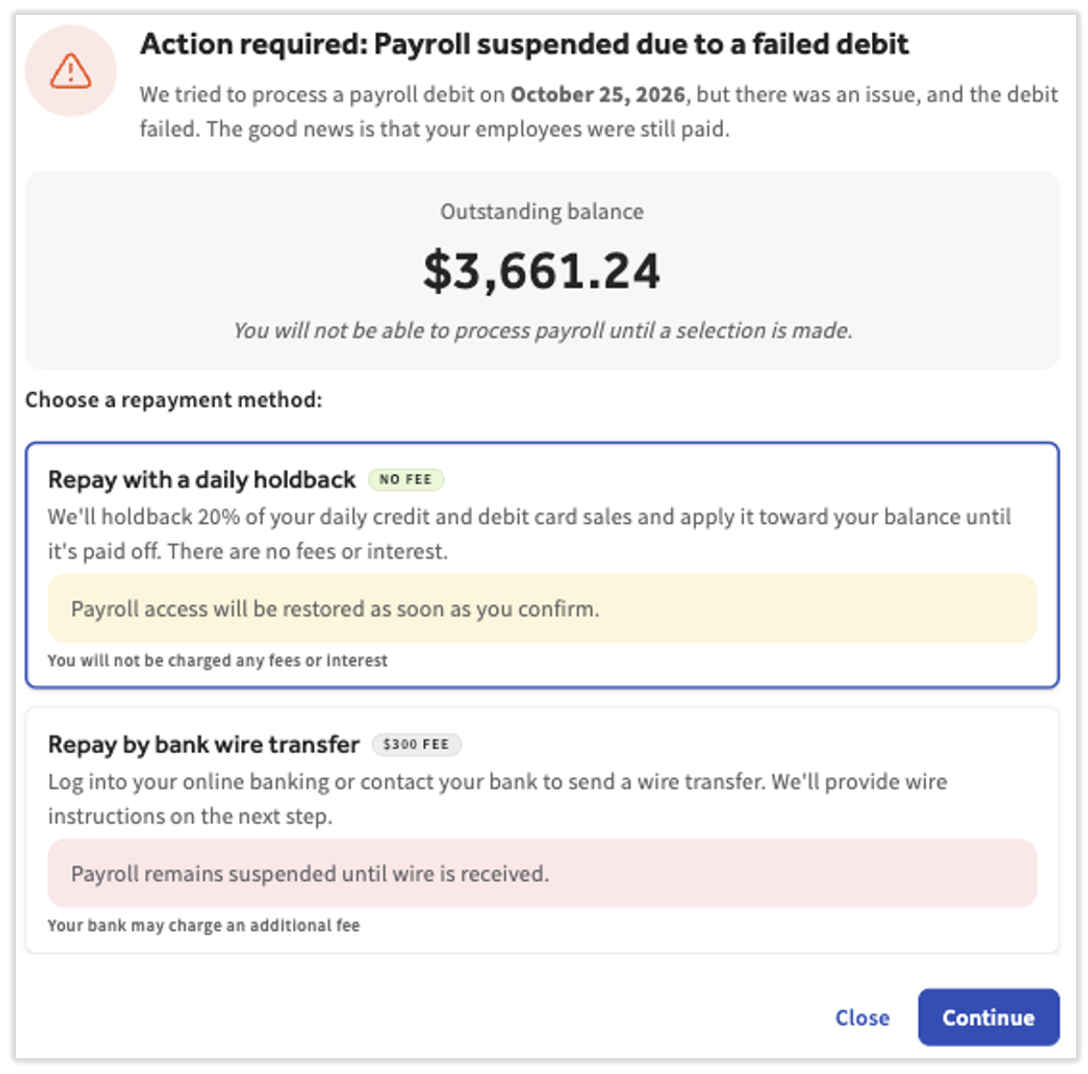
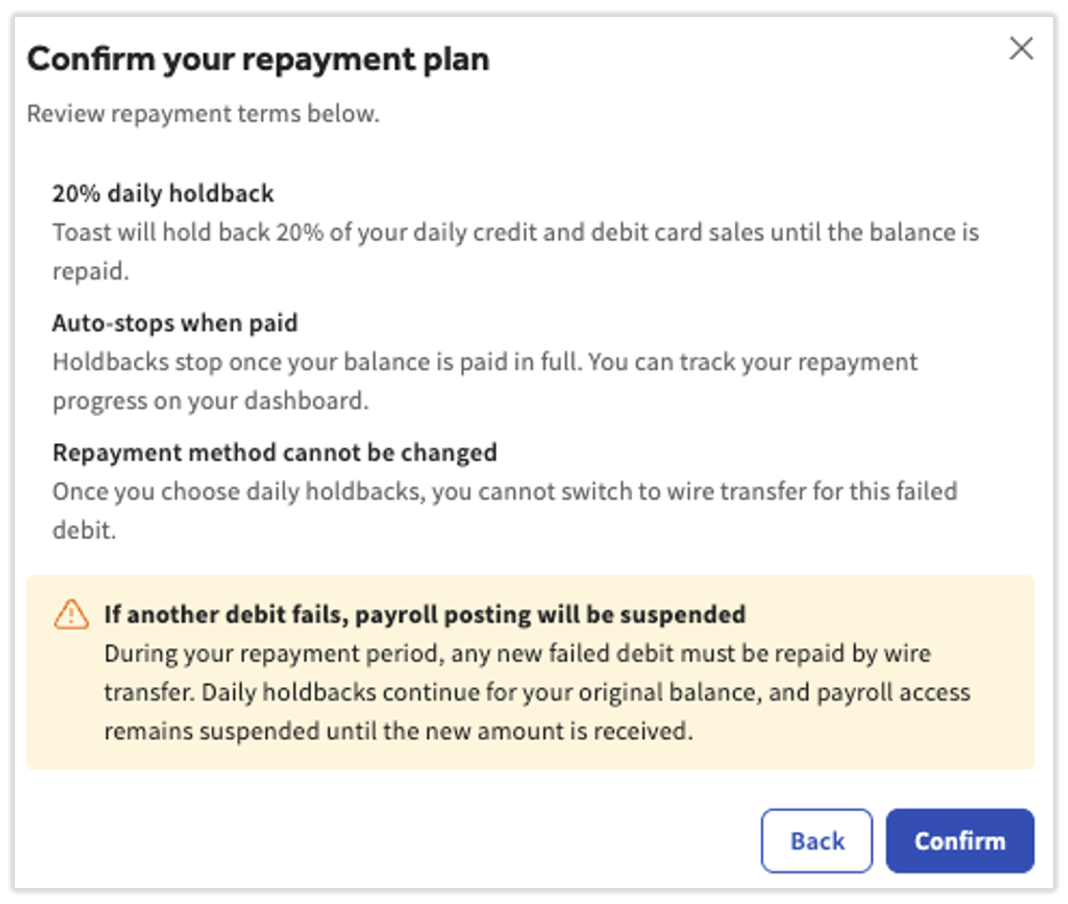
Expected outcome: You receive an email verifying your selection and you can process payroll again right away. Toast holds back a portion of each day's sales until the balance reaches $0. Then you receive a confirmation email and a Failed Payroll Debit Balance Resolved notification and the holdback stops.
Note: You cannot wire part of the balance and repay the rest from daily sales. The two repayment methods cannot be combined.
How Much Is Withheld From Your Daily Sales
Toast holds back a set share of each day's sales until your failed payroll debit is repaid.
- We will holdback 20% of daily sales across each consecutive calendar day.
- If you have more than one location, the amount is heldback equally across your location (20% per location).
There is no fixed end date, so how long repayment takes depends on your sales.
If Your Outstanding Balance Was Updated
An Updated Failed Payroll Debit Balance notification means another debit attempt for the same payroll was unsuccessful and your outstanding balance changed. Don't forget, Toast Payroll debits twice for each payroll run. Learn more in Toast Payroll: Manage Debit and Withdrawal Schedules.
- If you've already selected to repay the first balance via sales holdback, then this balance will join that. If you have already wired the original amount, you will need to do an additional wire.
- If you have not yet made a selection, log into Toast Payroll and review the notification on the dashboard. See the steps above to resolve this scenario.
Expected outcome: After Toast receives the updated balance, you receive a confirmation email and a Failed Payroll Debit Balance Resolved notification, and you can process payroll again.
If You Sent a Wire and Still Can't Process Payroll
If you sent payment and still can't process payroll, the payment may have been sent incorrectly or it may not have arrived yet.
If you sent the payment by ACH transfer:
- Send the full outstanding balance again by wire transfer. An ACH payment may debit from your bank account at first, but it should return to your account a few business days later, depending on your bank. Your bank can provide more details about this.
If you sent the payment by wire transfer:
- Contact your bank to confirm the estimated delivery time. Wire delivery timing depends on your bank.
- If you still can't process payroll, email payrollreturns@toasttab.com and include your wire confirmation.
Expected outcome: After Toast receives your wire transfer, you receive a confirmation email and a Failed Payroll Debit Balance Resolved notification in the Support Center.
If You See a Repayment Line on Your Payouts
A Repayment of failed payroll debit line on your payout is the amount withheld from that day's sales to repay a failed payroll debit. It appears only when you choose to repay from your daily sales.
- Log into Toast Web and navigate to Reports > Payments > Payout overview.
- Select the payout row and review the Withholdings section.
Expected outcome: You can see how much was withheld from each day's sales for your repayment.
If you see more than one Repayment of failed payroll debit line on the same payout or another payroll debit attempt after you chose daily sales, contact Toast Customer Care via the blue chat dot in the lower-right corner of any Toast page with the payout date, the amounts, and your company code.
If You Aren't Receiving Failed Payroll Debit Notifications
Failed payroll debit emails and Support Center notifications go to the finance contact for the location where the payroll was posted. If you aren't receiving them, the finance contact for your location may be missing or out of date. You can check and update the finance contact for your location. See Add or Update Financial Contact Email.
Expected outcome: Future failed payroll debit emails and Support Center notifications are received by the correct contact.
Frequently Asked Questions
Why can't Toast Payroll make my tax payments after a failed payroll debit?
Toast Payroll can't make your tax payments after a failed payroll debit because it doesn't make tax payments for any FEIN associated with your company code until it receives the funds for the failed debit. This applies even if the debit for the payroll tax portion was received. Your company is liable for any late fees or penalties from a tax agency related to a failed payroll debit for insufficient funds.
Can I pay my outstanding balance by ACH, Zelle, or Western Union?
No, Toast doesn't accept outstanding balance payments by ACH, Zelle, or Western Union. Send the funds by wire transfer, or repay from your daily sales if you're eligible. If you make an ACH payment, it should return to your account a few business days later. Contact your financial institution for more details.
Can I wire part of the balance and repay the rest from daily sales?
No, you can't wire part of the balance and repay the rest from daily sales. Each failed payroll debit is repaid with one method: the full balance by wire transfer, or daily holdback from your sales.
Also asked as:
- Can I wire half and finance the rest through daily sales?
What happens if I send only part of my outstanding balance?
Sending only part of your outstanding balance by wire doesn't restore payroll processing. You receive an email confirming the partial payment and reminding you to send the full amount. You can't process payroll until the full balance is paid.
Why did the option to repay from daily sales disappear?
The option to repay from daily sales disappears when you aren't eligible or when you've already chosen a different repayment method. Eligibility is based on your recent sales and can change from day to day. If you chose wire transfer for a failed payroll debit, you can't switch that debit to daily sales. After you choose daily sales, the wire transfer option no longer appears for that debit as well.
Why is more than 20% of my sales being withheld?
More than 20% of your sales is withheld when you are repaying more than one failed payroll debit at the same time. The percentage applies to each failed payroll debit separately, so the withholdings add together.
What happens if another check date payroll debit fails while I'm repaying from daily sales?
Another failed payroll debit during your repayment period must be repaid by wire transfer. The daily holdback continues for your original balance. You can't process payroll until Toast receives the wire for the new failed debit.
How do I check how much I have left to repay from daily sales?
You can check the amount withheld each day in Toast Web by navigating to Reports > Payments > Payout overview. In Toast Payroll, select Payroll > Past Payrolls to see which payrolls are still being repaid. (When the Toast Web and Toast Payroll navigation menus are both visible, select Payroll from the Toast Payroll navigation sub-menu. If you don't see the Toast Payroll sub-menu, selecting Payroll from the Toast Web navigation menu will expand it.)
For your exact remaining balance, contact Toast Customer Care.
How do I stop or pay off a repayment from daily sales?
If you opt into the holdback feature, you are unable to stop daily holdbacks until the balance is resolved. Our team will track when holdbacks should be ended according to your balance.
How do I know my failed payroll debit balance is resolved?
-
- If you used a wire transfer, you'll know the balance is resolved when you get an email confirmation of the wire received and when your payroll access has been restored.
- If you used the sales withholding method, you'll receive a confirmation email at the beginning saying your daily holdback has begun. Your Toast Payroll dashboard will update with your holdback progress and again when the balance has been paid.
How long do failed payroll debit notifications stay in the Support Center?
Failed payroll debit notifications stay in the Support Center for one week after they are sent. You also receive the same information by email.
Who can I contact with questions about a failed payroll debit?
You can email questions about a failed payroll debit to payrollreturns@toasttab.com.
Related Articles
- Add or Update Financial Contact Email
- Get Started With Support Center
- Toast Payroll: Manage Debit and Withdrawal Schedules
- Update or Add a New Bank Account in Toast Web
- Get Help With a Deposit That's Lower Than Expected
This content is for informational purposes and is not intended as legal, tax, HR, or any other professional advice. Please contact an attorney or other professional for advice.