Toast Payroll: Update Form W-4 Information
Last updated: Jun 23, 2026, 12:45 PM
- Before You Begin
- How Toast Payroll Withholds Tax Without a Form W-4
- 2026 Form W-4
- Update Your Federal Form W-4
- Update Your State Form W-4
- Add Extra Withholding or Adjust Your Withholding Amount
- View or Print a Completed Form W-4
- Form W-4 Settings for HR+ Users
- Frequently Asked Questions
- Related Articles
Before You Begin
Applies to: Toast Payroll
Permissions needed:
- Employee access to your own Toast Payroll profile (to update your own Form W-4)
- HR+ access (to apply Form W-4 settings, such as federal withholding exemption to an employee's record)
What you'll accomplish: Update your federal or state Form W-4 in Toast Payroll so your tax withholding reflects your current situation, with changes taking effect on the next payroll that has not yet been started.
Note: Toast Payroll cannot advise you on how to fill out a Form W-4 or how much tax to withhold. Toast can guide you to the form and help troubleshoot if it is not working as expected, but cannot tell you what to enter. For help deciding what to enter, use the IRS Tax Withholding Estimator or contact a CPA, tax advisor, or the IRS.
How Toast Payroll Withholds Tax Without a Form W-4
If an employee does not fill out their Form W-4, Toast Payroll uses the IRS guidelines to withhold the employee's Federal Income Tax (FIT) as if they filed as single with no deductions, also known as S-0.
The idea behind this IRS guideline is that this withholding leads to the highest per-pay-period taxes. It is better to overwithhold the employee and refund them when they file at year-end than to underwithhold and leave them owing additional funds when filing their taxes.
2026 Form W-4
The IRS released an updated Form W-4 and Toast Payroll now supports the 2026 Federal W-4. The updated form includes new additional withholding lines, an exemption checkbox, updated page 2 handling, and a direct link to the IRS Tax Withholding Estimator to help you complete the form accurately. While completing your Form W-4, you can use the IRS Tax Withholding Estimator to help determine the appropriate withholding amounts based on your individual situation. If you are a non-resident, review IRS Notice 1392 for special instructions on how to fill out your Federal W-4.
Update Your Federal Form W-4
To update your federal Form W-4, follow these steps:
- Log in to Toast Payroll. Starting in the upper-left corner, navigate to My Profile > Taxes & Documents > Tax Forms.
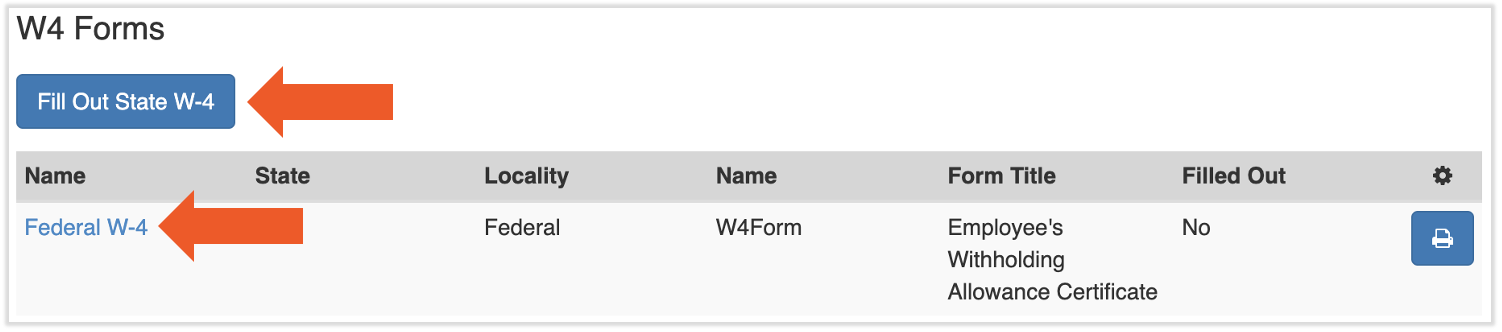
- Select the Federal W-4 hyperlink to open the form.
- Complete the form. Guidance for filling out your Federal W-4 is available on the IRS website.
- Select Submit at the bottom of the page to approve your updates.
Expected outcome: Your updated Federal W-4 is saved, and your changes take effect on the next payroll that has not yet been started.
Note: If you are exempt from federal income tax (FIT), complete your federal Form W-4 first. An employee cannot mark themselves exempt from federal withholding directly. After you submit your Form W-4, notify your manager or employer so they can apply the exemption using the Form W-4 settings described in Form W-4 Settings for HR+ Users below.
Update Your State Form W-4
The state Form W-4 appears as a button rather than a hyperlink. To update your state Form W-4, follow these steps:
- Log in to Toast Payroll. Starting in the upper-left corner, navigate to My Profile > Taxes & Documents > Tax Forms.
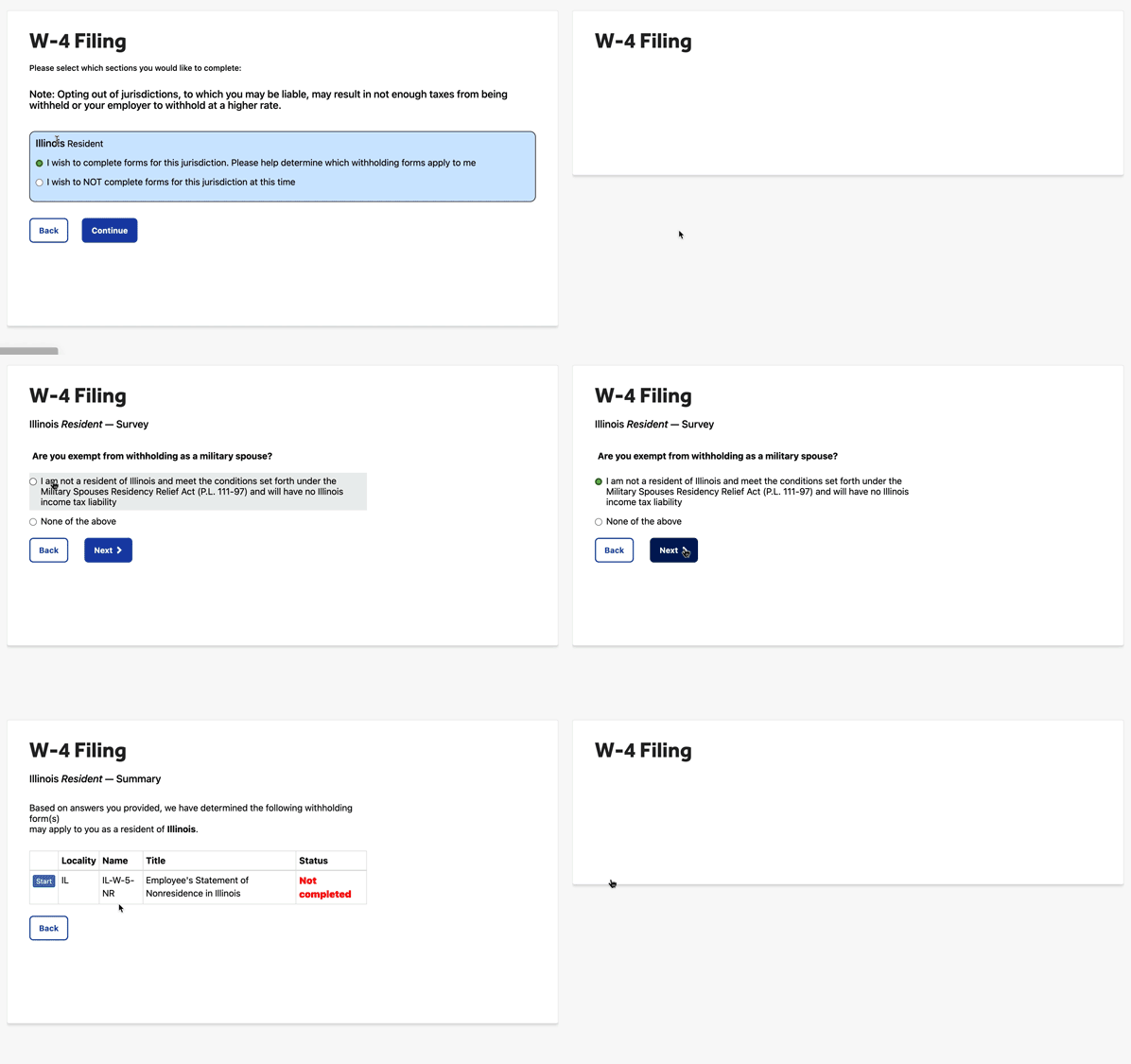
- Select Fill Out State W-4. You will be asked a series of questions specific to your state.
- Answer each question. For fields such as allowances and dependents, you must enter the information before you can advance to the next question.
- Preview the form before submitting it. At any point, you can switch to the forms and instructions tab to see the hard copy of the W-4 form. To return to the filing questions, select the Wizard tab.
- Once all questions across all state W-4s have been answered, select the option to review and submit your form.
Expected outcome: Your state Form W-4 is submitted, and your changes take effect on the next payroll that has not yet been started.
Note: Any changes you make take effect on the next payroll, as long as that payroll has not been started yet. Check with your manager or payroll administrator to confirm whether the upcoming payroll has already been started.
Add Extra Withholding or Adjust Your Withholding Amount
If you want more tax withheld from each paycheck, you can request additional withholding on your Form W-4. To do this, update your Form W-4 using the steps above and enter the extra amount in the additional withholding field of the form.
The IRS Form W-4 Deductions Worksheet, located on page 4 of the IRS Form W-4 documentation, can help you determine how much to enter. You can also use the IRS Tax Withholding Estimator to estimate the right amount for your situation.
Expected outcome: Your additional withholding amount is saved on your Form W-4 and applies to the next payroll that has not yet been started.
View or Print a Completed Form W-4
Once you finish submitting your Form W-4, you can no longer view it in the document library. To view a completed form or to fill out another Form W-4, navigate to My Profile > Taxes & Documents > Tax Forms and scroll down to the W-4 forms. Select the print icon to view a copy of the completed form.
Form W-4 Settings for HR+ Users
Available only to HR+ users, additional settings can be applied to an employee's Form W-4 values once the employee has filled out at least a federal Form W-4. To access these settings, navigate to the employee's profile > Taxes & Documents > Tax Forms and select the yellow Edit button.
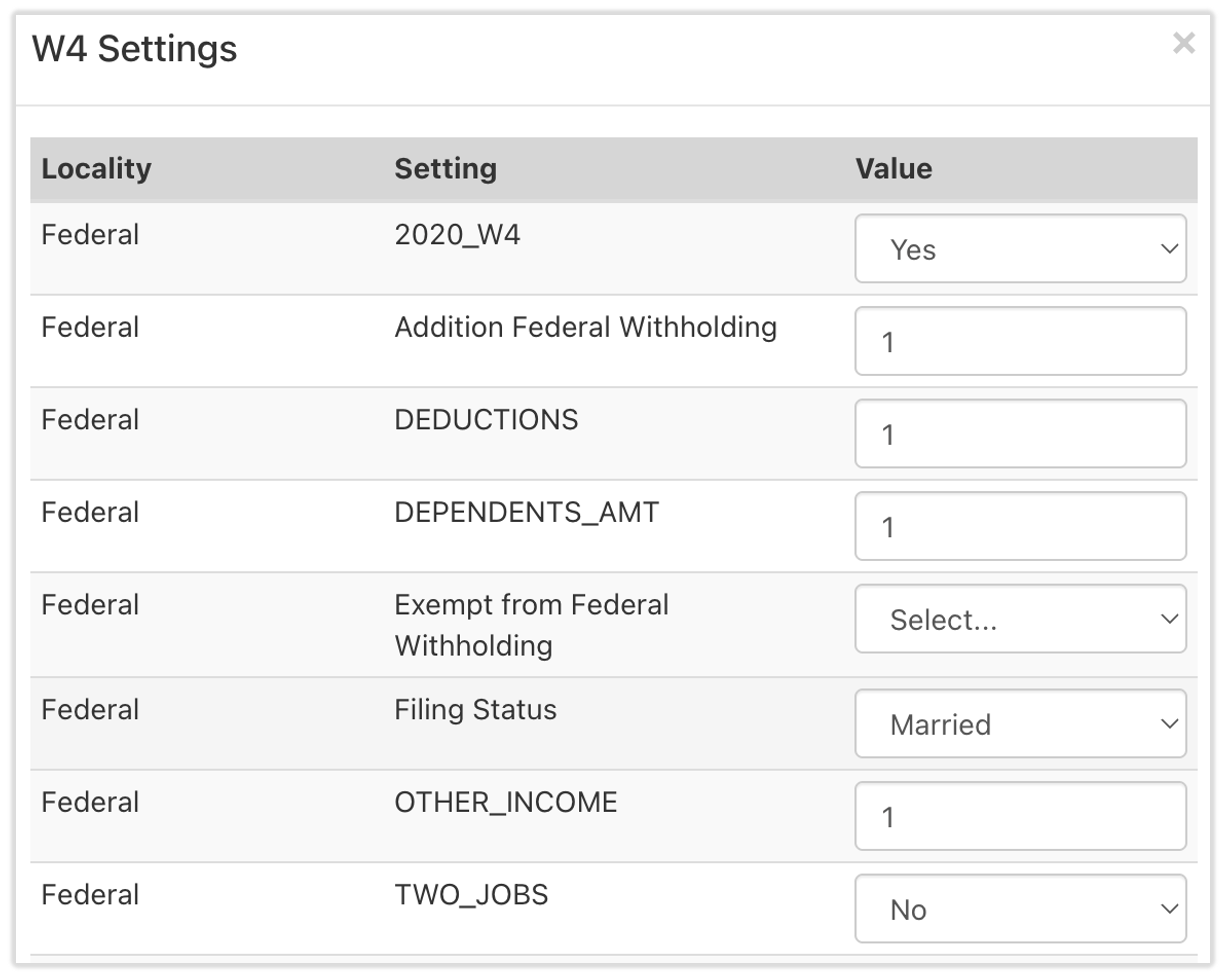
Use these settings at your discretion. If you want to make an employee exempt from federal income tax (FIT), select Yes for the Exempt from Federal Withholding option before selecting Save. Your experience may differ from the example shown.
Note: An employee must complete their federal Form W-4 before the Exempt from Federal Withholding option becomes available to the employer under Form W-4 settings.
Note: An employee cannot mark themselves exempt from federal withholding directly, including HR+ users. After you submit your Form W-4, notify another HR+ user so they can apply the exemption using the Form W-4 settings described in Form W-4 Settings for HR+ Users above.
Frequently Asked Questions
How do I update or change my Form W-4?
To update or change your Form W-4, log in to Toast Payroll and navigate to My Profile > Taxes & Documents > Tax Forms. Select the Federal W-4 hyperlink or the Fill Out State W-4 button, make your changes, and select Submit. Your changes will take effect on the next payroll that has not yet been started.
Also asked as:
- How do I update my W-4?
- How can I change my withholding on my tax forms?
- Where do I update my tax withholding?
How do I go exempt or claim exempt from federal tax?
To claim exempt from federal income tax, first complete your federal Form W-4 in Toast Payroll. An employee cannot mark themselves exempt from federal withholding on their own. After you submit your Form W-4, your manager or employer applies the exemption using the Exempt from Federal Withholding option in the Form W-4 settings on your profile. See Form W-4 Settings for HR+ Users above.
Also asked as:
- How do I file exempt?
- How do I go exempt on my federal taxes?
- How do I set myself to exempt?
Can my employer or manager fill out my Form W-4 for me?
Employers, managers, and HR+ users cannot edit or fill out an employee's Form W-4 on their behalf. Only the employee can complete and submit their own Form W-4. After the employee submits a federal Form W-4, an HR+ user can apply Form W-4 settings, such as the federal withholding exemption, but they cannot enter the employee's elections for them.
Also asked as:
- Can I edit an employee's W-4?
- How do I update a W-4 for an employee?
How do I make an employee exempt from federal income tax?
To make an employee exempt from federal income tax, the employee must first complete their federal Form W-4. Once their federal Form W-4 is completed, an HR+ user navigates to the Employee's Profile > Taxes & Documents > Tax Forms, selects the yellow Edit button, selects Yes for the Exempt from Federal Withholding option, and selects Save. See Form W-4 Settings for HR+ Users above.
Also asked as:
- How do I set an employee to tax exempt?
- How do I make someone's account tax-exempt?
How do I have more tax taken out of my paycheck?
To have more tax taken out of your paycheck, update your Form W-4 and enter an amount in the additional withholding field. You can use the IRS Form W-4 Deductions Worksheet or the IRS Tax Withholding Estimator to determine the amount. See Add Extra Withholding or Adjust Your Withholding Amount above.
Also asked as:
- How do I withhold extra tax?
- How do I deduct an extra amount on my W-4?
Why is too much or too little tax being withheld from my paycheck?
The amount of tax withheld from your paycheck depends on your Form W-4 elections, your earnings, your marital status, your withholding allowances, and any additional withholding you requested. Changes to pay rates, earning codes, pay frequencies, and home addresses are common reasons withholding goes up or down. Toast Payroll cannot advise on how much tax you should have withheld. To understand your withholding, review your Form W-4 elections and consult a tax professional or the IRS. For more detail, see Toast Payroll: Federal Income Tax & State Income Tax Calculations.
Also asked as:
- Why is so much tax being withheld?
- Why is no federal tax being taken out?
I marked myself exempt by mistake. How do I fix it?
If you marked yourself exempt by mistake, fill out a new Form W-4 in Toast Payroll to make sure you are taxed correctly going forward. When updating your Form W-4, you can choose to have additional taxes withheld to catch up on missed withholding. To correct paychecks that were already taxed incorrectly, see Toast Payroll: Employee Accidentally Marked Themselves Tax Exempt.
Also asked as:
- I filled out my W-4 wrong, how do I fix it?
- How do I undo tax exempt status?
When do my Form W-4 changes take effect?
Your Form W-4 changes take effect on the next payroll, as long as that payroll has not been started yet. Check with your manager or payroll administrator to confirm whether the upcoming payroll has already been started.
Also asked as:
- When will my withholding change take effect?
- How soon does my W-4 update apply?
Do all states require a Form W-4?
Not all states require a state Form W-4. Nine states (Alaska, Florida, Nevada, New Hampshire, South Dakota, Tennessee, Texas, Washington, and Wyoming) do not collect income tax and therefore do not require a state Form W-4. For more details on state forms, see Toast Payroll: State W-4 Form FAQ.
Also asked as:
- Which states need a state W-4?
- Do I have to fill out a state W-4?
Related Articles
- Toast Payroll: State W-4 Form FAQ
- Toast Payroll: Compare Forms W-2, W-4, and W-9
- Toast Payroll: Federal Income Tax & State Income Tax Calculations
- Toast Payroll: Employee Accidentally Marked Themselves Tax Exempt
This content is for informational purposes and is not intended as legal, tax, HR, or any other professional advice. Please contact an attorney or other professional for advice.