Toast Retail: Utilize Cross-Location Transfers
Last updated: Aug 18, 2026, 10:10 AM
- Cross-Location Transfers Overview
- Configure Email Notifications
- Initiate an Inventory Transfer
- Review an Inventory Transfer (Approve or Reject)
- Receive Inventory From a Transfer
Cross-Location Transfers Overview
Cross-location transfers is a useful tool for businesses that have multiple locations (or operate a store and also a warehouse or commissary kitchen) and need a way to move their inventory back and forth.
By transferring inventory from store to store, you can ensure that the products your guests want are available for purchase. Additionally, inventory transfers help reduce the cost of inventory by allowing stores to spread the cost of inventory over multiple stores instead of stocking all the inventory in one store. This helps you save money while still providing guests with the products they need.
If you use Toast Retail for more than one account, cross-location transfers will allow you to transfer inventory accurately and ensure your stock is tracked and accounted for.
Note: If you only use Toast Retail at a single location, this cross-location inventory transfers will not be an available feature.
Back to top
Things to Note About Cross-Location Transfers
There are a few things to consider before using cross-inventory transfers with Toast Retail:
- Cross-location transfers are only available for customers operating multiple Toast accounts, where each account has Toast Retail added.
- This includes customers who are not using Toast Multilocation Management (MLM).
- Inventory items must be matched to an item at the other location before cross-inventory transfers can be saved. See more in the Request an Inventory Transfer section.
- Receiving and sending items from a cross-location transfer will turn on inventory tracking for those items.
- Once a transfer is marked In Transit, it cannot be archived or voided. You'll need to receive the transfer at the destination location, then create a new transfer to move the inventory back if it was sent in error.
Please note that the following features are not currently available with cross-location transfers in Toast Retail:
- You cannot set up automatic inventory transfers between locations.
- Cross-location transfers does not integrate with existing accounting systems.
- Cross-location transfers do not track costs related to the transfer, such as fees or freight.
- Payments (cash or otherwise) are not supported for cross-location transfers.
Configure Email Notifications for Cross-Location Transfers
To receive email notification when there is a change or action needed from an open cross-location transfer, follow these steps:
- In Toast Web, navigate to Retail > Settings > Notifications.
- In the Cross-location transfer section, select + Add new contact and add any contacts who need notifications for cross-location transfers at this location.
- Repeat this process for other locations. You can add the same contact at multiple locations if you’d like.
Initiate an Inventory Transfer
Whether you want to request items from another location or move some of your own inventory, you’ll need to create a transfer. To initiate a cross-location inventory transfer with Toast Retail, follow these steps:
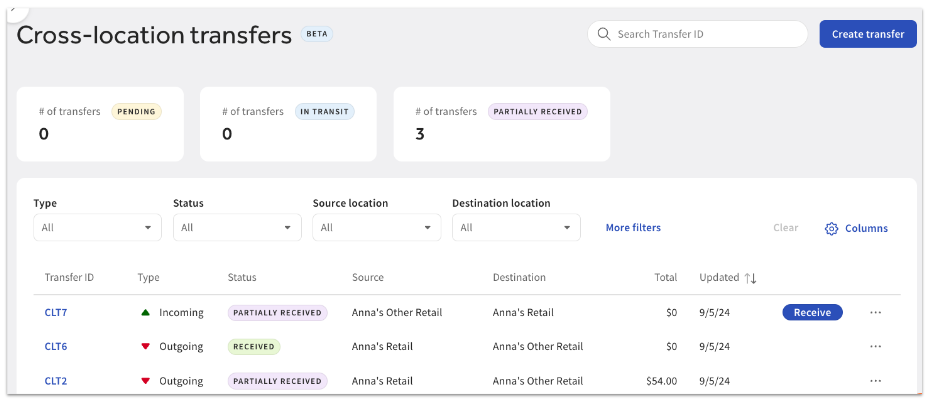
- In Toast Web, navigate to Retail > Purchasing > Cross-location transfers.
- Select Create transfer.
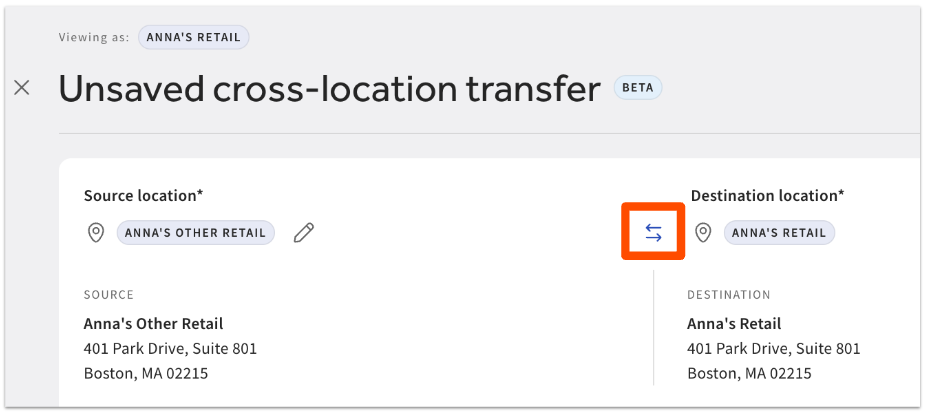
- The location you’re currently signed in to will be automatically set as the Destination location. Select + Select location to choose the Source location, which is where the inventory will be coming from. You can use the double arrow icon to swap the source location and destination location if you’re looking to send inventory from your location to another.
Note: If you’re logged into the Source location, that means you’re sending inventory elsewhere. These type of transfers do not need to be reviewed. When you’re finished following the steps below, a user at the destination location will need to receive the items to complete the transfer.
- Optional: Enter an Expected on date for the transfer.
- Select + Add items to begin building your transfer request.
- Use the search or filters available to quickly find the items you’re looking for.
- Items need to match at both locations in order to complete a cross-location transfer. If an automatic item match was found (based on barcode or PLU), you’ll see data such as number of items on hand, items on order, item sales over time, and PAR min/max.
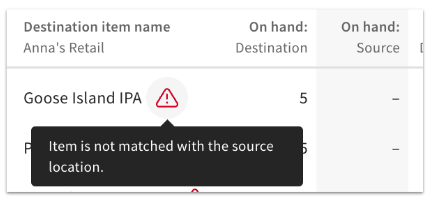
Note: The number of days of inventory on hand is not available in this view. - Items where an automatic match wasn’t found will show a warning icon. You can still select these items, but you’ll be prompted to confirm an item match before saving your transfer. Confirming a match is only required the first time an item is added to a transfer.
- Select the plus icon on the right side of the table to add items to your transfer request.
- Select the x to close the window when you are finished adding items to your transfer request.
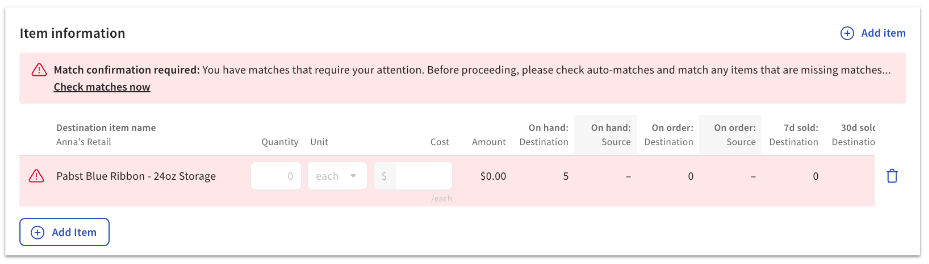
- If you see a red warning message, you’ll need to check your items that didn’t have an automatic match between locations. This can happen if the name of the item is different across locations, or if one location doesn’t have a barcode or PLU listed.
When you select Check matches now, a window will appear with the unmatched item. You’ll be able to search an item’s name, barcode, or PLU at the other location to find the appropriate match. You will only need to manually match items once– your selection will be remembered for future transfers. - Once all your items have been selected and you’ve resolved any unmatched items, adjust the Quantity, Unit, and Cost fields for each item you’re transferring. A suggested quantity will be entered based on the quantity you have on hand or on order, as well as your PAR min/max.
- Select Save as draft when you’re done making changes.
- At the top of the saved draft, you’ll have the option to edit, download, print barcodes, duplicate the cross-location transfer, archive, or void. When you’re ready to send the transfer to the other location for review, select Submit. The status of the transfer will change from Draft to Pending.
Once your transfer request has been submitted, it will need to be approved by a user at the source location. Any user who has been added as contact for cross-location transfer notifications at the source location will receive an email alerting them that a transfer request has been submitted.
Review an Inventory Transfer (Approve or Reject)
To review an inventory transfer request from another location, follow these steps:
- From your email notification, select Review Details. Or, log in to Toast Web at the source location and navigate to Retail > Purchasing > Cross-location transfers.
- Locate the pending transfer request, and select Review on the right side of the table.
- Select Review again and make any necessary changes in the Approved quantity, Approved unit, and Approved cost fields.
- Select Approve and mark as in transit at the top of the page when you’re finished.
- If you’re not ready to approve, you can select Reject instead and enter an optional reason for rejection.
Any user who has been added as a contact for cross-location transfer notifications at the destination location will receive an email when a request is approved or rejected.
When an inventory transfer request is approved, the quantity at the source location will be updated to reduce the items that are being moved to the destination location. The transfer will change from Pending to In transit, and the next step will be for the destination location to receive the inventory.
Receive Inventory From a Transfer
Once a cross-location inventory transfer has been approved at the source location, it will need to be received at the destination location to update the quantity, unit, and cost of the items that were transferred.
- From your email notification, select Review Details. Or, log in to Toast Web at the destination location and navigate to Retail > Purchasing > Cross-location transfers.
- Locate the “in transit” transfer request, and select Receive on the right side of the table. Or, you can manually receive via scanning.
Receiving the items will update the inventory at the destination location.