Understand the Processing Statements Report
Last updated: Jul 29, 2026, 5:04 PM
Learn how to understand the Processing Statements report.
- What This Applies To
- Where to Find the Processing Statements Report
- Processing Statements Line Items
- Other Withholdings Explained
- When Your Statement Is Available
- Frequently Asked Questions
- Related Articles
The Processing Statements report shows your monthly credit card activity and fee calculations in Toast Web. Use this guide to understand what each line item means.
What This Applies To
Product: Toast Web (Reports > Payments > Processing statements)
User types: Managers, accountants, financial contacts, and account owners
This report is also commonly called the merchant statement, the credit card statement, the CC settled statement, the card processing report, or the monthly EOM (end of month) statement. These all refer to the same Processing Statements report in Toast Web.
To view this report, you need access to 4.1 Sales Reports and 3.18 Cash Drawers (Full). For more detail on each permission, see the Permissions Reference Guide.
Where to Find the Processing Statements Report
To open the report, navigate to Reports > Payments > Processing statements in Toast Web. Adjust the date range and location, then select Update to pull the statement you want.
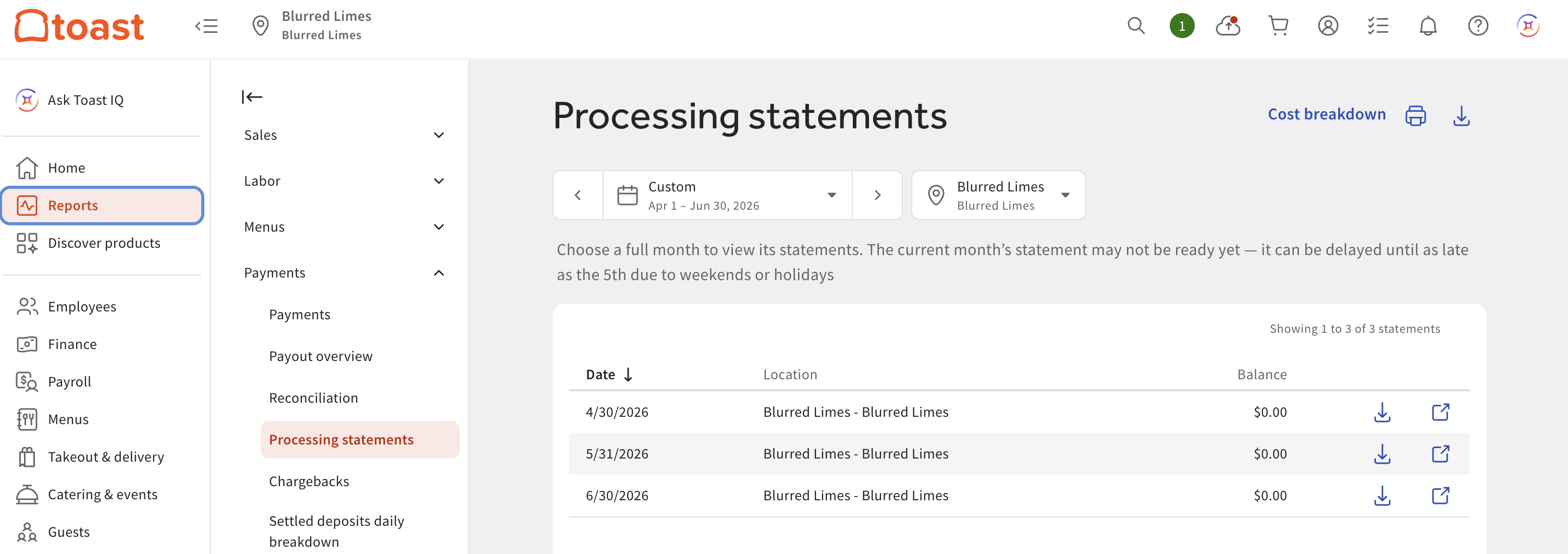
Note: The Processing statements report covers a date range within the last 25 months and cannot be longer than six months. To run a period longer than six months, split your date filter into six-month increments and run the report more than once.
Processing Statements Line Items
Each row below is a line item you may see on the report and what it represents.
| Line Item | What It Represents |
|---|---|
| Payments | The total amount of card payments made to the restaurant. If the merchant account balance is short at the end of the month, an ACH transfer may be made to settle the account, and it appears here when a payment is received. |
| Refunds | The total amount refunded to the guest. |
| Fees | The fee amount based on your credit card processing rate. |
| Fee Adjustments | When card fees are applied to a sale, they are estimated based on the information available to Toast and removed from the balance before the next-day deposit. Small rounding discrepancies can apply a penny or two where they should not. At the end of the month, Toast's system calculates the true card fees and adjusts the merchant account for the balance needed. |
| Other Withholdings | A combined figure that can include Marketplace Facilitator Tax, Toast Delivery Services, Toast Capital loans, Instant Deposit amounts, and EasyPay leases. See Other Withholdings Explained below for where to find the detail behind each. |
| Net | Net Sales = Total Sales Amount − (Tax + Gratuity + Tips + Deferred Amounts). |
| Previous Credit Card Balance | The amount left over in the merchant account Toast uses to process card fees before depositing payments to your account. A leftover amount can occur if Toast did not issue a credit to your bank account on file at the end of the prior month. |
| Monthly Adjustments | See Fee Adjustments above. Monthly Adjustments reflect the end-of-month true-up of estimated card fees to actual card fees. |
Other Withholdings Explained
Other Withholdings is a combined figure, so a single number on the statement can represent more than one type of deduction. To see what makes up your Other Withholdings, check the source for each component:
- Marketplace Facilitator Tax: check your Sales Summary report, or the reports from your third-party delivery provider.
- Toast Delivery Services: check the Digital Order Source report.
- Toast Capital: check your Toast Capital Dashboard.
- Instant Deposit: see Get Started With Instant Deposit.
- EasyPay leases: review your lease agreement details.
For a comprehensive breakdown of withholdings against your deposits, you can also review the Payout Overview report under Reports > Payments.
When Your Statement Is Available
Your first credit card processing statement arrives during the first week of the month following your first credit card payment. For example, if you process your first card payment in March, your first statement is available in early April.
Each month's statement covers the prior calendar month and posts in the first week of the following month. Until a new statement posts, you can review your daily activity under Reports > Payments. Daily-billed customers can use the Payout Overview report for a complete view of deposits and fee withholdings by day. For all customers, the Settled Deposits Daily Breakdown and Deposit Totals Overview reports are also available.
Frequently Asked Questions
What does "Other Withholdings" mean on my processing statement?
"Other Withholdings" on your processing statement is a combined figure that can include Marketplace Facilitator Tax, Toast Delivery Services, Toast Capital loan amounts, Instant Deposit amounts, and EasyPay leases. Because it groups several deduction types into one number, check the source report for each component to see the detail: Sales Summary for Marketplace Facilitator Tax, the Digital Order Source report for Toast Delivery Services, and your Toast Capital Dashboard for Toast Capital. For a combined view of withholdings against your deposits, review the Payout Overview report. If you are a daily-billed customer, daily fee deductions appear as labeled withholding line items in the Payout Overview report, making it the clearest place to see exactly what was deducted each day.
Also asked as:
-
- What are the other withholdings on my credit card processing statement?
- How and when are other withholdings settled?
- How do I see what my other withholdings are?
What are the monthly adjustments on the processing statement?
The monthly adjustments on the processing statement reflect the end-of-month true-up between the card fees Toast estimated during the month and the actual card fees. When card fees are applied to a sale, they are estimated and removed before the next-day deposit, which can create small rounding differences. At the end of the month, Toast calculates the true card fees and posts a Monthly Adjustment to settle the difference.
Also asked as:
-
- Can you explain the monthly adjustment on my statement?
- Why do I have a credit card balance with monthly adjustments on my statement?
What does the "Fees" line item mean?
The "Fees" line item is the credit card processing fee amount based on your credit card processing rate. For a detailed breakdown of how your rate is calculated, see Credit Card Processing Rate and Review Credit Card Processing Fees.
Also asked as:
-
- What does Fees refer to on my statement?
- Why are my credit card fees on the statement higher than expected?
Where do I find my processing statement, and when is it available?
You find your processing statement under Reports > Payments > Processing statements in Toast Web. Each statement covers the prior calendar month and posts during the first week of the following month, so the previous month's statement may not be available on the first day of the new month. Until it posts, daily-billed customers can use the Payout Overview report for a complete view of deposits and fee withholdings by day. For all customers, the Settled Deposits Daily Breakdown report is also available for daily activity. For step-by-step download instructions, see View Monthly Statements.
Also asked as:
-
- When do we receive the processing statement each month?
- When will last month's processing statement be available?
- How do I get my credit card processing statement?
Why doesn't the amount on my statement match my bank deposit?
Your processing statement may not match your bank deposit because the statement summarizes monthly card activity and fees, while your bank deposit reflects daily net settlements after fees. To reconcile the two, compare your statement against the Settled Deposits Daily Breakdown and Payout Overview reports under Reports > Payments, which show daily deposits, fees deducted, and net amounts credited to your bank. If you are a daily-billed customer, note that daily fee withholdings appear as labeled line items in the Payout Overview report rather than being bundled into a single deduction, which makes it easier to match specific fee amounts to your statement. If you still cannot account for a specific difference after comparing these reports, contact Toast Customer Care with the billing period, amount, and a screenshot.
Also asked as:
-
- Why is my net deposit different from my bank deposit?
- Why are the credit card charges on my bank statement higher than I expected?
How do I match a charge on my bank statement to my processing statement?
To match a charge on your bank statement to your processing statement, identify the charge code in the bank statement memo line first. Charge codes such as CCD and EOM typically correspond to your processing statement. If the charge code is something other than the above two, please contact Toast Customer Care.
Also asked as:
-
- What is the CCD charge on my bank statement?
- What does EOM mean on my bank statement?
Related Articles
- View Monthly Statements
- Toast Credit Card Processing and Billing FAQ
- Review Credit Card Processing Fees
- Credit Card Processing Rate