Unsubscribe From Toast Status Updates
Last updated: Sep 18, 2026, 10:55 AM
Question
- How do I unsubscribe from the Toast status updates?
- How do I stop receiving emails and/or text messages about Toast's incidents and scheduled maintenance?
Answer
Unsubscribe From Toast Status Email Updates
To stop receiving Toast status email updates, follow these steps:
- Visit status.toasttab.com.
- Select Subscribe To Updates in the top-right corner of the screen.
- Enter your email address and select Subscribe via Email.
- You will receive a confirmation email. Scroll down to the bottom of the email and select Manage your subscription.
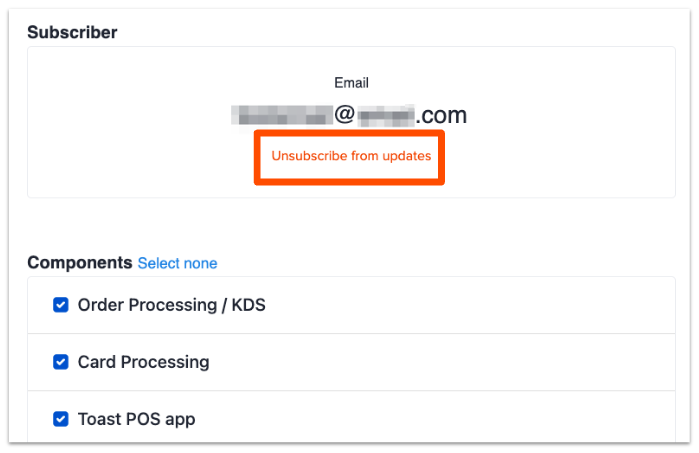
- You will be redirected to the subscription information page; from there, select Unsubscribe from updates.
- Note: If you still want to receive specific types of notifications, you can deselect certain components and save your changes instead of unsubscribing altogether.
- From the pop-up window, choose Unsubscribe from updates to confirm your selection.
Unsubscribe From Toast Status SMS Updates
To stop receiving Toast status text message updates, follow these steps:
- Visit status.toasttab.com.
- Select Subscribe To Updates in the top-right corner of the screen.
- Select the phone icon.
- Enter your phone number and select Subscribe via Text Message.
- You will receive a text message with a link to unsubscribe.