Use Single-Use Promotion Codes
Last updated: Sep 17, 2026, 4:23 PM
- Single-Use Promotion Codes Overview
- Add a Single-Use Promo Code to a Discount
- Apply Single-Use Promotion Code
Single-Use Promotion Codes Overview
Single-use promo codes give you the ability to create one-time-use discounts for your guests for Online Ordering and POS (Point of Sale) transactions. These codes are great for:
- Acquiring new guests to visit your location and try the menu
- Retaining existing guests for repeat business
- Winning back guests and encouraging them to visit again
Once created, these promo codes can be emailed, posted on social media, or print marketing for your guests to use.
In Toast Web, navigate to Finance > Related > Settings > Discounts & promo codes to see all of your configured discounts. Select the edit pencil next to a discount you wish to add a promo code to, or select + Add a Discount to create a new discount with a promo code.
To learn more about creating and managing discounts, check out this Support Center article: Get Started with Discounts.
To learn more about adding promo codes to your one-time email campaigns with Toast Email Marketing, check out this article: Add a Promo Code to Your Email Marketing Campaign.
Add a Single-Use Promo Code to a Discount
- On the discount details page, scroll down to the Promo Codes section and select + Add Promo Code.
- Enter a code and description, and check off the box in the Single-use column. You can also enter a start/end date for the promo code if desired.
- Save and publish your changes.
Apply Single-Use Promotion Code
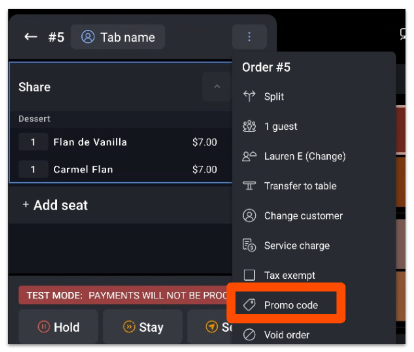
- You can add a single-use promo code to an item or an open check by selecting the three-dot overflow menu at the top.
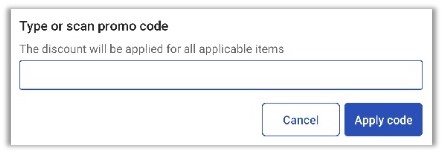
- Enter or scan the promo code, then select Apply code.
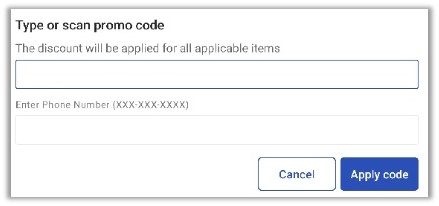
- Then, you will be prompted to enter the guest's phone number. Enter your guest's phone number, then select Apply code.
- If the code has already been used, a message will appear indicating that the code is no longer valid.
- If the code has already been used, a message will appear indicating that the code is no longer valid.