View Sales From Email Marketing Campaigns
Last updated: Sep 17, 2026, 7:01 PM
View Total Impact of Email Campaigns
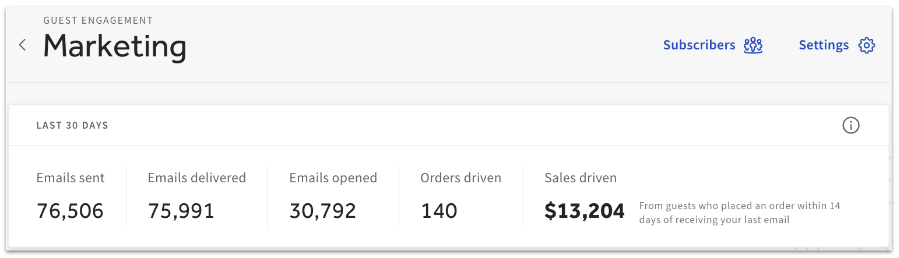
In Toast Web, navigate to Marketing > Email marketing > Campaigns. This will bring you to your Email Marketing dashboard, where you'll be able to see the total number of emails delivered to customers, how many of those emails were opened, and the combined sales of guests who made purchases in your restaurant within 14 days of receiving a marketing email in their inbox.
View Impact of a Single Campaign
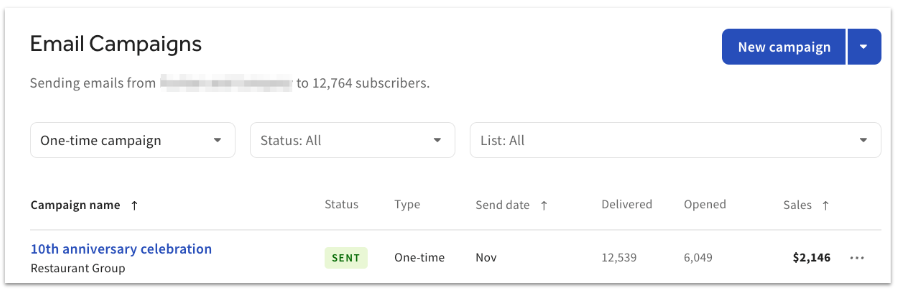
Estimated sales per campaign are displayed in the Sales column on your Email Marketing dashboard three days after the campaign has been sent to guests. Please note that the number of orders placed or the total number of guests attributed to a campaign is not available now. To view more campaign information such as campaign sales statistics, email start date, etc.), select the three dots next to the estimated campaign sales amount, and choose Details.
Estimated Sales Calculation
Estimated sales are the total dollar amount attributed to orders placed due to your recent marketing campaign(s).
Toast attributes a guest's order to your marketing campaign if the guest places an order within 14 days of receiving your email, and provides their email address with the order.
The guest may provide their email address in several ways:
- Requesting a digital receipt
- Paying with a credit card linked to their Toast rewards account
- Signing up for a Toast rewards account
- Placing an online order
A campaign's estimated sales amount first appears on the dashboard at least 72 hours after sending the campaign. The amount is then recalculated once a day to capture new revenue. Not all orders count towards the estimated sales amount, so your exact sales amount is likely higher than the estimate.
An order will not count towards estimated sales if:
- The guest placed more than one order after receiving your email. Only the first order placed within 14 days of receiving your email counts towards estimated sales.
- The guest who received your email did not provide their email address with the order.