Why won't the restaurant information change on the online ordering page?
Last updated: Sep 17, 2026, 4:17 PM
Question
- Why won't the restaurant information change on the online ordering page?
- I updated and published the location information page, but the changes are still not reflected on my online ordering website. What should I do to fix this?
- How to update my location information?
Answer
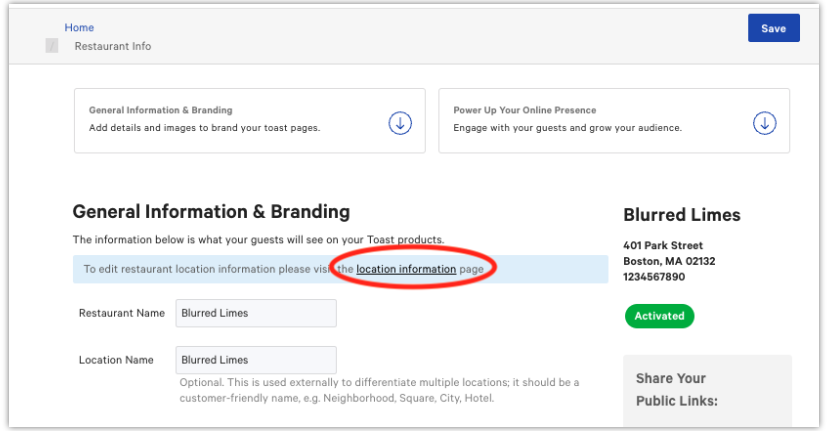
- Navigate to the Restaurant Information page and select Location Information in the blue banner at the top.
- Make your desired changes on the Location Information page and select Save.
- You will be returned to the main Restaurant Information page.
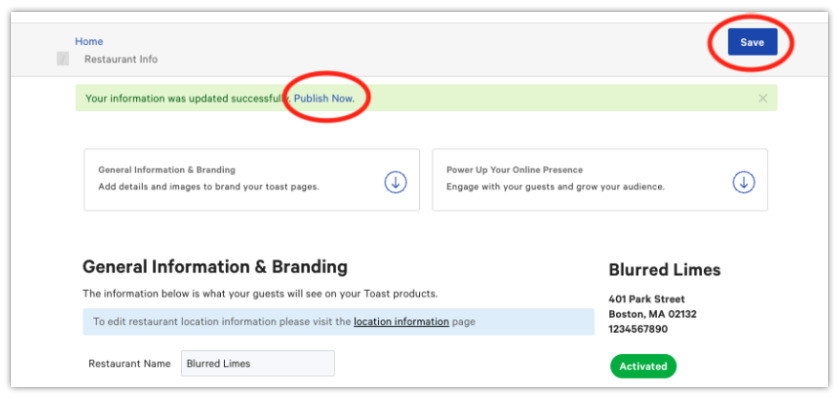
- To apply your updates, select Save again.
- A new banner will appear at the top of the page. Select the Publish button to make your changes live.
- Your new location details are now updated on your Online Ordering page.
Additional Information
Thank you for your patience as we improve this feature. We are currently fixing an issue that requires an extra step to update your information.
For now, to ensure your changes go live correctly, please remember to save your edits on both the Location Information page and the main Restaurant Information page.
Our team is actively working on a permanent solution to streamline this process. We appreciate your understanding.