Get Help With Your Meraki Router
Last updated: Oct 31, 2025, 11:12 AM
Learn to troubleshoot your Meraki router.
Meraki Router Details
The front side of your Meraki has an LED display that indicates the operational status of the router, and the back has 5 ethernet ports.
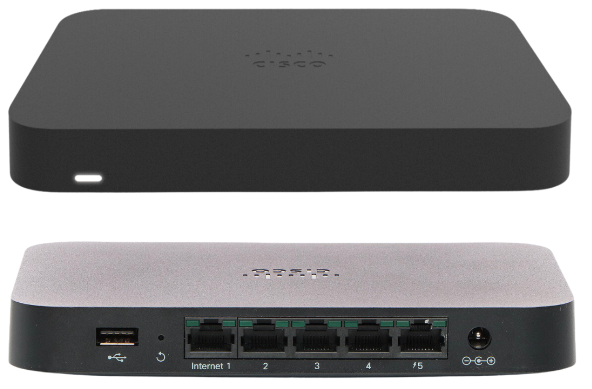
| Light Status | Meraki |
| Solid orange | There is no connectivity. |
| Changing colors | Trying to establish internet connectivity. |
| Blinking white | Updating firmware and configuration from the Meraki cloud. |
| Solid white | The device is online with full internet connectivity. |
Troubleshoot your Meraki Router Issues
- Confirm you have the internet port of the Meraki connected to your ISP modem. When plugged into this port, the router will light up with cycling rainbow colors as it gets connected, and eventually stabilize to a solid white light.
- If you still don't see a solid white light or cycling of rainbow colors, then try a different ethernet cable and wait a few minutes for the Meraki to reconnect.
- Unplug your devices and plug them back in. You can power cycle the ISP modem and the Meraki by disconnecting the power cable from the device for a minute or two and reconnecting it. Wait for the status light to cycle through rainbow colors.
- If you're still unable to get either a solid white light or cycling of rainbow colors, then call your internet service provider (ISP) and confirm whether you have a Static IP or DHCP. Your Meraki should be able to connect if you have DHCP, so if you are unable to establish a connection, then your ISP may be able to advise here. If you have a Static IP you will want to contact Customer Care or your Onboarding Consultant with this information for further troubleshooting.
Troubleshooting steps with Meraki images
If these steps did not help resolve the issue, reach out to your Onboarding Consultant or Toast Customer Care to speak to a Networking Specialist for further assistance.
Note: If your restaurant is frequently experiencing network disconnections or network interruptions from your ISP (internet service provider), cellular failover options can be used. Please consult your own IT team regarding failover options that are compatible with your Cisco Meraki router and continue to utilize Toast in Offline Mode.
Check out our article regarding Offline Mode: Using Toast During an Internet Service Provider (ISP) Outage for more information.