xtraCHEF: Get Started With User Roles
Last updated: Jul 7, 2026, 3:37 PM
Roles Overview
Want to invite your team to your xtraCHEF account? Tenant Administrators, also referred to as Tenant Admins, can add and manage users. Tenant Admin can also grant their users specific privileges within the account depending on staff members' position or need to access certain features.
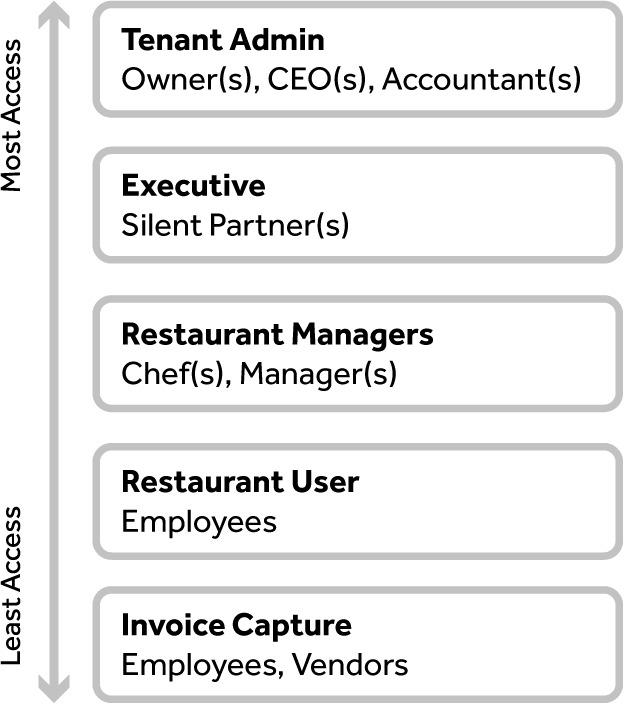
There are five roles available in xtraCHEF: Tenant Administrator, Executive, Restaurant Manager, Restaurant User, and Invoice Capture.
User roles can be adjusted by Tenant Admins via these steps:
- Navigate to the gear icon > Users.
- Use the search bar to locate the individual in question.
- Select their pencil icon.
- Select the User Access tab.
- Mark the checkbox for the role a user should have and select +Update to save your changes. Users should only be assigned one role, as each role encompasses the privileges below it.
- If a user leaves your organization or no longer needs to be involved with xtraCHEF, revoke their access by deselecting any and all checkboxes in the User Access tab.
Role Levels
Now that we've covered the basics, let's take a closer look at each role starting with Tenant Administrator.
Tenant Administrator
Tenant Administrators are often owners, supervising/regional managers, or others who need a high level of visibility, access, and control across all parts of xtraCHEF.
There's no limit to how many Tenant Admins an account can have, but since Tenant Administrators have far-reaching and exclusive privileges, it's important to choose them carefully.
There are certain actions in xtraCHEF that can only be taken by a Tenant Admin, including adding and editing locations, adding and managing users, adding and editing accounting integrations and data, account configuration, approvals, and more. Ideally, your Tenant Admin(s) should be an expert in your organization's processes, have a good working knowledge of xtraCHEF (or be willing to learn), and initially be in contact with your xtraCHEF Onboarding Consultant to keep things running smoothly.
Executive
Executive is a read-only role in xtraCHEF. Team members who you grant this role can view everything in xtraCHEF, and have unfettered access to financial reports and other valuable data. However, Executives can't take any action. This is a role typically assigned to silent partners, investors, or team members who only need to view reporting.
Back to top
Restaurant Manager
Restaurant Manager is the most common role in xtraCHEF. Restaurant Managers are frequently general managers, executive chefs, or others who are deeply involved with some or all of your organization's locations. Restaurant Managers must be assigned to each individual location.
For each of their assigned locations, Restaurant Managers can perform a number of tasks such as exporting data, creating orders, and managing xtraCHEF's Recipe feature.
Back to top
Restaurant User
Restaurant Users are generally shift leads or assistant managers who are involved in the day to day work of uploading invoices and taking inventory. Restaurant Users can accomplish a variety of front and back of house tasks in xtraCHEF but do not have permission to edit or make changes to their location's account.
Restaurant Users must be added to each one of your locations - they will not be able to view data for locations they haven't been assigned.
Back to top
Invoice Capture
Cooks, bartenders, and others who handle receipts/invoices but don't need to analyze data are ideal candidates for the Invoice Capture role. This role can easily upload invoices to xtraCHEF via mobile, desktop, or email.
Since people assigned the Invoice Capture role can't see any part of xtraCHEF beyond the upload interface, there's no risk of accidental changes or sensitive information leaks.
Back to top
Features by Role Breakdown
Need a more in depth breakdown of roles and the features they have access to? The chart below breaks out just this. Read on to learn the specifics of each role level.
| Module | xtraCHEF Feature | Feature Description | Tenant Administrator | Executive | Restaurant Manager | Invoice Capture | Restaurant User |
|---|---|---|---|---|---|---|---|
| Dashboard | Upload Documents | Upload Documents from Dashboard | ✅ | ✅ | ✅ | ✅ | ✅ |
| Dashboard | Search Invoice | Search Invoice from Dashboard | ✅ | ✅ | ✅ | ✅ | ✅ |
| Dashboard | Invoices | Invoice Tile | ✅ | ✅ | ✅ | ✅ | ✅ |
| Invoice | Invoice listing | View Invoice listing (for Invoice Capture role, only self-loaded documents will be visible) | ✅ | ✅ | ✅ | ✅ | ✅ |
| Invoice | Invoice Upload | Uploading of Invoice (single and batch) | ✅ | ✅ | ✅ | ✅ | ✅ |
| Invoice | Invoice Location Change | Invoice Location Change | ✅ | ✅ | ✅ | ✅ | ✅ |
| Invoice | View Invoice | Ability to Edit Invoice Header Level Data | ✅ | ✅ | ✅ | ❌ | ✅ |
| Invoice | View Invoice | Ability to Edit Invoice Line Level Data | ✅ | ✅ | ✅ | ❌ | ✅ |
| Invoice | View Invoice | Ability to Edit Category Invoice amount Breakup | ✅ | ✅ | ✅ | ❌ | ✅ |
| Invoice | View Invoice | Ability to Edit Credit line details | ✅ | ✅ | ✅ | ❌ | ✅ |
| Invoice | Rejected | Reject invoice and enter reject review comments | ✅ | ✅ | ✅ | ❌ | ✅ |
| Invoice | Export CSV | Ability to export the invoice listing | ✅ | ✅ | ✅ | ✅ | ✅ |
| Credit and Return Management | Credits and Returns | Capture Credit Image through a camera | ✅ | ✅ | ✅ | ✅ | ✅ |
| Credit and Return Management | Credits and Returns | Upload Credit Image | ✅ | ✅ | ✅ | ✅ | ✅ |
| Credit and Return Management | Credits and Returns | "Apply Credit" switch against each credit line | ✅ | ✅ | ✅ | ✅ | ✅ |
| Credit and Return Management | Credits and Returns | Capture Category wise Invoice Amount Breakup | ✅ | ✅ | ✅ | ✅ | ✅ |
| Credit and Return Management | Credits and Returns | View credits in the credit tile on the dashboard | ✅ | ✅ | ✅ | ✅ | ✅ |
| Location Management | Locations | Add/Modify/View Locations | ✅ | ❌ | ❌ | ❌ | ❌ |
| User Management | Users | Add/Modify/View Users | ✅ | ❌ | ❌ | ❌ | ❌ |
| User Management | Users | Reset password for users | ✅ | ❌ | ❌ | ❌ | ❌ |
| GL Code Management | GL Codes | Add/Modify/View GL Codes | ✅ | ❌ | ❌ | ❌ | ❌ |
| GL Code Management | GL Codes | Enable/Disable GL Codes | ✅ | ❌ | ❌ | ❌ | ❌ |
| Category Management | Custom Categories | Add/ Modify/ View Custom Categories | ✅ | ❌ | ❌ | ❌ | ❌ |
| Category Management | Custom Categories | Enable/Disable Custom Categories | ✅ | ❌ | ❌ | ❌ | ❌ |
| COGS Management | COGS Groups | Add/Modify/View COGS Groups | ✅ | ❌ | ❌ | ❌ | ❌ |
| Configurations | Tenant Configuration | Setup Invoice threshold, Start day of the week, Allow credit entry | ✅ | ❌ | ❌ | ❌ | ❌ |
| Budget Management | Budget | Create and monitor declining budgets | ✅ | ❌ | ✅ | ❌ | ✅ |
| Inventory Management | Map Inventory | Assign categories to inventory items | ✅ | ✅ | ✅ | ❌ | ❌ |
| Exception Management | Exceptions | View and clear the exceptions | ✅ | ✅ | ✅ | ❌ | ❌ |
| Approval Management | Approval | View and approve invoices | ✅ | ✅ | ✅ | ❌ | ✅ |
| Approval Management | Approval Rule | Define Approval rules and enable /disable them | ✅ | ❌ | ❌ | ❌ | ❌ |
| Cost Center Management | Cost Center | Create cost centers/groups | ✅ | ❌ | ❌ | ❌ | ❌ |
| Item Library Management | Product Verification | Review invoice items and approve | ✅ | ❌ | ❌ | ❌ | ❌ |
| Item Library Management | Manage Catalog | Ability to manage invoice items catalog of their own purchase | ✅ | ✅ | ✅ | ❌ | ❌ |
| Search Management | Invoice Search | Comprehensive search for Invoice properties | ✅ | ✅ | ✅ | ❌ | ❌ |
| Reconciliation | Reconciliation | Reconcile invoices uploaded | ✅ | ✅ | ✅ | ❌ | ✅ |
| Vendor Hub | Vendor Management | View/Edit vendor details | ✅ | ✅ | ✅ | ❌ | ❌ |
| Vendor Hub | Payment Terms | Assign payment terms to a vendor | ✅ | ❌ | ✅ | ❌ | ❌ |
| Vendor Management | Payment Terms | Add/Edit payment terms | ✅ | ❌ | ❌ | ❌ | ❌ |
| Receipt Management | Payment Methods | Define payment methods for assigning to receipts | ✅ | ❌ | ❌ | ❌ | ❌ |
| Extract Monitor | Export Management | Extract Monitor to view export files | ✅ | ❌ | ✅ | ❌ | ❌ |
| Price Tracker | Analytics | Access Purchase Price Tracker | ✅ | ✅ | ✅ | ❌ | ✅ |
| 7 DAY Change | Analytics | Access 7 day Change metric | ✅ | ✅ | ✅ | ❌ | ✅ |
| COGS | Analytics | Access 7 day COGS metric | ✅ | ✅ | ✅ | ❌ | ✅ |
| Analytics | Reconciliation | View invoice reconciliation report | ✅ | ✅ | ✅ | ✅ | ✅ |
| Analytics | Spending by GL | View/Filter spending distributed across GLs | ✅ | ✅ | ✅ | ❌ | ✅ |
| Analytics | Category Weekly | View category wide spending weekly | ✅ | ✅ | ✅ | ❌ | ✅ |
| Analytics | Food Cost Weekly | View Food Cost by COGS weekly | ✅ | ✅ | ✅ | ❌ | ✅ |
| Analytics | Volume | View invoice volume across locations | ✅ | ✅ | ✅ | ❌ | ✅ |
| Analytics | Spending by Category | View/Filter spending distributed across categories and locations | ✅ | ✅ | ✅ | ❌ | ✅ |
| Analytics | Spending by Vendor | View/Filter spending distributed across vendors and locations | ✅ | ✅ | ✅ | ❌ | ✅ |
| Analytics | Unit Comparison | View comparison of food cost per unit between two locations | ✅ | ✅ | ✅ | ❌ | ✅ |
| Reports | Purchase History | Create Purchase groups | ✅ | ✅ | ✅ | ❌ | ✅ |
| Reports | Purchase History | View report by unit cost | ✅ | ✅ | ✅ | ❌ | ✅ |
| Reports | Purchase History | View report by price fluctuation | ✅ | ✅ | ✅ | ❌ | ✅ |
| Reports | Food Cost Ratio | View/download report on Food Cost Ratio | ✅ | ✅ | ✅ | ❌ | ✅ |
| Reports | Invoice Summary by GL | View/Download invoice summary by GL | ✅ | ✅ | ✅ | ❌ | ✅ |
| Reports | Spend Summary by GL | View/Download report for spending distributed across GLs and locations | ✅ | ✅ | ✅ | ❌ | ✅ |
| Reports | GL Distribution Report | View /Download report for GL distribution for invoice | ✅ | ❌ | ✅ | ❌ | ✅ |
| Reports | GL Summary Report | GL Summary across locations | ✅ | ❌ | ✅ | ❌ | ✅ |
| Reports | Contracted Price Variance Report | Price variance report based on the contracted price for invoice items | ✅ | ❌ | ✅ | ❌ | ✅ |
| Reports | Top 100 Product Purchase Report | List the top 100 invoice items purchased | ✅ | ❌ | ✅ | ❌ | ✅ |
| Reports | Operation Reports | All Operation Reports | ✅ | ✅ | ✅ | ❌ | ✅ |
| Reports | Administrative Reports | Usage Report | ✅ | ✅ | ✅ | ❌ | ✅ |
| Order | Outbound Order | Recent Orders List | ✅ | ❌ | ✅ | ❌ | ✅ |
| Order | Order | Order History | ✅ | ❌ | ✅ | ❌ | ✅ |
| Order | Order | Create Order | ✅ | ❌ | ✅ | ❌ | ✅ |
| Order | Order | Add to Cart | ✅ | ❌ | ✅ | ❌ | ✅ |
| Order | Order | Check Out | ✅ | ❌ | ✅ | ❌ | ✅ |
| Order Guide | Bid sheet | Upload Bid Sheet | ✅ | ❌ | ✅ | ❌ | ✅ |
| Order Guide | Create | Create Order Guide | ✅ | ❌ | ✅ | ❌ | ✅ |
| Order Guide | Edit | Edit Order Guide | ✅ | ❌ | ✅ | ❌ | ✅ |
| Order Guide | Order Guide | Schedule | ✅ | ❌ | ✅ | ❌ | ✅ |
| Order Guide | Order Guide | Download | ✅ | ❌ | ✅ | ❌ | ✅ |
| Order History | Order History | Export | ✅ | ❌ | ✅ | ❌ | ✅ |
| Statements | Upload | Upload Statements | ✅ | ✅ | ✅ | ❌ | ✅ |
| Recipe | Recipe Menu | Access to Recipe Module | ✅ | ❌ | ✅ | ❌ | ❌ |
| Recipe | Menus | Shows Menu | ✅ | ❌ | ✅ | ❌ | ❌ |
| Recipe | Recipe | Shows Recipes | ✅ | ❌ | ✅ | ❌ | ❌ |
| Recipe | Prep Recipe | Shows Prep Recipe | ✅ | ❌ | ✅ | ❌ | ❌ |
| Recipe | Variance Analysis | Variance Analysis | ✅ | ❌ | ✅ | ❌ | ❌ |
| Recipe | Product Mix Report | Product Mix Report | ✅ | ❌ | ✅ | ❌ | ❌ |
| Recipe | Product Mapping Report | Product Mapping Report | ✅ | ❌ | ✅ | ❌ | ❌ |
| Recipe | Configurations | Configurations | ✅ | ❌ | ✅ | ❌ | ❌ |
| Inventory | Inventory Counts | Counting the inventory | ✅ | ✅ | ✅ | ❌ | ✅ |
| Inventory | Count Lists | Creating count lists | ✅ | ✅ | ✅ | ❌ | ✅ |
| Inventory | Area Set up | Create the Areas where they will track their inventory | ✅ | ❌ | ✅ | ❌ | ✅ |
| Inventory | Manage Waste | tracks the waste produced by unprocessed inventory | ✅ | ❌ | ✅ | ❌ | ✅ |
| Inventory | Analytics | Actual Vs Theoretical analysis/depleting inventory | ✅ | ❌ | ✅ | ❌ | ✅ |
| Inventory | Reports | Reports Inventory by GL/Inventory summary/Variance | ✅ | ❌ | ✅ | ❌ | ✅ |
| Sync Monitor | Sync Monitor | Shows the monthly calendar with information about the sales entered | ✅ | ✅ | ✅ | ❌ | ✅ |
| Operating Summary | Operating Summary | Provides a real-time snapshot of financial health by calculating Gross and Net Profits | ✅ | ✅ | ✅ | ❌ | ❌ |