Las traducciones se proporcionan solo a modo de cortesía. Es posible que los acuerdos legales con Toast, incluidos, entre otros, el Acuerdo de comerciante y el Acuerdo de licencia de usuario final, deban celebrarse en un idioma distinto al que se utiliza en esta página y que los términos de esos acuerdos se apliquen independientemente de que se proporcionen o no traducciones de esta página a otros idiomas.
Agregar una ventana emergente de verificación de edad a tu sitio web
Última actualización: 16 sept 2026, 12:40 p.m.
Pregunta
- ¿Cómo agrego una ventana emergente de “21 años o más” a mi sitio web?
- ¿Cómo agrego una ventana emergente de verificación de edad a mi sitio web?
Respuesta
Para agregar una ventana emergente de verificación de edad a tu sitio web de Toast, sigue estos pasos:
- En Toast Web, ve a Sitios web > Editor y marca.
- Selecciona el botón Editar sitio.
- Desplázate hacia abajo hasta la sección Verificación y selecciona la plantilla de verificación 21+.
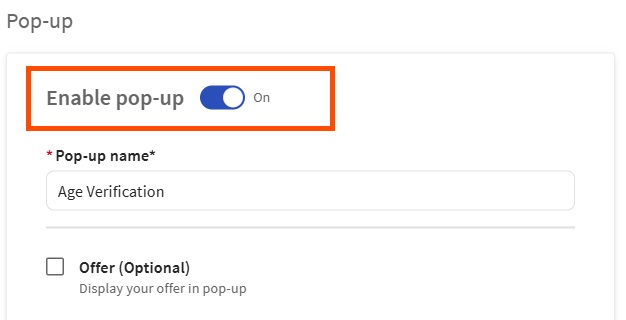
- Activa la ventana emergente de verificación de edad activando la posición Activar ventana emergente. Desde la página de la ventana emergente, podrás configurar su diseño, contenido, ubicación, visibilidad, cómo aparece en la página y cómo se cierra.
- Una vez configurada la configuración de ventanas emergentes, selecciona Listo.
- Selecciona el botón Publicar para publicar los cambios.