Las traducciones se proporcionan solo a modo de cortesía. Es posible que los acuerdos legales con Toast, incluidos, entre otros, el Acuerdo de comerciante y el Acuerdo de licencia de usuario final, deban celebrarse en un idioma distinto al que se utiliza en esta página y que los términos de esos acuerdos se apliquen independientemente de que se proporcionen o no traducciones de esta página a otros idiomas.
Menú de desbordamiento de acciones de cuenta
Última actualización: 16 sept 2026, 5:13 p.m.
Pregunta
- ¿Cómo divido una cuenta?
- ¿Cómo descuento una cuenta?
- ¿A dónde voy para dividir o descontar una cuenta?
Respuesta
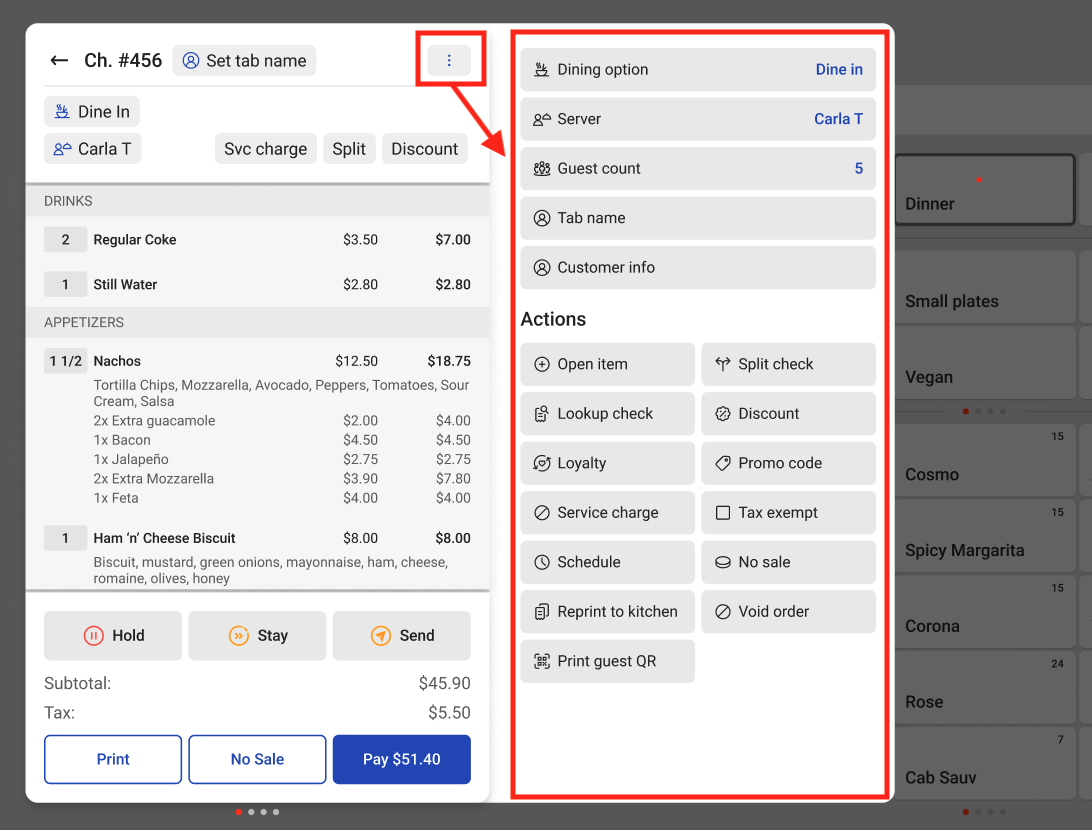
Algunas acciones de la cuenta se pueden encontrar en el menú de desbordamiento de la cuenta. El menú de desbordamiento está formado por los tres puntos verticales ubicados en la esquina superior derecha de la cuenta en el POS. En este menú, puedes dividir una cuenta y aplicar un descuento, entre otras cosas, como se ve en la imagen a continuación.