Las traducciones se proporcionan solo a modo de cortesía. Es posible que los acuerdos legales con Toast, incluidos, entre otros, el Acuerdo de comerciante y el Acuerdo de licencia de usuario final, deban celebrarse en un idioma distinto al que se utiliza en esta página y que los términos de esos acuerdos se apliquen independientemente de que se proporcionen o no traducciones de esta página a otros idiomas.
Navega tu dispositivo Android
Última actualización: 17 sept 2026, 7:02 p.m.
Aprende lo básico sobre cómo navegar un dispositivo Android.
En este artículo: 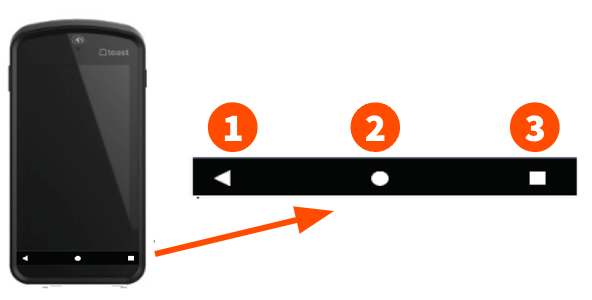
Navega tu dispositivo Android
La aplicación Toast funciona en dispositivos Android. Al usar un dispositivo Android, puedes utilizar 3 botones en la parte inferior de tu pantalla para navegar entre aplicaciones, regresar a tu última pantalla o visitar la pantalla de inicio del dispositivo.
- El primer botón a la izquierda (el triángulo que apunta a la izquierda) es el botón de Atrás.
- El botón del medio (círculo) es el botón de Inicio.
- El botón de la derecha (cuadrado) es el botón de Aplicaciones recientes.
Consejos útiles para Android
- Para mostrar el panel de notificaciones, desliza hacia abajo desde la parte superior de la pantalla.
- Para cerrar o forzar la salida de una aplicación, selecciona el botón de aplicaciones recientes y desliza hacia arriba sobre la aplicación que deseas cerrar.
- Para desinstalar una aplicación, presiona y mantén presionado el ícono de la aplicación para solicitar una desinstalación.
- Para ir a la pantalla anterior o minimizar el teclado en pantalla, selecciona el botón de atrás.