Usar Bill Pay con la cuenta corriente de Toast
Última actualización: 7 oct 2026, 5:39 p.m.
Bill Pay es una función de cuentas por pagar dentro de la cuenta corriente de Toast que te permite enviar pagos directamente a tus proveedores.
Nota: Bill Pay dentro de la cuenta corriente de Toast es una herramienta separada de la función Bill Pay de xtraCHEF. See xtraCHEF: Primeros pasos con Toast Bill Pay para obtener más información.
- Resumen de Bill Pay
- Cargar una factura en Bill Pay
- Enviar un pago usando Bill Pay
- Experiencia de pago del proveedor
- Revisa y gestiona los pagos a proveedores de Bill Pay
- Preguntas frecuentes
Resumen de Bill Pay
Bill Pay es una función de cuentas por pagar dentro de Toast Web que te permite enviar pagos directamente a tus proveedores. Los usuarios que tengan la cuenta corriente de Toast y el permiso 8.1 Cuentas financieras pueden acceder a Bill Pay y enviar pagos.
Bill Pay ingresa automáticamente a tus cuentas bancarias verificadas en Toast y todos tus Jars de Toast Checking* al enviar una factura. Para agregar una nueva cuenta bancaria a tu cuenta de Toast, ve a esta página en Toast Web. Esta cuenta proporcionará tus pagos a través de Bill Pay. (En este momento, no admitimos tarjetas de crédito como método de pago).
No hay cargos asociados con el uso de Bill Pay. Si alguna vez agregamos una tarifa para usar Bill Pay, nos aseguraremos de avisarte con anticipación y nunca te cobraremos una tarifa sin tu consentimiento.
Si tienes más preguntas sobre cómo usar Toast Bill Pay, escríbenos a billpay@toasttab.com.
Cargar una factura en Bill Pay
Puedes cargar una factura en Bill Pay siguiendo estos pasos:
-
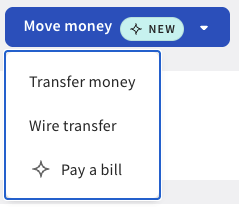
Accede a Pagar factura a través de este enlace Toast Web o selecciona Pagar factura en tu panel de la cuenta corriente de Toast*.
-
Dentro del panel Bill Pay, selecciona Pagar una factura.
- Suelta un archivo PDF, JPG o PNG de tu factura en el cuadro Cargar una factura o selecciona Cargar para abrir el selector de archivos.
- Una vez cargada, el sistema extraerá automáticamente los detalles de la factura por ti.
- Selecciona la opción deseada dentro de los campos Detalles del pago.
- Selecciona Revisar y enviar para enviar el pago.
Enviar un pago usando Bill Pay
Puedes usar Bill Pay para enviar un pago a tu proveedor con o sin factura adjunta. Para enviar un pago sin factura, sigue estos pasos:
- Navega hasta Bill Pay en Toast Web.
- Selecciona Pagar una cuenta en la esquina superior derecha.
- Selecciona el proveedor o crea un nuevo proveedor (ver Gestionar proveedores en Bill Pay).
- Completa los detalles de la factura:
- Número de factura y fecha de vencimiento (opcional)
- Monto de la factura
- Selecciona los detalles del pago:
- Pagar ahora o programar pago
- Método de pago
- Método de desembolso a proveedores
- Selecciona Revisar y pagar.
- Selecciona Enviar pago.
Los pagos se pueden realizar en Bill Pay con fines comerciales y no personales a una persona o entidad que sea proveedora de bienes y servicios. Dependiendo de tu selección al enviar un pago, tu proveedor puede recibir pagos mediante transferencia ACH o cheque físico:
- Para pagarle a tu proveedor con cheque, proporciona su dirección postal.
- Para pagarle a tu proveedor mediante transferencia ACH, proporciona su número de cuenta bancaria y su número de ruta.
- Si no tienes la información ACH de tu proveedor, puedes proporcionar la dirección postal del proveedor y enviar el pago por cheque.
Si un pago falla, recibirás un correo electrónico con el motivo del error. Puedes ver directamente los detalles en el panel Bill Pay si seleccionas Detalles de facturación.
Planificación de pagos de Bill Pay
Para pagos enviados en días hábiles antes de las 10:55 p. m. ET, los fondos se retiran el mismo día (a menos que se programen para una fecha futura). Si la fecha de pago programada cae en un feriado federal o un fin de semana, o envías el pago después de las 10:55 p. m. ET, el procesamiento de pagos comenzará el siguiente día hábil.
Al programar un pago para una fecha futura, puedes elegir tu tipo de pago y la velocidad (de 10 a 12 días hábiles para una cuenta o de 5 a 7 días hábiles para ACH), según tus necesidades, en Detalles del pago al enviar un pago.
Cancelar un pago de Bill Pay
Puedes cancelar los pagos que están programados para una fecha futura. Los pagos con estado “Procesando” no se pueden cancelar porque el movimiento de dinero ya está en curso. Para cancelar un pago, sigue estos pasos:
- Ve al Panel de Bill Pay y busca el pago que deseas cancelar.
- Selecciona los tres puntos verticales ( ⋮ ) junto al pago.
- Selecciona Cancelar pago.
Experiencia de pago del proveedor
- Si se te paga mediante transferencia ACH, tu proveedor verá los primeros cinco caracteres del nombre de tu negocio, seguidos de los últimos cuatro dígitos de la referencia o número de factura de la factura. Por ejemplo, “Ejemplo de crédito ACH para proveedores: Resta-1234."
- Si se te paga con cheque, tu proveedor recibirá un cheque físico, que se entregará en la dirección de remisión registrada. El cheque estará firmado por “Toast Inc.” El campo del memo listará el número de factura, si se proporciona, o un ID de referencia de factura generado por el sistema, si no se proporciona.
Al crear un proveedor, puedes optar por enviar correos electrónicos de remisión de pagos a la dirección de correo electrónico del proveedor. Si eliges enviar un correo electrónico a tu proveedor, se le notificará cuando se le haya enviado el pago; esto incluirá el nombre de tu negocio, la referencia de la factura o el número de factura (opcional), la fecha de pago, el monto del pago y la dirección de envío (si se pagó con cheque).
Para garantizar que tus proveedores cobren a tiempo, ofrecemos diferentes opciones de velocidad de pago (cheque o transferencia ACH). Al enviar tus pagos, selecciona el método que mejor se adapte a tus necesidades.
Nota: Las cuentas que no se cobren dentro de los 90 días posteriores a su emisión se anularán automáticamente y los fondos se devolverán a tu cuenta. Cuando esto ocurra, recibirás una notificación por correo electrónico.
Revisa y gestiona los pagos a proveedores de Bill Pay
Puedes ver los detalles del pago seleccionando los tres puntos verticales ( ⋮ ) junto a la cuenta y, luego, seleccionando Ver detalles.
Puedes hacer un seguimiento del estado de tus pagos yendo a tu Panel de Bill Pay y consultando la columna Estado. Los estados de pago que puedes ver incluyen:
- Planificado: El pago está planificado para comenzar a procesarse. Estos pagos se pueden cancelar.
- Procesamiento: Los pagos comenzaron a procesarse y estamos enviando pagos a tu proveedor. Estos pagos no se pueden cancelar.
- Cancelado: Se canceló el pago programado o anulaste la transacción de pago. No se transfirieron fondos.
- Error: El pago no se puede procesar. Envía otra factura una vez corregido el motivo del error.
- Acción necesaria: El pago no se puede procesar; se requiere acción para completar correctamente el pago.
- Pagado: Se debitaron fondos de tu cuenta y se pagó a tu proveedor.
- Reembolso pendiente: el reembolso está en curso. Los fondos aún no se reembolsaron a tu cuenta.
- Reembolso: Tu proveedor no pudo recibir el pago de la cuenta o ACH. Esto significa que te devolvimos los fondos.
FAQ
¿Puedo hacer varios pagos de Bill Pay de Toast Checking en una sola transacción?
En este momento, no, no admitimos múltiples pagos en una sola transacción.
¿Proporcionas asistencia para la antigüedad de la cuenta corriente de Toast Bill Pay?
Sí, Toast ofrece asistencia para el envejecimiento de cuentas revisando todas las cuentas que tienen más de 30 días, cada mes. Te enviaremos una notificación por correo electrónico de todos los pagos pendientes, si los hay, y trabajaremos contigo para detener y reembolsar el pago.
*Toast no es un banco asegurado por la FDIC. Servicios bancarios proporcionados por Thread Bank, miembro de la FDIC. El seguro de depósitos de la FDIC cubre la quiebra de un banco asegurado. La cobertura del seguro de traspaso está sujeta a condiciones.