xtraCHEF: Configurar integración con Sage Intacct
Última actualización: 9 jul 2026, 4:04 p.m.
| Esta integración requiere acceso a las integraciones de socios de Toast. Para obtener más información, consulta Configurar integraciones de socios de Toast.
Los productos de terceros, como Sage Intacct, se proporcionan únicamente de acuerdo con la garantía y otros términos especificados por el proveedor de terceros, que es el único responsable del servicio y el soporte de su producto.
Para comenzar a integrar Sage Intacct con Toast, consulta Primero pasos con la integración de Sage Intacct. |
- Configuración de integración
- Usar clase (ID de ubicación) con extractos Intacct
- Ejemplo de sincronización de Intacct
- Integración con Sage Intacct: Solución de problemas y asistencia
Configuración de integración
Para admitir esta integración, deberás hacer algunos cambios en tu cuenta de Sage Intacct. Para hacerlo, necesitarás acceso de administrador en Sage Intacct.
Paso 1: Agregar usuario de servicios web
- En Sage Intacct, suscríbete a Servicios web visitando Empresa > Suscripciones.
- A continuación, desplázate hacia abajo hasta ver Servicios web y activa esta función. Con Servicios web activados, deberás darle a xtraCHEF acceso a tu cuenta creando un nuevo usuario web. Para hacerlo, regresa a la pestaña Empresa. Luego, selecciona Usuarios de servicios web y Agregar.
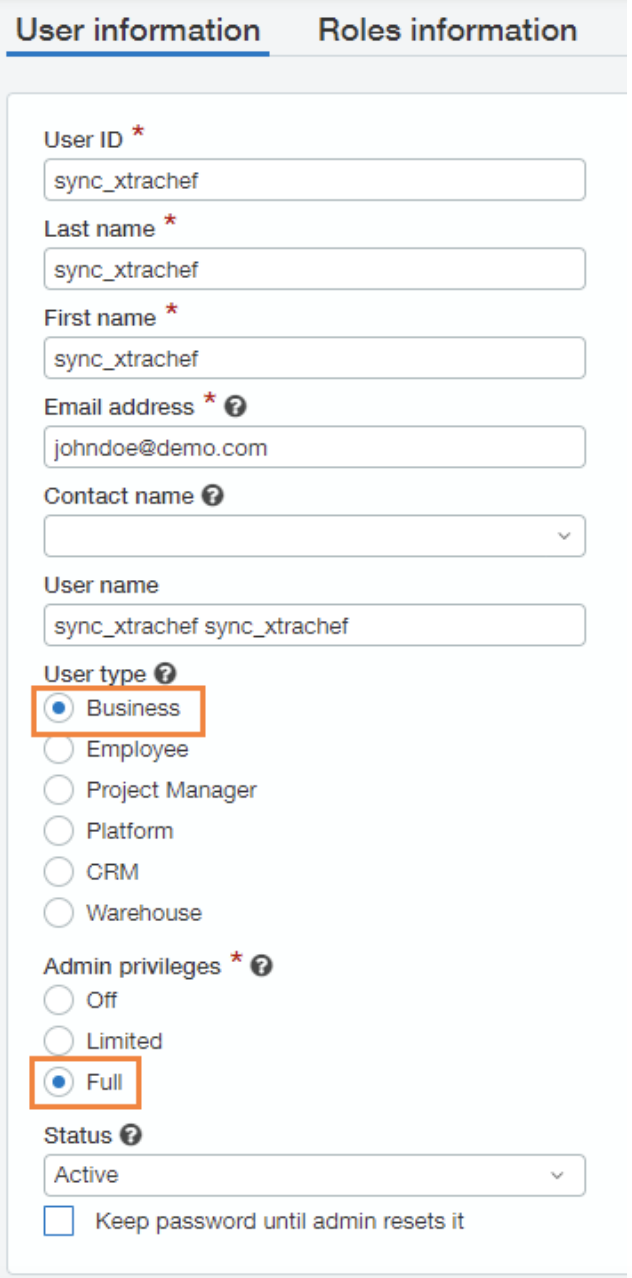
- Sage Intacct requerirá un identificador de usuario, nombre, apellido y dirección de correo electrónico. Ingresa “sync_xtrachef” como ID de usuario, nombre y apellido. Este nombre de usuario indicará un usuario no facturable y se usará estrictamente para la integración. Para el campo Dirección de correo electrónico restante, usa la dirección de la persona que gestiona tu cuenta de xtraCHEF a fin de que pueda supervisar tus próximas sincronizaciones.
- También deberás seleccionar Negociocomo tipo de usuario y otorgar privilegios de administración completos. Una vez creado el usuario de Servicios web de xtraCHEF, recibirás un correo electrónico de Sage Intacct con una contraseña temporal.
Paso 2: Editar permisos de suscripción
A continuación, deberás configurar permisos para este usuario de servicios web. Para hacerlo, regresa a la pestaña Empresa. Luego, selecciona Usuarios de servicios web y tu nuevo usuario (sync_xtrachef). Allí verás un botón de suscripciones. Selecciona Suscripciones para asegurarte de que los permisos estén habilitados para todos los módulos.
Paso 3: Editar permisos de roles
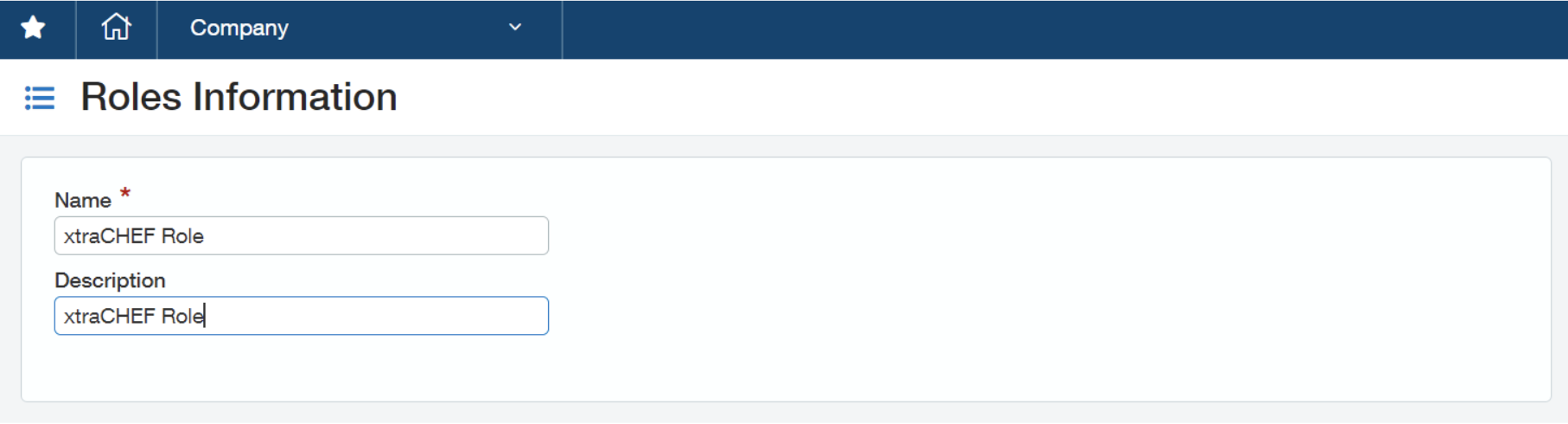
- Si usas permisos basados en roles, deberás crear un nuevo rol para el usuario (sync_xtrachef). Para hacerlo, selecciona Empresa en tus cuentas de Sage Intacct. Luego, selecciona Roles y Agregar.
- Para crear un rol, deberás agregar un nombre. Recomendamos nombrar este rol de xtraCHEF.
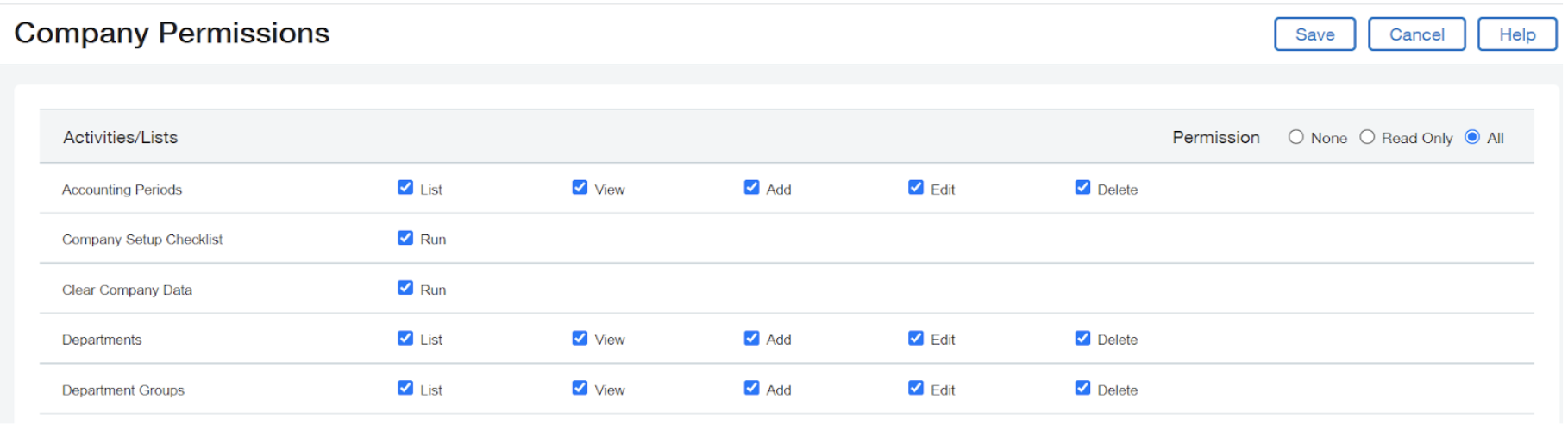
- Desde aquí, selecciona Todo para cada aplicación o módulo. Asegúrate de guardar los cambios una vez completados. Nota: Algunos módulos tienen una sección adicional de permisos para informes. Seleccionar todo para informes también
Paso 4: Agregar ID del remitente
- A continuación, agrega el identificador de remitente de tu empresa a la lista permitida en tu cuenta de Sage Intacct. Para hacerlo, selecciona Empresa > Información de la empresa. A continuación, selecciona Editar y, luego, Seguridad.
- Desplázate hacia abajo hasta la sección Autorizaciones de servicios web y agrega tu ID de remitente. Ingresa el ID del remitente que recibiste de Sage y asigna una descripción del ID del remitente para xtraCHEF.
- Si Sage lo solicita, el ID del remitente de xtraCHEF es xtraCHEFMPP.
- Por último, selecciona Guardar.
Paso 5: Agregar URL de factura
- Para que xtraCHEF sincronice correctamente las imágenes de las facturas con Sage Intacct, es necesario crear una URL de factura. Para hacerlo, selecciona Empresa > Servicio de personalización. A continuación, selecciona Campos personalizados.
- Para algunas cuentas, la sección Campos personalizados podría estar en Servicios de plataforma.
- Selecciona Agregar y, luego, eligeFactura de APen el menú desplegable Elegir objeto para extender.
- A continuación, selecciona URLen el menú desplegable Elegir tipo de datos de campo. Continúa seleccionando Siguiente.
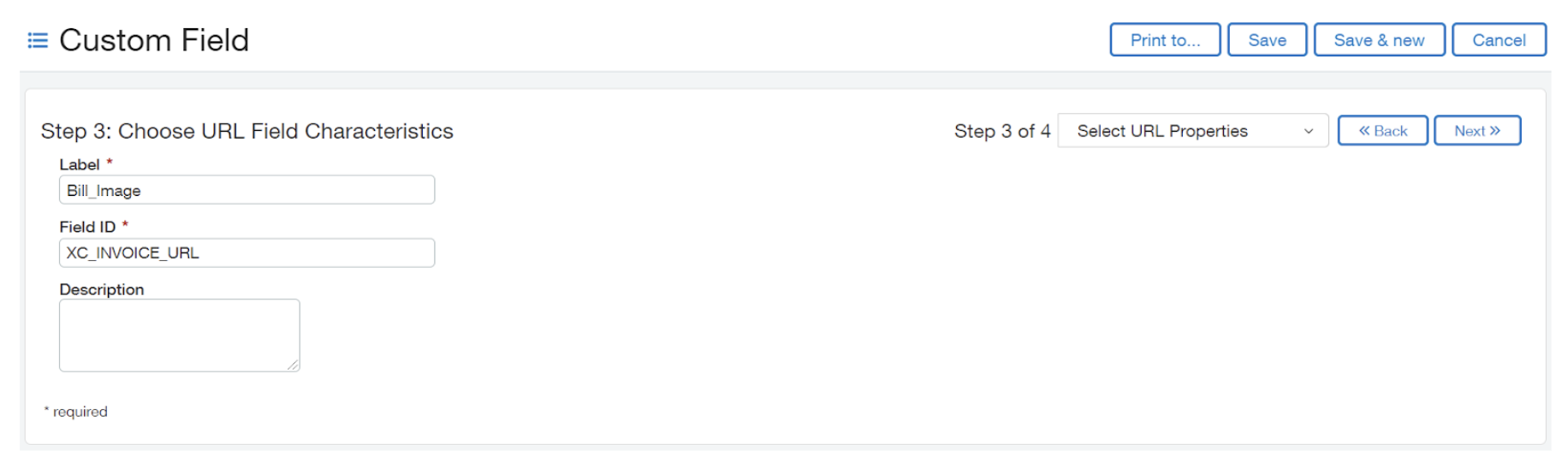
- Luego, se te pedirá que elijas Características del campo de URL. UnderLabel, enter "Bill_Image". Para tu ID de campo, ingresa “XC_INVOICE_URL”
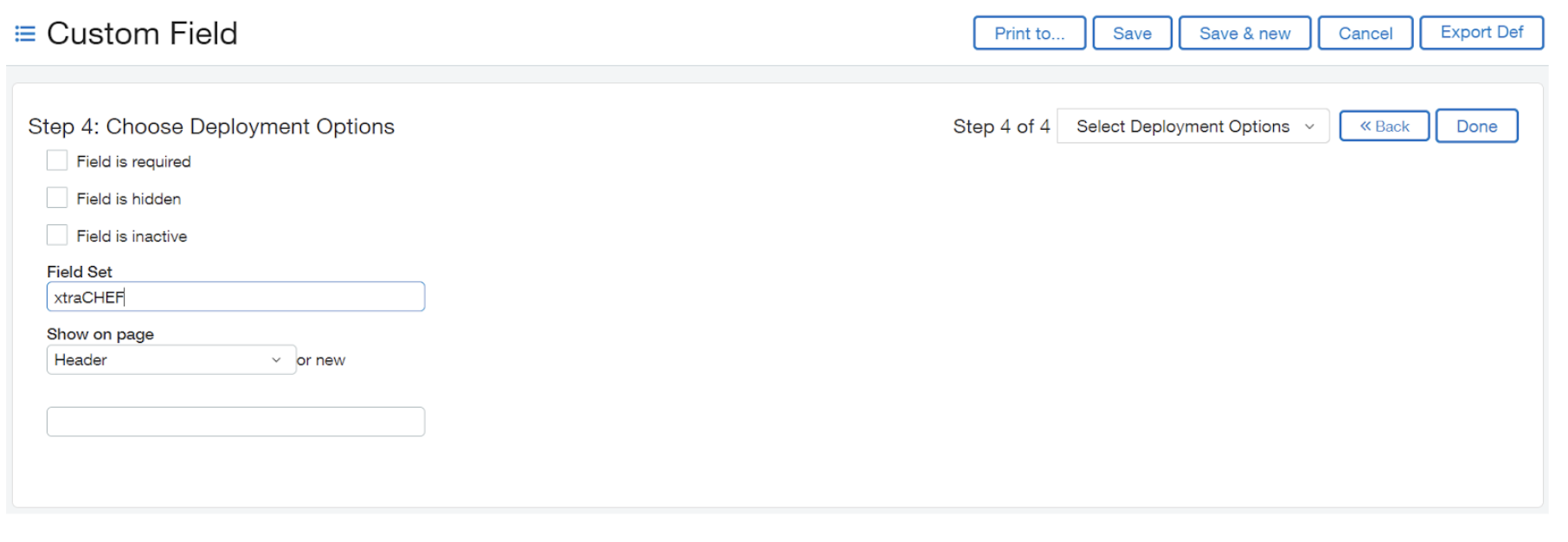
- Para continuar, selecciona Siguiente. A continuación, puedes elegir opciones de implementación. Ingresa “Configuración de campo” como “xtraCHEF” y “Mostrar en la página como “Encabezado”. Finalmente, selecciona Listo.


Paso 6: Configuración de xtraCHEF
- Una vez completados los pasos de configuración de Sage Intacct, podemos finalizar tu conexión con xtraCHEF. Para hacerlo, inicia sesión en tu cuenta de xtraCHEF y ve al ícono de engranaje > Configuración de cuenta.
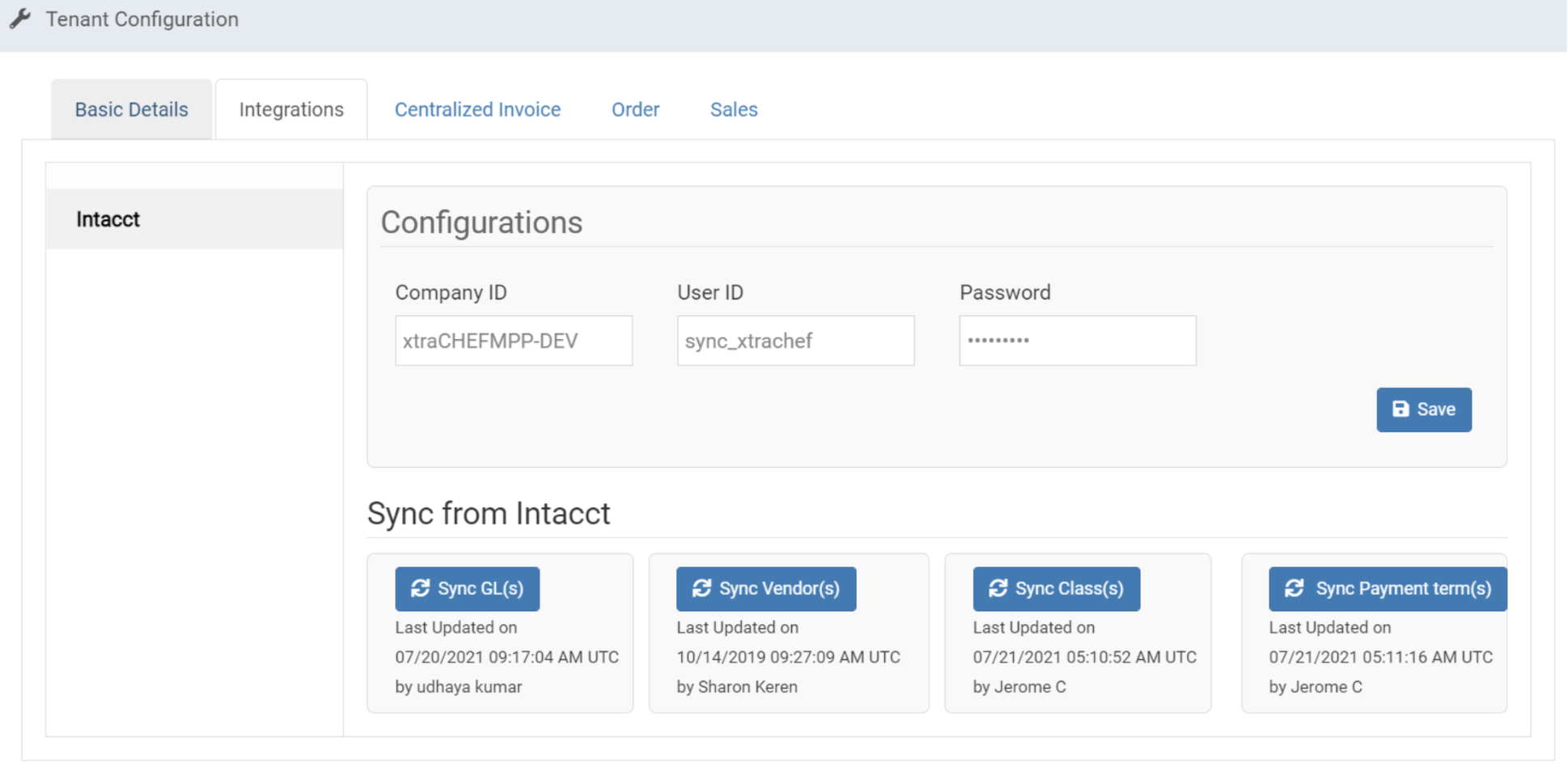
- Luego, selecciona Integraciones e Intactar. Aquí puedes ingresar los identificadores que configuraste previamente en tu cuenta de Sage Intacct. Con base en las instrucciones anteriores, estos campos deben decir lo siguiente:
- Identificador de empresa: Sage proporcionará este campo
- ID de usuario: sync_xtrachef
- Contraseña: Revisa el correo electrónico asociado con tu usuario de sync_xtrachef. Se envió por correo electrónico una contraseña a esa dirección cuando se creó el usuario en el paso 1 anterior.
Usar clase (ID de ubicación) con extractos Intacct
Los clientes pueden extraer facturas de xtraCHEF usando Class (a nivel de ubicación), Department o ambos. Para tener esto configurado en xtraCHEF, ve al ícono de engranaje > Ubicaciones. Luego, podrás seleccionar la ubicación que deseas extraer a nivel de ubicación y editar el número de cuenta de esta ubicación.
- Si solo deseas usar Class, el valor en el campo “Número de cuenta” debe ser el ID de Class de la ubicación en Intacct seguido de una tilde. Por ejemplo, ABCD~
- La clase puede etiquetarse como “ID de ubicación” en Intacct.
- Si solo deseas usar Departamento, el valor en el campo “Número de cuenta” debe ser una tilde seguida del ID del Departamento en Intacct. Por ejemplo, ~1234
- Si deseas usar clases y departamentos, el valor en el campo “Número de cuenta” debería verse algo así: ABCD~1234
Nota: La integración admite la extracción de facturas a nivel de factura de clase. Para configurar esta configuración, ponte en contacto con tu equipo de atención al cliente de xtraCHEF escribiendo a support@xtrachef.com.
Ejemplo de sincronización Intacct
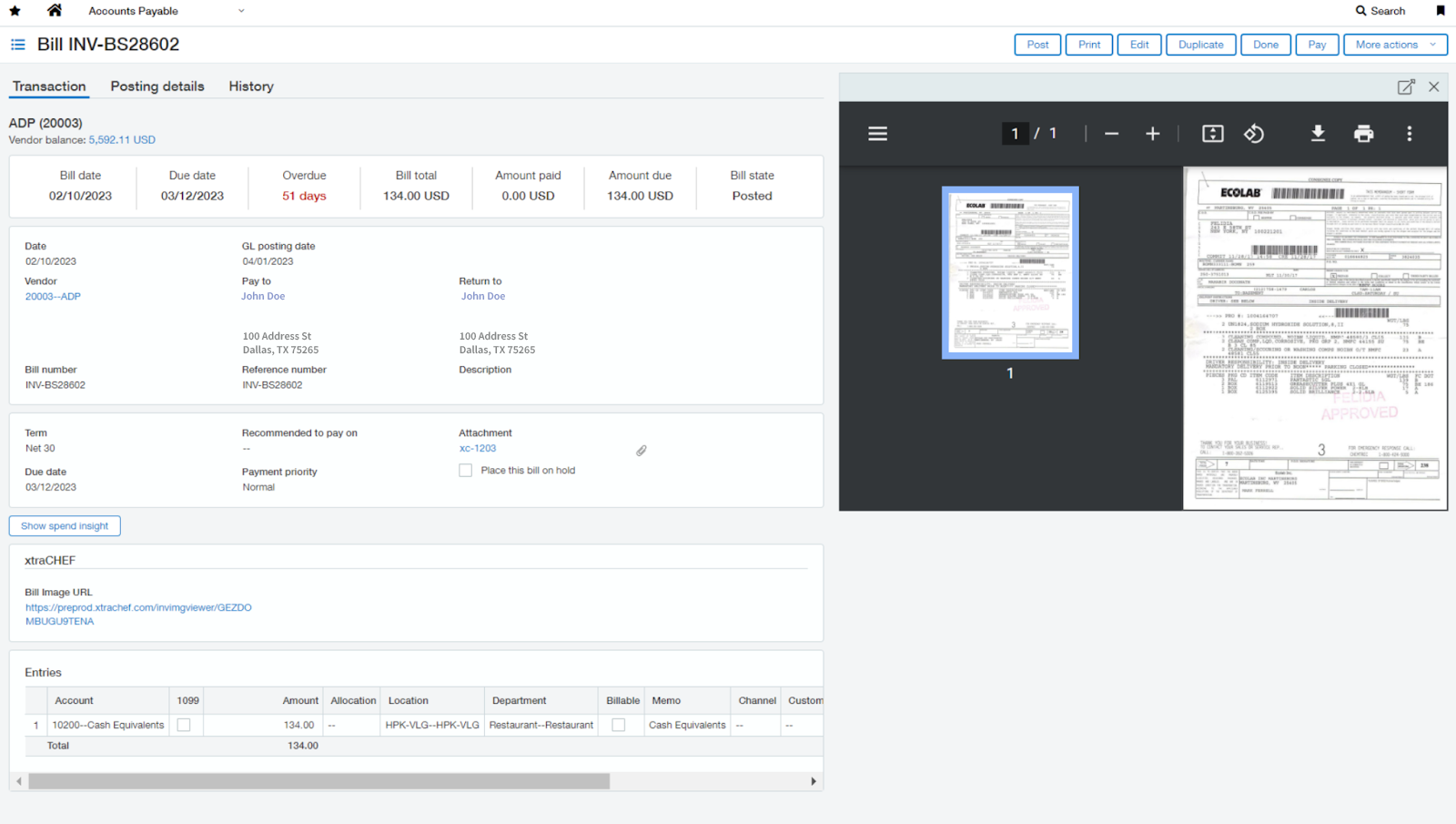
Una vez sincronizadas, las facturas se transferirán a tu sistema contable como factura. Del mismo modo, las ventas diarias aparecerán como asientos contables. La imagen a continuación representa un ejemplo de una factura sincronizada a través de la integración de xtraCHEF.
Integración con Sage Intacct: Solución de problemas y asistencia
Para cualquier pregunta o problema de asistencia relacionado con la integración de Sage Intacct, puedes ponerte en contacto con Sage Intacct en:
- Asistencia general
- Correo electrónico:Asistencia del POS
- Disponibilidad: De lunes a viernes, de 8:00 a. m. a 5:00 p. m. CET