Manage the Credit Card Surcharging Product
Dernière mise à jour : 8 oct. 2026, 12 h 19
 | Some customers or locations may not be eligible for Credit Card Surcharging. See Get Started with Credit Card Surcharging in Support Center for more information on eligibility criteria. |
| Credit Card Surcharging must be enabled before proceeding with the steps in the article below. See Get Started With Credit Card Surcharging in Support Center for more information on how to sign up. |
This content is for informational purposes and is not intended as legal, tax, HR, or any other professional advice. You are responsible for your own compliance with laws and regulations, including card brand rules. Please contact an attorney or other professional for specific advice. Note that this article applies to U.S. and U.S. territories only.
Once you’ve signed up for the Credit Card Surcharging product, you will need to complete additional compliance requirements to become fully compliant with card brand rules governing credit card surcharges at your restaurant. The Credit Card Surcharging page in Toast Web will indicate the required steps you MUST take to complete a rollout of surcharges at your restaurant that complies with card brand rules. From there, you can also manage and update your surcharge settings. Note that you may be required to take different or additional steps under laws and regulations applicable to you in your jurisdiction. You are responsible for taking any steps necessary to comply.
Note: Toast does not create or own any rules and regulations around card brand surcharging requirements. The requirements below, and the requirements embodied in Toast’s Credit Card Surcharging product, are all based on rules and restrictions established by the card brands. For more information on card brand compliance rules, such as Visa, see these external articles or consult articles/materials published by the card brands:
- Credit Card Surcharging Card Brand Rule Compliance Requirements
- Reporting
- Refunds
- Modify Credit Card Surcharging Settings
- Additional Resources
Credit Card Surcharging Rule Brand Compliance Requirements
After you've signed up for Toast Credit Card Surcharging, the right-hand side of the product will indicate the steps required by the card brands that you MUST take to complete a compliant rollout of Credit Card Surcharging at your restaurant. Note: After completing the initial sign-up process, there is a mandatory three-to-six-day waiting period before surcharges become active. An email notification is sent three days before activation to help you prepare.
To access the Credit Card Surcharging page in Toast Web:
- Navigate to Finance > Related > Settings > Credit card surcharging.
- In the middle of the page, you will see four steps that you will need to take to roll out surcharging at your location.
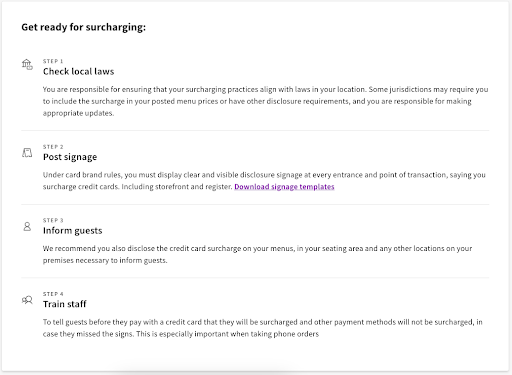
1. Check Local Laws
There may be laws in your jurisdiction that impact your surcharging practices. Toast Credit Card Surcharging is designed to comply with card brand rules, but not every local/state law that may have an impact on credit card surcharging or other guest-facing fees. You are responsible for ensuring that your surcharging practices are aligned with any applicable laws in your area.
As part of the card brand surcharging rules, you must display clear and visible disclosure signage at every entrance and point of transaction (e.g., storefront and registers) stating that your restaurant surcharges credit cards.
Toast automatically provides you with signage templates intended to comply with card brand rules, which you can download and print by selecting the Download signage templates button on the right-hand side of the Credit Card Surcharging page:

You are not required to use the signage templates required by Toast. You may choose to create your own signs and disclosures in accordance with card brand rules. However, you remain responsible for posting signage in accordance with applicable laws and rules, and making any changes necessary to comply.
3. Inform Guests
Toast recommends you inform your guests and disclose your credit card surcharge policy on your menus, in seating areas, etc. This is a recommended best practice to help ensure your guests are fully informed of your credit card surcharge.
Note: If you accept orders through Toast Online Ordering or Toast Local, in addition to posting physical signage in your restaurant, you should add the surcharging disclosure to your website and any menus posted online. Please note that if you reference any specific card brands on your website or any menus posted online, you must include the surcharging disclosure to comply with card brand rules.
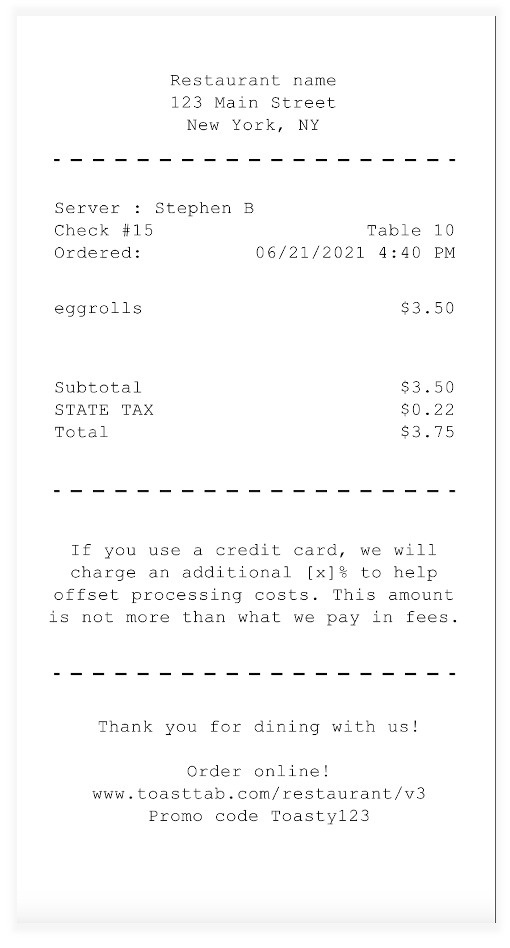
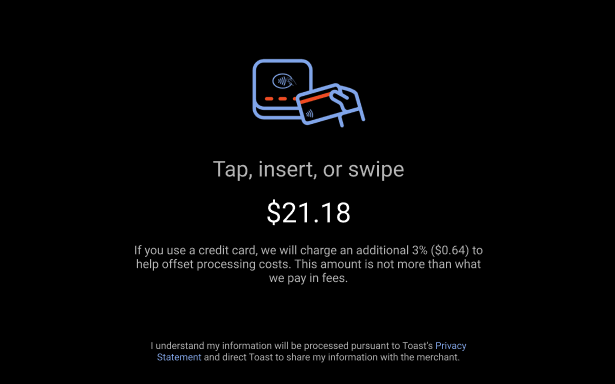
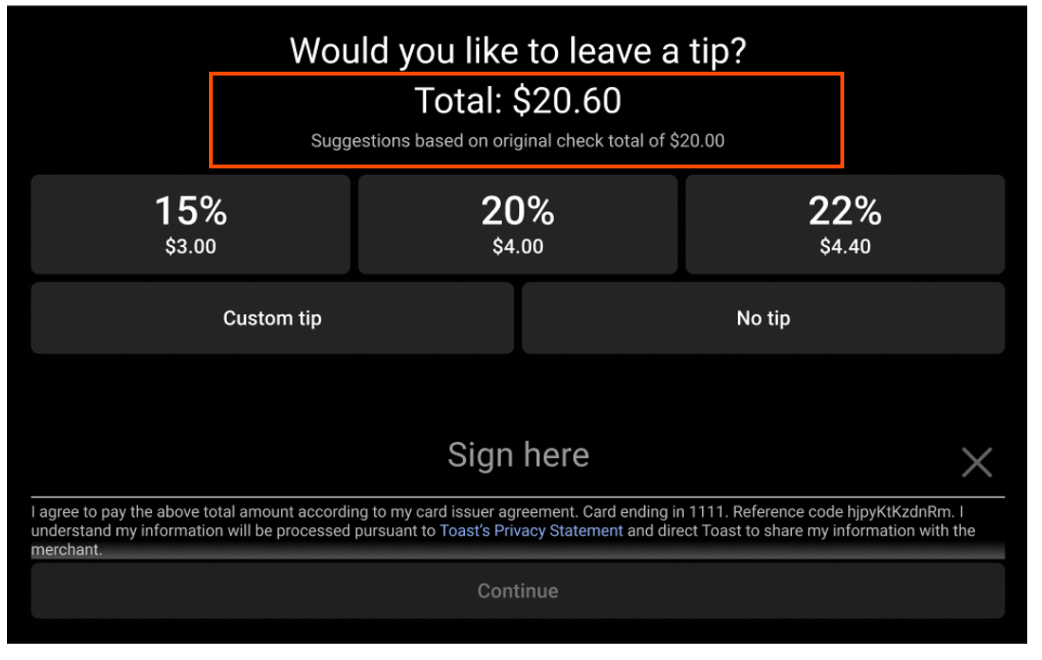
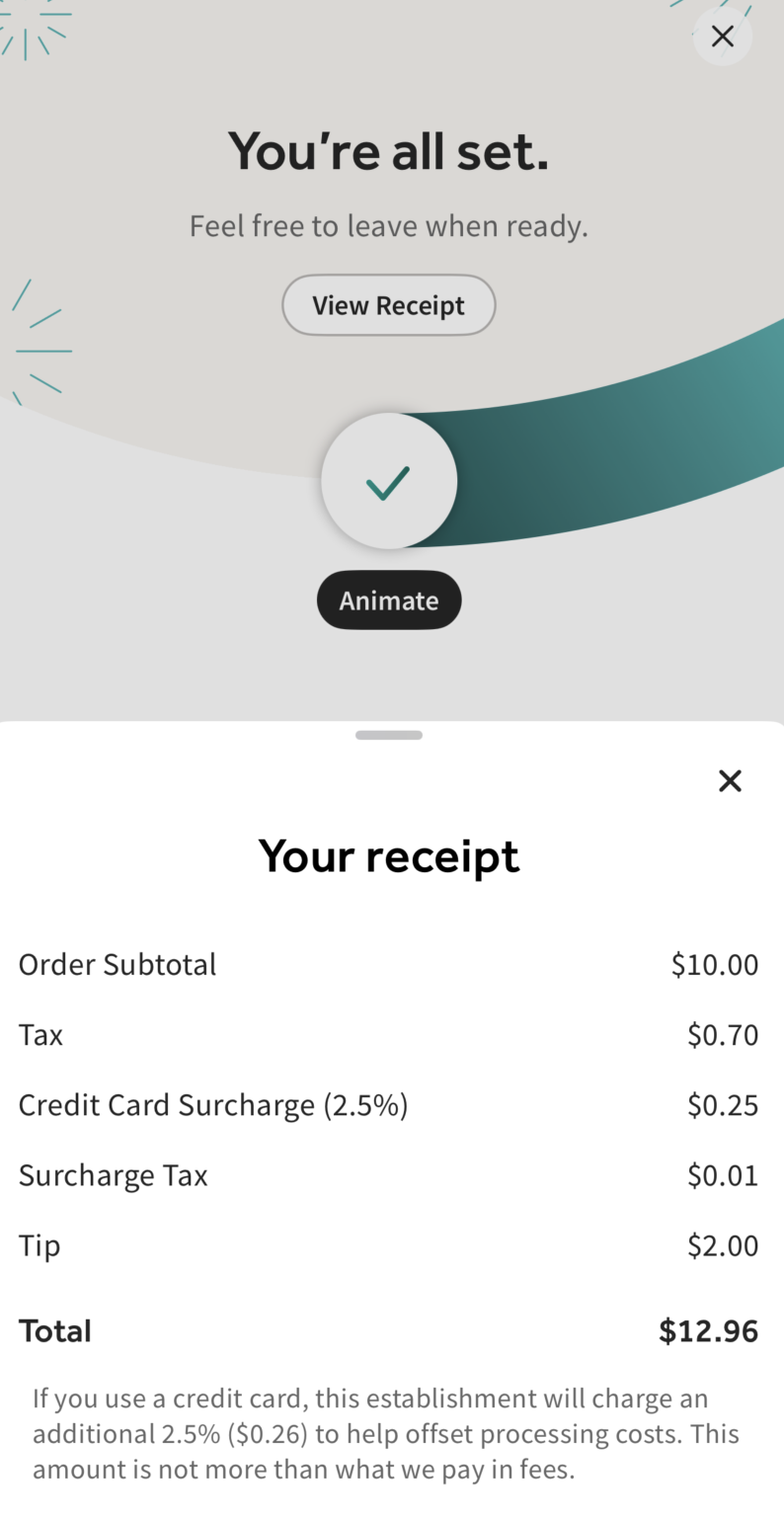
Towards the bottom right-hand side of the page, you will also get to see previews of how your surcharge will appear to your guests as they place orders in different channels to ensure they are informed of the surcharge in advance of making payment.
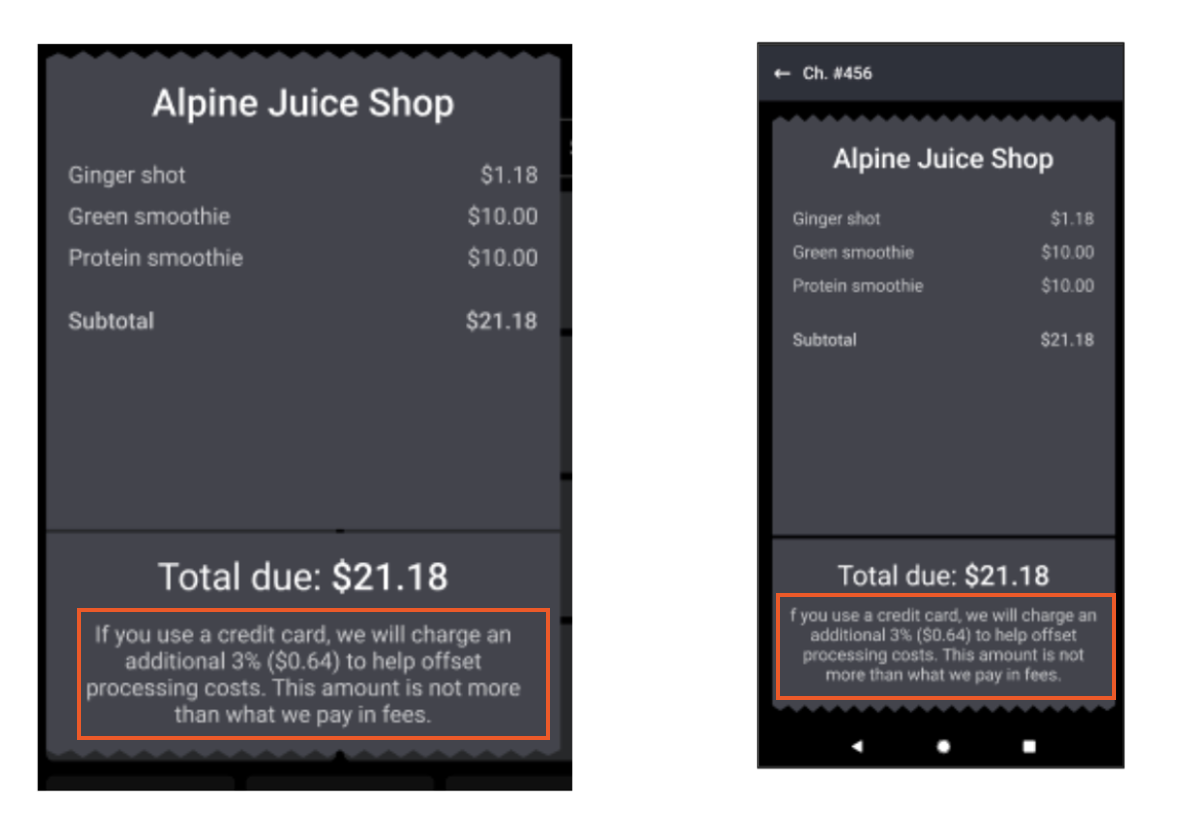
Disclosure on Printed Check:
Guest-Facing Display (GFD):
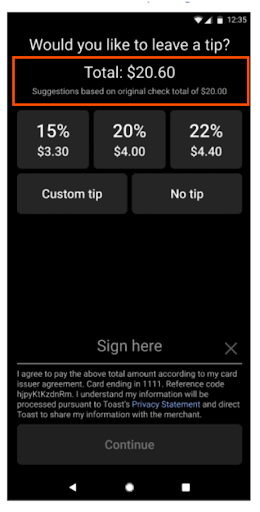
The tip and signature screen includes help text to provide clarity on tip suggestions for surcharged transactions:
Handheld:
The tip and signature screen includes help text to provide clarity on tip suggestions for surcharged transactions:
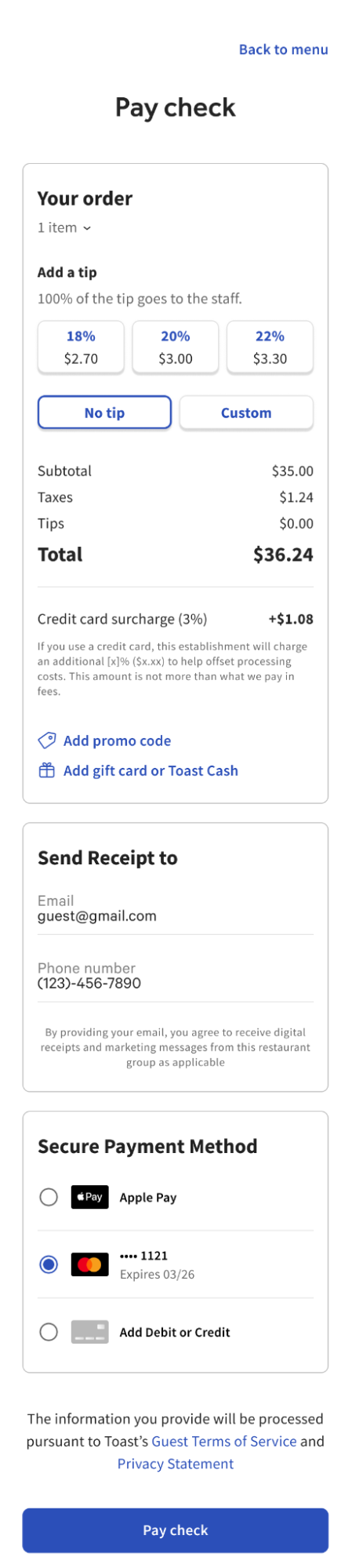
Mobile Order & Pay™
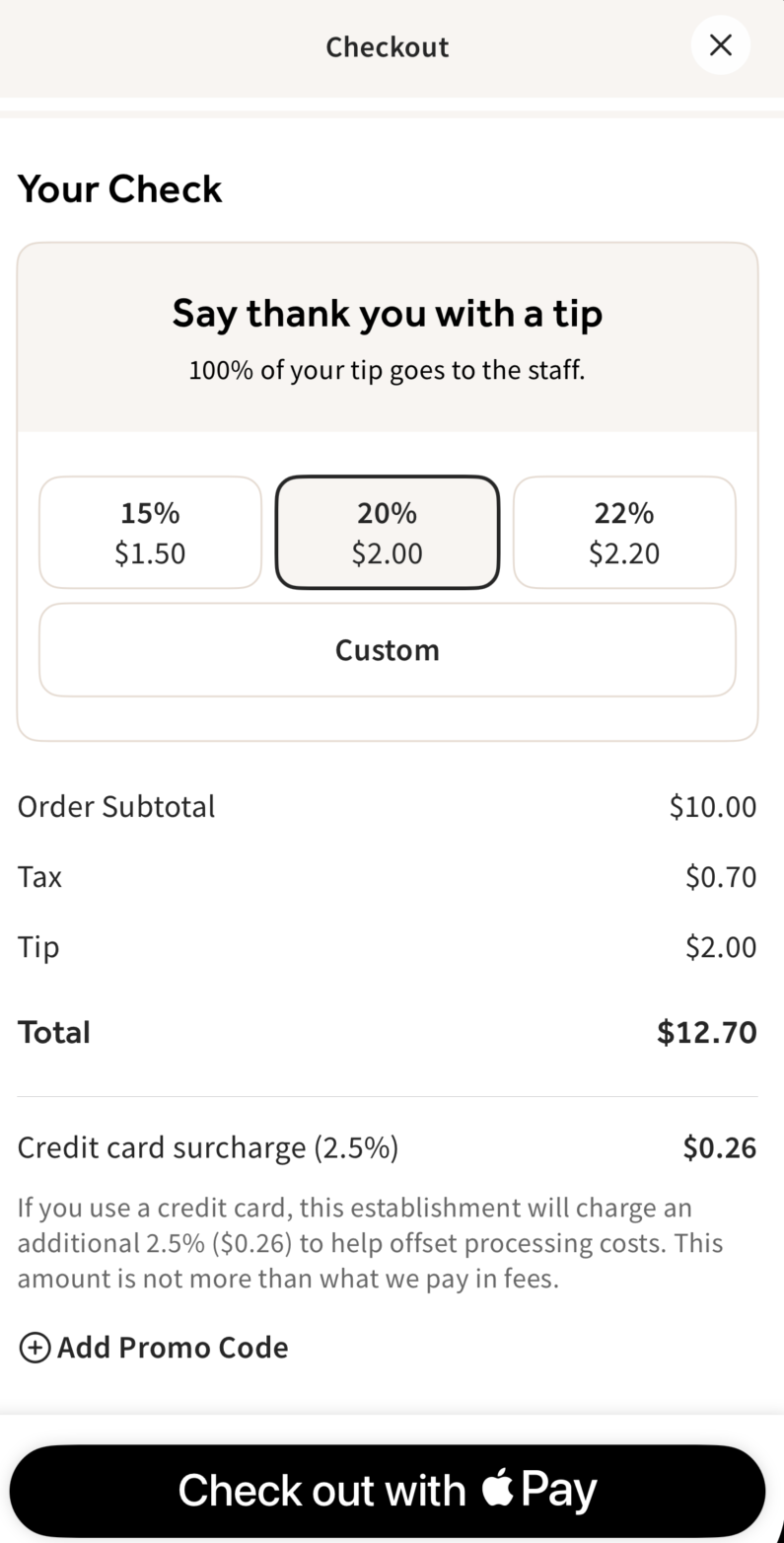
Scan to Pay
Back to top
Toast recommends informing and training your staff on how credit card surcharging works and how to discuss credit card surcharging with guests.
Credit Card Surcharging is designed to automatically identify credit cards and calculate and apply surcharges to guest checks accordingly. Staff does not need to identify guest payment cards manually, nor can they manually remove surcharges.
Two of the most important things for staff to understand are:
- Surcharges ONLY apply to credit cards, not debit/prepaid cards or any other payment method.
- Tell guests before they pay with a credit card that they will be surcharged and that other payment methods will not be surcharged. When taking phone orders, this is especially important.
Back to top
Reporting
After Credit Card Surcharging is live at your location, surcharge revenue will populate in the Reporting section of Toast Web.
Sales Summary
In the Sales Summary report, customers can see their surcharge totals for the selected date period and filters in the Service Charge section.

The total number and total amount of credit card surcharges you apply to guest orders during a period is also reflected as part of the total number and total amount of Non-Grat Svc Charges in the Sales Category section.
Note: Although your surcharge amount is reflected in both places, your surcharge revenue is not counted twice for revenue reporting purposes.
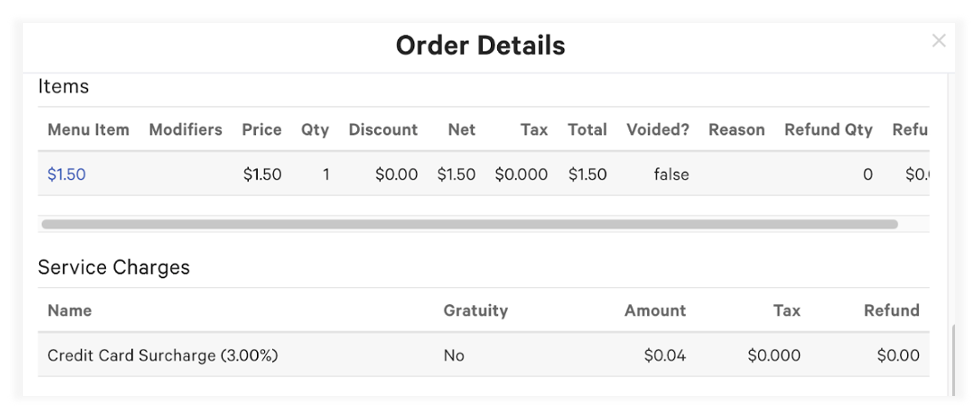
Credit card surcharges will also show on the Order Details for guest transactions where a credit card was used.
Refunds
Toast Credit Card Surcharging automatically refunds credit card surcharge amounts when refunding guests who pay with credit cards. As part of surcharging compliance, you do not have the ability to manually remove surcharges from refunds, as you are required to refund surcharge amounts during a refund.
For full refunds, the entire surcharge amount is automatically refunded to the guest along with the entire bill of goods.
For partial refunds, Toast Credit Card Surcharging automatically prorates the surcharge amount and refunds the calculated surcharge portion only.
Modify Credit Card Surcharging Settings
Change Surcharge Rate and Tax Settings
- Navigate to Finance > Related > Settings > Credit card surcharging.
- To change the surcharge rate:
- Enter the chosen rate number in the Surcharge rate field. To comply with card brand rules, rates cannot be entered over 3%.
- To change sales tax settings for surcharges:
- In the Apply sales tax to surcharge field, select Yes from the dropdown to apply sales tax to surcharges. Select No from the dropdown to prevent sales tax from being applied to surcharges.
- To add or remove state or local tax to surcharges, check or uncheck the checkboxes next to state or local tax.
- Note: The tax rates shown next to state and local taxes are individualized to your restaurant location’s set tax rates. You can also amend your tax rates by selecting Manage your tax rates here in the explainer text below these checkboxes. After you save and publish any amended tax rate settings, the new tax rate numbers will then show in the local and state tax rate checkboxes here. As a reminder, you are responsible for keeping your tax configuration compliant.
- Select Save and Publish all changes.
Disable Surcharging
- Navigate to Payments > Credit card surcharging.
- Select the Surcharging on toggle at the top of the page so the toggle is gray and shows Surcharging off.
- Select Save and Publish all changes.


Toast provides flexibility in managing surcharge activation dates. Your business can control the start date and toggle surcharges on or off as needed. A notification will inform you three days before the start for better preparation and compliance management.
Note: If surcharging is disabled and you are no longer surcharging guests on credit card payments, you will need to remove any posted signage, along with retraining staff, to ensure there is no confusion with guests. You will also remain on any card processing rates applicable immediately prior to disablement of your surcharge (subject to change in accordance with your agreement with Toast). Please note that disabling Credit Card Surcharging applies to all applicable ordering channels.