Credit Card Surcharging FAQ
上次更新时间:2026年8月17日 18:11
| This content is provided for informational purposes only and is not intended as legal, accounting, tax, HR, or other professional advice. You are responsible for your own compliance with laws and regulations, including card network rules. You should contact your attorney or other relevant advisors for advice specific to your circumstances. This article applies to the U.S. and U.S. territories only. The development, release, and timing of any products, features, or functionality remain at the sole discretion of Toast and are subject to change. |
This article answers common questions about credit card surcharging and the Toast Credit Card Surcharging product, including who is eligible, which cards and channels are surcharged, how the surcharge amount is calculated, how surcharges appear in your reports, and how to turn surcharging on or off. If you are setting up surcharging for the first time, start with Get Started With Credit Card Surcharging. For the rules behind surcharging, see Surcharging Overview.
- Surcharging basics and compliance
- Eligibility
- Which cards and channels are surcharged
- Signage and guest disclosure
- The surcharge amount and how it is calculated
- Timing, turning surcharging on, and turning it off
- Reporting, refunds, and processing fees
- Related Articles
Surcharging basics and compliance
What is a credit card surcharge?
A credit card surcharge is a fee that merchants charge guests for credit card acceptance, typically to recoup some of the merchant's processing costs.
Is my surcharge compliant?
Toast Credit Card Surcharging helps you comply with card brand requirements. You remain responsible for compliance with physical disclosures and other legal requirements that may apply in your state. To understand the card brand rules behind surcharging, see Surcharging Overview.
What are the risks of non-compliance with card brand rules?
The risks of non-compliance with card brand rules are significant. As of April 15, 2023, Visa's surcharging rules changed, and the fines for non-compliance increased significantly. The card brands, such as Visa and Mastercard, can impose fines of up to tens of thousands of dollars for non-compliance with their surcharging rules. They can even prevent you from accepting their brand's cards entirely as a payment method. To learn more, see Surcharging Overview.
Who is responsible for fines or other penalties if I am found non-compliant?
You are responsible for any fines or penalties that you receive as a result of non-compliant surcharging or any other non-compliant practices. It is important to know the card brand rules, as well as your state and local laws, to ensure that you stay protected from any fines or penalties.
Where can I learn more about the card brands' surcharging rules?
You can learn more about the card brands' surcharging rules by referring to Visa's Merchant Surcharge Q&A and Mastercard's Credit Card Surcharge Rules & Fees for Merchants (external links).
Why can't I use the Service Charges feature to apply a credit card surcharge?
You cannot use the Service Charges feature to apply a credit card surcharge because service charges cannot be applied exclusively to credit card transactions, and you will receive an error message when creating a service charge related to credit card surcharging. The Service Charges feature is intended for fees unrelated to the payment method a guest uses, so it applies to all payment methods equally. Incorrectly surcharging can lead to costly fines if it is non-compliant with card brand rules. Visa actively enforces its rules through in-person audits (mystery shoppers) and cardholder complaints. Other card brands are starting to follow suit. Violations start at $1,000 and increase for repeated violations. To create a compliant service charge for fees unrelated to the payment method, see Customize Service Charges and Mandatory Gratuity.
Can I use the Service Charges feature to apply a fee to all payment methods, including credit, debit, cash, and gift cards?
Yes, you can use the Service Charges feature to apply a fee to all payment methods as long as the fee is applied equally to every payment method and is not removed for any one of them. For example, you cannot implement a fee and then remove it when a guest pays with cash, because that is the equivalent of a non-compliant surcharge on debit cards. Surcharging on debit and prepaid cards is prohibited for all U.S. merchants.
You may use Toast Credit Card Surcharging and apply service charges at the same time. Credit Card Surcharging helps you offset your credit card processing costs, while service charges relate to operational costs other than the cost of accepting payment cards. If you implement a compliant service charge, review the requirements in Service Charges Overview. Some jurisdictions may have additional requirements, such as requiring that extra fees be included in advertised menu prices, so consult an attorney or other professional if you are unsure about the rules that apply to you.
Eligibility
Who is eligible for Toast Credit Card Surcharging?
Most U.S. merchants are eligible for Toast Credit Card Surcharging, except in states where surcharging is prohibited and in a few other cases described below. Toast Credit Card Surcharging is available on a location-by-location basis. For full eligibility and sign-up details, see Get Started With Credit Card Surcharging.
Who is not eligible for Toast Credit Card Surcharging?
The following merchants are not eligible for Toast Credit Card Surcharging:
- Merchants in states where surcharging is prohibited, including Connecticut, Maine, and Massachusetts.
- Merchants based outside of the U.S., including those in U.S. territories.
- Merchants that have a direct Card Acceptance Agreement with American Express, because these agreements include provisions governing the merchant's surcharging of American Express cards.
- Certain merchants that participate in American Express's OptBlue program.
Is credit card surcharging legal in every U.S. state?
No, credit card surcharging is not legal in every U.S. state. Merchants in states where surcharging is prohibited — including Connecticut, Maine, and Massachusetts — are not eligible for Toast Credit Card Surcharging.
Note: As of November 1, 2025, Oklahoma removed its prohibition on credit card surcharging, so Toast customers in Oklahoma can sign up to use Toast Credit Card Surcharging. Credit card surcharges are capped at 2% in Oklahoma.
Some states may have other laws that impose additional disclosure requirements, such as requiring that all mandatory fees be included in the advertised price. To get compliance guidance specific to your state, first check whether your local regulator has issued guidance on credit card or other surcharges. For example, California's attorney general issued guidance on mandatory fees and credit card surcharges effective October 1, 2025, and Minnesota has issued similar guidance explaining why a credit card surcharge might not be considered a "mandatory" fee in those states. To understand how your state's specific requirements apply to your business, consider consulting a lawyer or other qualified professional.
Is credit card surcharging legal in the state of New York?
Credit card surcharging is legal in New York, as we understand it, as long as businesses include the amount of the credit card surcharge in their listed or advertised prices for each item. You are responsible for determining whether your business practices are permitted under your state's law; to get the best answer, contact your lawyer or other qualified professional. Toast Credit Card Surcharging is available only on POS and handheld devices, including manually keyed transactions, for New York locations. For more information, see Toast Credit Card Surcharging in New York.
I have locations in both eligible and ineligible states. Can I surcharge?
Yes, if you are a multi-unit operator with locations in both eligible and ineligible states, your eligible locations are permitted to surcharge. Toast Credit Card Surcharging is available on a location-by-location basis, so locations in ineligible states will not be allowed to surcharge even if their parent or sibling locations are in eligible states.
Can customers outside the U.S. sign up for Toast Credit Card Surcharging?
No, customers outside the U.S. cannot sign up for Toast Credit Card Surcharging. The product is not offered outside of the U.S., including in U.S. territories.
Which cards and channels are surcharged
Why can't I surcharge on debit or prepaid cards?
You can't surcharge on debit or prepaid cards because it is prohibited by the card brands, such as Visa and Mastercard, for all U.S. merchants, with no exceptions. Toast Credit Card Surcharging is designed to automatically distinguish between credit and debit or prepaid cards, helping ensure that a surcharge is added only when a guest uses a credit card. To learn more, see Surcharging Overview.
Can I run debit and prepaid cards as "credit" so that I can surcharge?
No, you cannot run debit and prepaid cards as "credit" to surcharge them. Running debit and prepaid cards as "credit," whether with a PIN or not, does not change the fact that they are debit and prepaid cards, so the surcharge would still be non-compliant. Surcharging on debit and prepaid cards is prohibited for all U.S. merchants, regardless of how they are processed. Toast Credit Card Surcharging automatically adds a surcharge only when a credit card is detected, even when a debit card is run as "credit."
Why can't I assess a surcharge that applies to all cards but not other payment methods?
You can't assess a surcharge that applies to all cards but not other payment methods because it would add a fee to debit and prepaid cards, which is prohibited by the card brands. A fee that applies to both credit cards and debit or prepaid cards — but not to other payment methods such as cash and gift cards — is treated as a surcharge on debit and prepaid cards, which is prohibited for all U.S. merchants. To learn more, see Surcharging Overview.
Does the system charge the surcharge on cash and debit card payments?
No, the system does not charge the surcharge on cash or debit card payments. Toast Credit Card Surcharging automatically distinguishes between credit and debit or prepaid cards and applies the surcharge only when a guest pays with a credit card. Guests who pay with cash, a debit or prepaid card, or a gift card are not surcharged.
What channels are available for surcharging?
Credit Card Surcharging is available across multiple ordering channels, and it applies to all of your surcharging-supported channels rather than to a single channel you select. For a complete list of supported channels and the steps required to surcharge in digital channels, see Get Started With Credit Card Surcharging.
Note: You cannot limit surcharging to only takeout or online orders. When surcharging is enabled, it applies to credit card transactions across all supported channels for the location.
Will Toast Credit Card Surcharging work with digital wallets like Google Pay and Apple Pay?
Yes, Toast Credit Card Surcharging works with digital wallets like Google Pay and Apple Pay when a credit card is used. If a guest uses a credit card stored in their Google Pay or Apple Pay wallet, the surcharge is applied automatically in supported channels. The surcharge does not apply if the guest uses a debit card or another non-credit payment method in their digital wallet, and it does not apply for transactions in unsupported ordering channels.
Can checks that are split across different payment methods be surcharged?
Yes, checks that are split across different payment methods can be surcharged on the credit card portion only. The portion of the check paid with a credit card is surcharged, and the portion paid with a debit card, cash, or gift card is not. If the check is split between multiple credit card payments, each guest who pays by credit card pays the applicable surcharge on their portion. Tips and taxes are not surcharged.
Signage and guest disclosure
Do I need to disclose the credit card surcharge to my guests?
Yes, you need to disclose the credit card surcharge to your guests. According to card brand rules, clear and conspicuous signage must be posted at the point of entry (such as the outside face of the restaurant or entryway) and at the point of sale or point of interaction (such as next to the cash register). The signage must state that the surcharge applies only to credit cards, include the specific surcharge rate, confirm that the rate does not exceed your cost of acceptance, and must not suggest that the fee is charged by Toast, a card brand, or another third party.
Toast provides compliant signage templates you may use, but it remains your responsibility to ensure signage is posted in the proper areas and complies with applicable law and card brand rules. You may also create your own signs and disclosures in accordance with card brand rules. Toast recommends that you also disclose the surcharge on your menus, in your seating areas, and in any other locations necessary to inform guests. If you accept orders through Toast Online Ordering or Toast Local, add the surcharging disclosure to your website and any menus posted online; if you reference specific card brands online, you must include the surcharging disclosure to comply with card brand rules.
Do I need to use the Toast-provided signage, or can I create my own?
You do not need to use the Toast-provided signage, and you are free to design your own signage and disclosures. The templates provided by Toast are examples intended to comply with card brand rules. If you create your own signs and disclosures, you are responsible for posting signage in accordance with applicable law and all card brand rules. Toast encourages you to use the same language as the provided templates, but it is not required. Language on Toast's guest-facing displays is not customizable. Some jurisdictions impose unique disclosure requirements, so check local legal requirements and make any necessary changes. To learn more, see Surcharging Overview.
Why do I need to post signage when I apply credit card surcharging?
You need to post signage when you apply credit card surcharging because it is required by the card brands. For example, under Visa's rules on surcharging, you must clearly alert consumers to the practice at the point of entry, the point of sale or transaction, and on every receipt. Posting signage also gives your guests a better experience and allows them to pay by other means if they choose. To learn more, see Surcharging Overview.
Why isn't the surcharge showing on the guest-facing display before payment?
If the surcharge disclosure is not showing on the guest-facing display before payment, the card reader is most likely set to Employee Pay rather than Guest Pay. The surcharge disclosure appears on the guest screen only when the card reader is set to Guest Pay, so the guest sees the disclosure when they tap to pay. To change this setting, go to Device Setup on the POS, select the relevant card reader, and change the Payment Option to Guest Pay. The surcharge still appears on the printed receipt after payment, regardless of this setting.
How do I make sure the surcharge shows on the receipt?
The credit card surcharge appears automatically on receipts for surcharged transactions, so no extra setup is required for it to print. The surcharge shows as a separate line item on the printed check and receipt for any transaction paid with a credit card. If you want to confirm how the surcharge appears across guest-facing touchpoints, you can preview the printed check, guest-facing display, and handheld disclosures. To learn more, see Manage the Credit Card Surcharging Product.
Do my staff need to do anything specific related to credit card surcharging?
Toast recommends that you train your staff to explain that the credit card surcharge helps your business offset processing costs and is not more than what you currently pay in fees. Your staff should also tell guests that the surcharge does not apply to debit or prepaid cards, cash, or gift cards, and should inform guests before they pay that credit card payments will be surcharged in case they miss the disclosures. For phone orders, you or your staff must make the disclosure verbally when taking the order, before the transaction is complete, and guests must be given the opportunity to opt out or pay by other means before the surcharge is applied.
The surcharge amount and how it is calculated
What surcharge rate can I charge?
Most customers may surcharge up to 3%, which is the maximum set by the card brands. If you see a note under the Surcharge rate field on the Credit Card Surcharging page that reads "Max. set by card brands: 3%," you may set your rate up to 3%. Customers based in Oklahoma will see a note that reads "Max. set by your state: 2%," because surcharges are capped at 2% in Oklahoma.
Some customers may see a note with a "suggested compliant surcharge rate" that is lower than these caps. Your suggested compliant rate is an estimate of your credit card processing costs at that location, based on data available to Toast. The card brands do not allow merchants to profit from surcharges, so your rate should not exceed this figure. You are free to choose a lower percentage if you wish to surcharge less.
Does the surcharge rate vary by state?
The maximum surcharge rate is set by the card brands at 3% for most states, but some states cap it lower. For example, surcharges are capped at 2% in Oklahoma. Your own suggested compliant rate may also be lower than the cap, because it is based on an estimate of your processing costs at that location, and the card brands do not allow merchants to profit from surcharges. The rate available to you appears as a note under the Surcharge rate field on the Credit Card Surcharging page in Toast Web.
Why is the surcharge amount lower than I expected?
The surcharge amount may be lower than you expected for a few reasons. The surcharge is calculated only on the pre-tax, pre-tip amount, so tax and tip are excluded from the base. The surcharge also does not apply to debit cards, prepaid cards, cash, or gift cards, so only the credit card portion of a check is surcharged. In addition, the surcharge amount is included in the check subtotal, so to verify the percentage, you should subtract the surcharge from the subtotal first and then apply your rate. On very small transactions, the calculated surcharge can round down and may show as a very small amount or as zero.
Can I apply a credit card surcharge to custom tips added by guests?
No, you cannot apply a credit card surcharge to custom tips added by guests. Credit Card Surcharging calculates surcharge amounts pre-tax and pre-tip, so custom tips are not surcharged. The only fees that can be surcharged are pre-configured gratuity and non-gratuity service charges, not custom tips.
Do guests need to pay sales tax on credit card surcharges?
Generally, guests need to pay sales tax on credit card surcharges. However, credit card surcharges are not subject to sales tax in Colorado for merchants located in that state, so long as they are otherwise compliant. You may use this information to determine whether a surcharge is subject to sales tax in your state, but this does not constitute tax advice from Toast; consult a tax advisor if you have specific questions.
What options do my guests have to avoid the surcharge?
Guests can avoid the surcharge by paying with cash, a debit or prepaid card, or any payment method other than a credit card. This option is stated on the signage you post in the restaurant, on guest-facing displays, on pre-payment bills (checks), and in digital environments where applicable.
Timing, turning surcharging on, and turning it off
How long will it take from when I sign up until I can begin surcharging?
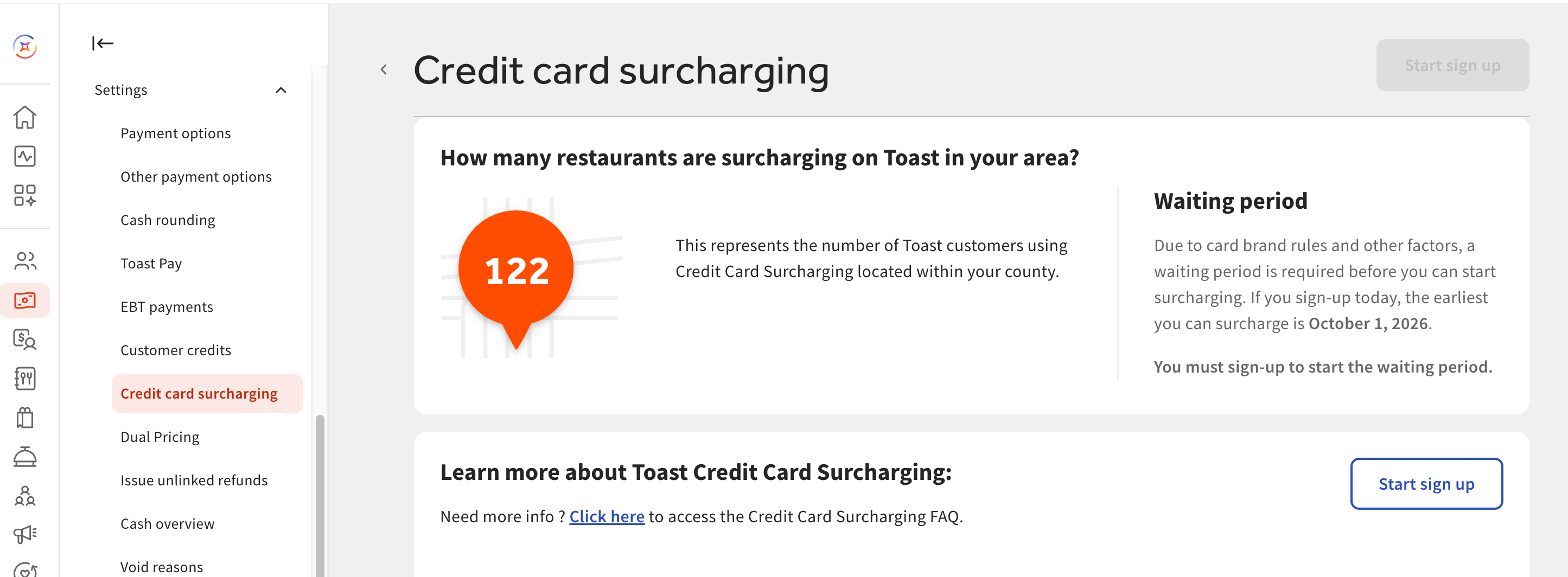
The time from sign-up to surcharging depends on your situation, and there is always a required waiting period. If you are a new Toast customer eligible for Credit Card Surcharging and you indicated interest during the initial sales process, you must wait at least 30 days after you are onboarded to Toast Web to begin surcharging. You also need to sign up for surcharging and configure your surcharge settings in Toast Web for surcharging to begin.
For other eligible Toast customers, it can take 30 to 60 days to begin surcharging after signing up. In these cases, surcharging can only begin on the 1st of a month (after 30 days have passed) for consistent reporting and reconciliation. For example, if you sign up on April 15, surcharging begins on June 1.
To see how soon you can begin surcharging, navigate to Finance > Related > Settings > Credit card surcharging in Toast Web. Near the top of the screen, you will see the earliest date you can start surcharging. After you complete sign-up, Toast automatically enables your surcharge on that date at 5:00 a.m. local time.
Why do I need to wait to begin surcharging after I sign up?
You need to wait to begin surcharging because card brand rules require a merchant to wait a minimum of 30 days before surcharging can start. To learn more, see Surcharging Overview.
Will I be notified when surcharging takes effect?
Yes, you will be notified when surcharging takes effect. Toast sends you an email three days before your surcharge start date to remind you that your credit card surcharge will begin shortly and to post your signage for guests.
Can I delay or postpone my surcharging start date?
You cannot delay the surcharging start date once you have signed up for Credit Card Surcharging. However, you can prevent the surcharge from applying by toggling Surcharging Off on the Credit Card Surcharging page in Toast Web on your start date or any time afterward. Be sure to Save and Publish the change.
How do I turn surcharging on?
You turn surcharging on by signing up for Credit Card Surcharging and configuring your settings in Toast Web. Navigate to Finance > Related > Settings > Credit card surcharging to start the sign-up process and set your surcharge rate. Surcharging applies to credit card transactions across all supported channels and cannot be limited to a single channel. For the full step-by-step sign-up walkthrough, see Get Started With Credit Card Surcharging.
How do I disable surcharging?
You can disable surcharging at any time after the surcharge becomes effective by toggling Surcharging Off on the Credit Card Surcharging page in Toast Web, then saving and publishing the change. Toggling Surcharging Off prevents the surcharge from being applied to guest orders but does not change your card processing rates. Disabling applies to all channels for the location. If you are unable to save or publish the change, you may not have the required permissions, or there may be a pending surcharge change that must be processed first; contact Toast Customer Care if the problem continues. For more details, see Manage the Credit Card Surcharging Product.
Can I manually remove a surcharge for select transactions?
No, you cannot manually remove a surcharge for select transactions. To ensure compliance, it is not possible to manually remove the credit card surcharge from individual transactions.
Reporting, refunds, and processing fees
Where can I see my surcharges in my reports?
You can see your surcharges in the Sales Summary Report and in Order Details. In the Sales Summary Report, surcharges appear as a separate "Credit Card Surcharges" line item under the Service Charge Summary section, and the total number and amount are also counted among your "Non-Grat Svc Charges" totals under the Sales Category Summary section. Although surcharge totals appear in both places, your surcharge revenue is not counted twice. In Order Details, a surcharge appears on the order details for any specific check where it was applied. The credit card surcharging amount is included in your net sales.
Note: If you just enabled surcharging today, same-day payments may not appear right away in the Payout Overview. Use the Sales Summary Report to confirm surcharges that have been collected.
How does surcharge revenue get paid back to me?
Surcharge revenue is added to your sales volume rather than deducted from your processing fees. The amounts you collect in credit card surcharges increase your sales volume to help offset your processing costs. The surcharge amount is included in your net sales and appears in the Sales Summary Report under the Service Charge Summary section. Surcharges are not a separate reimbursement or credit against your monthly processing statement.
Why am I still paying credit card processing fees while using Credit Card Surcharging?
You are still paying credit card processing fees because Credit Card Surcharging offsets your costs by adding revenue, not by reducing your fees. Toast Credit Card Surcharging helps you offset your processing costs by charging guests an additional fee on credit card transactions, which increases your sales volume. The surcharges you collect are not deducted from your processing fees. You remain responsible for paying your full contractual processing rate on the gross amount of all card transactions, including both credit and debit cards.
Because you are not permitted to surcharge debit or prepaid cards, the amount you collect in surcharges will not exactly match the amount you pay in processing fees, so your processing costs are not offset entirely. Fees for card-not-present transactions may also not be fully covered. Surcharges are not applied to custom guest tips or taxes, but they are applied to other configured service charges, such as automatic or mandatory gratuity, and processing fees also apply to surcharge volume.
How do refunds and chargebacks work for surcharges?
Toast Credit Card Surcharging automatically refunds or credits the surcharge amount back to your guests. For a partial refund or chargeback, the product automatically prorates the surcharge amount that is refunded or credited. You cannot manually remove surcharges from being refunded or credited back, because card brand compliance rules require surcharges to be refunded or credited back to guests for both refunds and chargebacks.
Why am I seeing a 404 error when I open the surcharging settings in Toast Web?
You are seeing a 404 error because surcharging functionality is restricted to users with both financial accounts and payment setup permissions in Toast Web. If you receive this 404 screen, you do not have the required permissions and should consult your financial manager. To learn more, see Permissions Reference Guide.
Why isn't the surcharge applying to my orders?
If the surcharge does not apply to your orders, the most common reason is that the transaction was paid with a debit or prepaid card, which is never surcharged. If a credit card was used and the surcharge is still missing, confirm that Credit Card Surcharging is enabled and published, then reboot and resync the POS device. For step-by-step troubleshooting, see Missing Credit Card Surcharging on Orders and Configured Surcharge Is Not Applying to All Card Transactions.
Related Articles
- Get Started With Credit Card Surcharging
- Manage the Credit Card Surcharging Product
- Surcharging Overview
- Surcharging & Other Ways to Offset Costs
- Toast Credit Card Surcharging in New York
- Missing Credit Card Surcharging on Orders
- Configured Surcharge Is Not Applying to All Card Transactions
- Permissions Reference Guide